


Sarah’s phone buzzed at 2 AM. It was her 78-year-old father, his voice trembling. “A man from the IRS just called,” he whispered. “He said I owe back taxes or they’ll arrest me tomorrow.” Sarah’s heart sank. She lives three states away, juggling work and young kids, while her dad lives independently.
This late-night panic call represents a growing reality for millions of families. According to the FBI, older adults lose over $3 billion annually to financial exploitation. Many parents built their savings over decades, only to face sophisticated fraud schemes that threaten everything they’ve worked for.
What makes this especially heartbreaking? Scammers often prey on the trusting nature and kindness that define our loved ones. They exploit hearing challenges, vision limitations, or the simple fact that today’s older generation grew up in a more trusting era.
This guide is for you—the caring family member who wants to protect parents from afar. We’ll help you recognize warning signs and implement practical elderly parent fraud protection strategies that respect their independence while giving you peace of mind.
Key Takeaways
- Older adults lose billions annually to financial exploitation schemes
- Distance doesn’t have to prevent effective protection for loved ones
- Recognizing warning signs early can prevent significant financial loss
- Practical remote monitoring solutions respect independence while providing security
- Open conversations about financial safety strengthen family bonds
- Technology can bridge the distance gap for daily check-ins and alerts
- Combining education with compassionate support creates effective protection
Overview of Senior Scams and Their Impact
Financial predators have turned their attention to our most vulnerable loved ones with devastating results. The scale of this elder fraud crisis reaches staggering proportions that demand our immediate attention and understanding.
Understanding the Scope of Elder Fraud
The FBI reports that older Americans lose over $3 billion annually to financial exploitation. This represents millions of individuals who become victim to sophisticated schemes.
Why are our parents’ generation targeted? They’ve spent lifetimes building savings and home equity. Scammers see this accumulated wealth as prime targets for deception.
Real-Life Examples and Financial Consequences
Real stories reveal how quickly life savings disappear. One grandparent lost $20,000 to a fake tech support call. Another sent retirement funds to a romance scammer they never met.
The emotional damage often hurts more than the financial loss. Many feel too embarrassed to report what happened, fearing judgment or loss of independence.
“The shame victims feel can be more damaging than the money they lost. They worry their family will see them as incapable.”
| Scam Type | Average Loss | Emotional Impact |
|---|---|---|
| Tech Support Fraud | $15,000 | Confusion and embarrassment |
| Romance Schemes | $25,000 | Heartbreak and isolation |
| Government Impersonation | $10,000 | Fear and anxiety |
Understanding common financial scams targeting older adults helps families recognize warning signs early. The stolen information can lead to identity theft that causes damage for years.
Recognizing Warning Signs and Red Flags
You notice your mom suddenly whispering during phone calls or quickly changing the subject when money comes up. These subtle shifts in behavior are often the first warning signs that something isn’t right. Pay close attention to these changes—they’re your early alert system.
Unusual Communication Tactics and Pressure
Scammers create extreme emotions to cloud judgment. They might promise incredible prizes or threaten terrible consequences. This emotional manipulation is a clear warning that you’re dealing with a dishonest person.
Watch for these red flags in your parent’s conversations:
- Urgent deadlines created by strangers
- Hostility when asking simple questions
- Secretive behavior about new relationships
- Unusual mail or package deliveries

Identifying Impersonation and High-Pressure Scams
Impersonation schemes often sound official but feel wrong. Callers claiming to be from government agencies use fear tactics. Remember—real organizations never demand immediate payment or threaten arrest.
The pressure to act quickly is the scammer’s most reliable tool. If your gut says something feels off, trust that instinct. That uncomfortable feeling often means you’re spotting the classic signs of fraud.
Educational resources like this comprehensive guide can help you recognize these patterns early. Recognizing these warning signs can prevent financial loss and emotional trauma.
How to Protect Your Family Remotely
Distance shouldn’t mean disconnection when it comes to your parent’s safety. Today, compassionate technology creates a safety net that respects their independence. You can offer meaningful support from anywhere.
This approach focuses on connection, not control. It gives you peace of mind while empowering your loved ones.

Building a Family Scam Safety Plan Before a Crisis Happens
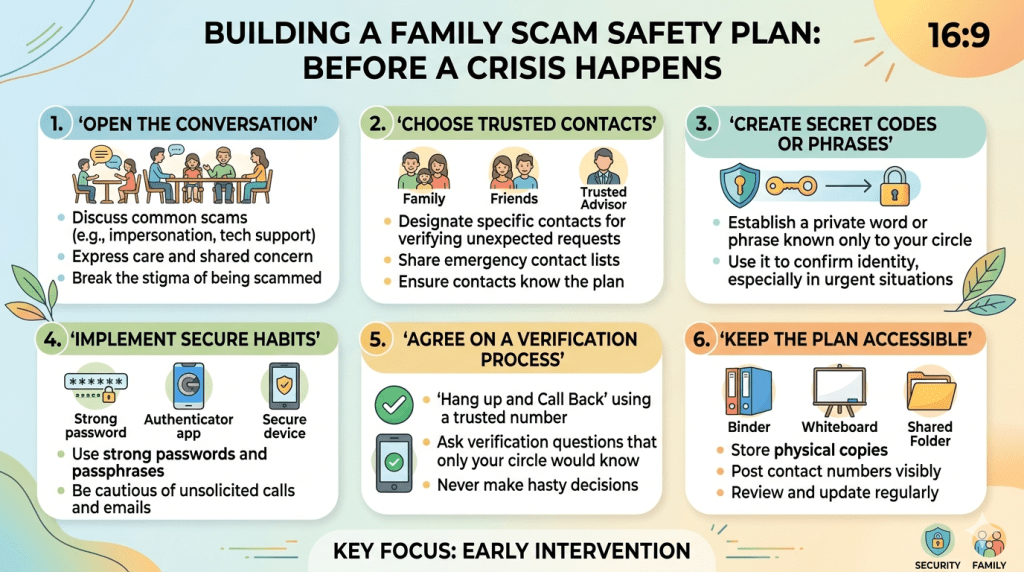
Most scams do not succeed because an older adult is careless. They succeed because the scammer creates panic, secrecy, urgency, or emotional pressure at exactly the wrong moment. That is why families need more than general advice like “be careful” or “don’t click suspicious links.” Seniors need a simple plan they can follow when they feel confused, scared, flattered, or rushed.
A family scam safety plan is a pre-agreed set of rules that helps your parent pause before responding to a suspicious call, message, email, pop-up, letter, or request for money. It protects them without making them feel watched or controlled.
The existing article already covers common scams, red flags, digital safeguards, remote check-ins, and reporting options. This section adds the missing piece: what your family should agree to before a scammer ever reaches your parent. That matters because older adults are reporting rising high-dollar losses, and agencies such as the FTC, CFPB, FBI, and financial regulators continue to emphasize prevention, trusted contacts, and early intervention.
Create a “Pause First” Rule for Every Money Request
The most useful family rule is also the simplest: no urgent financial decision gets made alone.
This does not mean your parent cannot manage their own money. It means that any unexpected request involving money, account access, passwords, identity documents, gift cards, crypto, wire transfers, bank withdrawals, or remote computer access must wait until they speak with one trusted person first.
Try JoyCalls Free
No app or new device needed. Start with a free 7-day trial.
You can phrase it gently:
“Mom, this is not because we don’t trust you. It’s because scammers are trained to make good people feel rushed. Let’s make a family rule that protects all of us: if anyone asks for money urgently, we pause and check together.”
This rule should apply even when the request appears to come from a government agency, bank, utility company, charity, investment advisor, grandchild, police officer, doctor, delivery company, or tech support agent.
A helpful phrase for seniors to remember is:
“I don’t make financial decisions during unexpected calls. I will call back using a number I already trust.”
Write this sentence on a card and place it near the phone, computer, and checkbook. If your parent uses a smartphone, save it as a note or wallpaper reminder.
Build a Trusted Contact Circle
Your parent should not have to decide in the moment who to call. Create a short “trusted contact circle” with two or three people they can reach before acting on anything suspicious.
This circle may include:
- One adult child or close relative
- One backup family member
- One trusted friend, neighbor, attorney, accountant, or financial advisor
Keep the list small. Too many names can create confusion. The goal is speed and clarity.
For each trusted contact, include:
- Name
- Relationship
- Phone number
- Best time to call
- Backup number
- What kind of help they can provide
For example:
Primary contact: Lisa, daughter — call before sending money, sharing bank details, or responding to suspicious messages.
Backup contact: Mark, nephew — call if Lisa does not answer.
Local support: Mrs. Thompson, neighbor — call if someone comes to the door asking for payment, signatures, or documents.
If your parent is comfortable, ask their bank or credit union about adding a trusted contact person to their account profile. A trusted contact usually does not get account ownership or spending power. Instead, the financial institution may contact that person if it notices signs of possible exploitation, confusion, or suspicious activity. The CFPB specifically provides resources on choosing trusted contacts and working with financial institutions to protect older adults.
Use a Family Password for Emergency Calls
Grandparent scams are especially painful because they use love as the weapon. A caller may claim to be a grandchild in trouble, a lawyer, a police officer, or a hospital worker. They may say, “Please don’t tell Mom and Dad,” or “I need bail money right now.”
To prevent this, create a private family password.
The password should be:
- Easy for your parent to remember
- Not available on social media
- Not a pet name, birthday, school name, or address
- Known only to close family members
For example, the family password could be a random phrase like “blue teacup” or “Sunday mango.”
Then make this rule:
“If someone claims to be family and asks for money, they must know the family password. If they do not know it, we hang up and call the real family member directly.”
This one habit can stop a high-pressure emotional scam before it begins.
Set Money Movement Limits in Advance
Scammers often push older adults toward fast, irreversible payments. That includes gift cards, cryptocurrency, wire transfers, payment apps, cash withdrawals, gold purchases, courier pickups, and bank-to-bank transfers. Once money moves through these channels, recovery can be difficult.
Families can reduce this risk by setting practical money movement limits before there is a problem.
Discuss limits such as:
- No gift cards for bills, taxes, prizes, emergencies, or account problems
- No cryptocurrency purchases for someone met online
- No wire transfers without speaking to a trusted contact
- No large cash withdrawals without a cooling-off period
- No sending money to online romantic partners
- No courier pickups for cash, gold, jewelry, bank cards, or documents
- No remote access to a computer unless the appointment was scheduled directly with a known provider
This should not sound like a lecture. Position it as a household safety policy.
You might say:
“Dad, even I follow this rule. If someone asks me to move money urgently, I stop and verify it. Let’s make this our family standard.”
Also ask the bank whether it can send alerts for large withdrawals, unusual transfers, new payees, failed login attempts, or changes to contact information. Some institutions may also have procedures for delaying suspicious transactions where permitted by law. Financial regulators have encouraged institutions to use tools such as trusted contacts, suspicious activity reporting, employee training, and transaction holds where appropriate to help address elder financial exploitation.
Create a “Verify Separately” Checklist
Scammers want your parent to stay inside the conversation. They do not want them to hang up, call someone else, or check the facts independently. That is why every family scam plan should include a verification checklist.
Teach your parent to ask:
- Did this contact come unexpectedly?
- Is the person asking for secrecy?
- Are they creating fear, urgency, romance, guilt, or excitement?
- Are they asking for money, codes, passwords, account numbers, or remote access?
- Are they refusing to let me call back?
- Are they asking for payment in gift cards, crypto, wire transfer, cash, or gold?
- Would I feel embarrassed telling my family about this?
If the answer to any question is yes, the next step is not to argue. The next step is to stop.
They can say:
“I do not handle this over unexpected calls. I will call the official number myself.”
Then they should hang up and use a number from a trusted source: the back of a bank card, a printed statement, an official website typed manually into the browser, or a saved contact already verified by the family.
Prepare Scripts for Awkward Moments
Many older adults stay on scam calls because they do not want to be rude. They were raised to answer questions politely, respect authority, and avoid conflict. Scammers know this.
Give your parent permission to end conversations without explaining.
Here are simple scripts they can use:
For suspicious calls:
“I do not discuss money or personal information on unexpected calls. Goodbye.”
For fake bank calls:
“I will call my bank directly using the number on my card.”
For government impersonators:
“I do not respond to threats over the phone. Send official mail.”
For tech support pop-ups:
“I did not request support. I am closing this now.”
For charity pressure:
“I do not donate during phone calls. I review charities later.”
For family emergency scams:
“I need to verify this with our family password and a direct call.”
For romance or friendship requests involving money:
“I do not send money to people I have not met in person and verified.”
The goal is not to win the conversation. The goal is to end it.
Make the Home Environment Scam-Resistant
Remote protection is easier when the home itself supports good decisions. A few visible reminders can prevent panic.
Place a small safety card near:
- Landline phone
- Smartphone charging station
- Computer
- Checkbook
- Medication area
- Front door
- Refrigerator
The card can say:
Before sending money or sharing information, stop and call:
- Lisa: xxx-xxx-xxxx
- Mark: xxx-xxx-xxxx
- Bank fraud line: xxx-xxx-xxxx
Never pay with:
Gift cards, crypto, wire transfer, cash courier, gold, or payment apps for unexpected requests.
Never share:
Passwords, one-time codes, Social Security number, Medicare number, bank login, or remote computer access.
This works because it interrupts the scammer’s emotional pressure with a calm, familiar instruction.
Assign Family Roles Clearly
When multiple siblings or relatives are involved, scam protection can become messy. One person assumes someone else is watching the accounts. Another only hears about problems after money is gone. Your parent may feel overwhelmed by too many people asking questions.
Avoid this by assigning clear roles.
For example:
- Financial alert contact: receives bank or credit card alerts if the parent agrees
- Technology helper: manages password updates, device settings, antivirus checks, and suspicious pop-ups
- Weekly check-in person: asks gentle questions about calls, mail, new contacts, and unusual requests
- Local helper: visits if there is a door-to-door concern or urgent paperwork issue
- Document keeper: stores copies of power of attorney, bank contacts, insurance contacts, and fraud reporting steps
This keeps the family organized while reducing pressure on the parent.
The check-in person should avoid sounding like an investigator. Instead of asking, “Did you fall for anything this week?” ask:
“Did anyone call, text, email, or visit this week asking for money, information, or urgent action?”
That wording is less judgmental and more useful.
Watch for Behavioral Changes, Not Just Financial Ones
Many families only look for missing money. But scams often show up first as emotional changes.
Watch for:
- Increased secrecy around phone calls
- Defensiveness about a new online friend
- Sudden anxiety after using the computer
- Frequent trips to the bank or store
- Unusual gift card purchases
- New interest in cryptocurrency or “guaranteed” investments
- Fear of answering the phone
- Shame, withdrawal, or irritability
- Statements like “You wouldn’t understand” or “They told me not to tell anyone”
- Packages, letters, or documents your parent will not explain
These signs do not prove a scam is happening. But they do mean it is time for a calm conversation.
Try:
“I’m not upset, and you are not in trouble. I just want to understand what happened so we can protect you.”
Shame helps scammers. Safety comes from making it easy to speak up.
Practice a Scam Drill Once a Month
Families practice fire drills, emergency contacts, and medication routines. Scam safety deserves the same kind of rehearsal.
Once a month, ask your parent a simple scenario:
“What would you do if someone called saying your bank account was frozen?”
Or:
“What would you do if someone said your grandchild needed bail money?”
Let them answer. Then gently walk through the family plan.
The goal is not to test them. The goal is to make the response automatic.
A good monthly drill takes five minutes:
- Read one example scam aloud.
- Ask what they would do first.
- Practice the script.
- Confirm who they would call.
- Praise the pause.
This builds confidence. It also makes scam conversations normal instead of frightening.
Keep Independence at the Center
The biggest mistake families make is turning scam prevention into a control battle. If your parent feels accused, monitored, or treated like a child, they may hide suspicious interactions from you. That makes them more vulnerable.
Use partnership language:
- “Let’s make a plan together.”
- “You stay in charge; this just gives you backup.”
- “Scammers are professionals. Everyone needs a second set of eyes.”
- “I’m not here to judge. I’m here to help.”
- “Calling me first is a strength, not a weakness.”
The safest parent is not the one who never encounters a scam. The safest parent is the one who feels comfortable saying, “Something strange happened. Can you help me check it?”
Create a One-Page Scam Response Plan
End by putting everything into one simple document. Keep it printed and easy to find.
Include:
- Trusted contact names and numbers
- Bank fraud department number
- Credit card fraud number
- Medicare or insurance contact number
- Local police non-emergency number
- FTC ReportFraud.gov reminder
- FBI IC3.gov reminder for internet-enabled scams
- Family password reminder
- “Never pay with” list
- “Never share” list
- Call-back verification rule
- Steps to take if money was already sent
The response plan should be short enough that your parent can use it while stressed.
A simple final instruction can be:
“Pause. Hang up. Call someone you trust. Verify separately.”
That one line can protect years of savings, confidence, and independence.
Advanced Protection Layer: Proactively Blocking Scams Before They Reach Your Parents
If the earlier section focused on what your parents should do when approached by a scammer, this section goes one step further—reducing how often those scams even reach them in the first place.
Think of this as building a “protective shield” around your parents’ digital, financial, and communication environment. The fewer scam attempts they receive, the less pressure they face—and the safer they remain.
This section is especially useful for adult children managing things remotely, because these are systems you can set up once and monitor quietly in the background.
Reduce Exposure: The First Line of Defense
Scammers don’t randomly pick victims. They rely heavily on data exposure—public phone numbers, leaked email addresses, social media details, and past purchases.
Your first job is to reduce how visible your parents are in the data ecosystem.
Remove Personal Data from Public Listings
Start by searching your parent’s name, phone number, and address on Google. You may find:
- Data broker websites
- Old directories
- Property listings
- Public profiles
- Social media mentions
Many scammers buy this data in bulk.
Action steps:
- Opt out from major data broker sites (like Spokeo, Whitepages, Truecaller listings, etc.)
- Remove unnecessary public phone number listings
- Limit visibility of social profiles (set to private where possible)
- Avoid posting sensitive info like birthdays, travel plans, or grandchildren names
Even small reductions here can significantly reduce scam targeting.
Lock Down Communication Channels
Most scams reach seniors through three primary channels:
- Phone calls
- Text messages
- Emails
Each of these can be strengthened.
Strengthening Phone Safety
Phones are still the #1 attack channel for seniors.
What you can do:
- Enable spam call filtering (Truecaller, built-in Android/iPhone filters)
- Turn on “Silence Unknown Callers” (iPhone) or equivalent Android settings
- Register numbers on “Do Not Disturb” (DND) lists
- Block repeat spam numbers aggressively
For landlines:
- Use call-blocking devices that filter robocalls
- Set default voicemail for unknown numbers instead of answering
Important mindset shift for seniors:
“If it’s important, they will leave a message.”
This single rule reduces scam exposure dramatically.
Securing Text Messages (SMS & WhatsApp)
Scammers increasingly use SMS and WhatsApp for:
- Fake delivery updates
- Bank alerts
- KYC verification scams
- Prize or lottery claims
Set clear rules:
- Never click links in unexpected messages
- Never download apps from links sent via SMS
- Never share OTPs (one-time passwords), even if message looks official
Practical setup:
- Enable spam filtering for SMS
- Archive unknown WhatsApp chats immediately
- Disable auto-download of media on WhatsApp
Email Protection That Actually Works
Email scams are becoming more convincing with AI.
Instead of teaching seniors to “spot fake emails” (which is unreliable), simplify the rule:
“Never act on an email involving money, accounts, or urgency.”
Better system:
- Create a “safe contacts” list
- Tell your parent: only trust emails from these senders for financial matters
Technical setup:
- Enable spam filters (Gmail/Outlook already do this well)
- Turn on 2-factor authentication (2FA)
- Use a password manager (even a simple one)
Financial Safeguards That Work in the Background
The next layer is protecting where it matters most: money movement.
Set Up Transaction Alerts Everywhere
Make sure your parent receives alerts for:
- Large withdrawals
- New payees added
- International transactions
- Failed login attempts
If possible, duplicate alerts to you or another trusted family member (with consent).
This gives you early warning before a scam escalates.
Use Spending Friction as Protection
Scammers depend on speed. You can counter this by adding intentional delays.
Examples:
- Lower daily transfer limits
- Disable international transfers unless needed
- Require OTP approval for transactions
- Enable cooling-off periods for new beneficiaries
These small barriers give your parent time to think—or call you.
Separate Accounts by Purpose
This is one of the most effective strategies.
Instead of one primary account, create:
- Primary account: receives pension/income (limited access)
- Spending account: small balance for daily use
- Emergency reserve: not linked to cards or apps
Even if one account is compromised, total damage is limited.
Device-Level Protection: Quiet but Powerful
Most scams today involve some level of device manipulation—fake apps, screen sharing, or phishing links.
Secure the Smartphone
Checklist:
- Only install apps from official app stores
- Remove unused apps regularly
- Disable “Install from unknown sources”
- Turn on automatic updates
- Use a screen lock (PIN or fingerprint)
Also:
- Rename sensitive contacts (e.g., instead of “Son,” use first name)
→ Prevents impersonation scams
Protect Against Remote Access Scams
Tech support scams often ask seniors to:
- Install screen-sharing apps
- Grant remote control access
Make this a strict rule:
“No one gets access to your phone or computer unless we scheduled it together.”
You can also:
- Pre-install legitimate support tools (so they don’t download random ones)
- Add a sticker or note near the device with this rule
Social Engineering Awareness: The Real Battlefield
Scammers don’t hack systems—they manipulate emotions.
Teach your parents to recognize emotional triggers, not technical details.
The 5 Emotional Hooks Used in Almost Every Scam
- Urgency – “Act now or lose everything”
- Fear – “Your account will be frozen”
- Authority – “This is the police/bank/government”
- Love/Trust – “I’m your grandchild”
- Greed/Reward – “You’ve won a prize”
Instead of explaining dozens of scams, teach this:
“If a message makes you feel strong emotion, pause immediately.”
That pause is the most powerful defense.
Build a “Second Brain” for Your Parents
Even with all safeguards, your parent may forget rules in stressful moments.
So instead of relying on memory, create a system they can follow without thinking.
Create a Scam Decision Flow
Write this clearly and visibly:
If someone asks for money or information:
- Stop immediately
- Do not respond
- Do not click anything
- Do not share anything
- Call a trusted person
- Verify using official numbers
Keep this printed and visible.
Use Technology to Support, Not Replace, Judgment
Tools like call blockers, spam filters, and monitoring apps are helpful—but they are not foolproof.
The goal is not to automate everything.
The goal is to:
- Reduce noise
- Slow down decisions
- Create checkpoints
Human judgment—supported by family—is still the strongest defense.
Handling Resistance from Parents (Very Important)

Many seniors resist these measures because they feel:
- Controlled
- Distrusted
- Embarrassed
- Overwhelmed by technology
This is normal.
What NOT to Say
Avoid:
- “You’ll get scammed if you don’t listen”
- “You don’t understand technology”
- “Let me handle everything”
These create resistance and secrecy.
What Works Better
Use language like:
- “Scammers are getting smarter, even I double-check things”
- “Let’s make this easier, not harder for you”
- “This is just a backup system, you’re still in control”
- “We’re a team”
Position everything as support, not control.
The Real Goal: Confidence, Not Fear
A lot of scam prevention advice creates fear. That backfires.
Your parent doesn’t need to feel scared—they need to feel:
- Prepared
- Supported
- Capable
- Comfortable asking for help
When seniors feel confident, they are far less likely to fall into panic-driven scams.
Final Thought: Protection Is a System, Not a One-Time Setup
Scam prevention is not something you “fix once.”
It is an ongoing system that includes:
- Regular conversations
- Updated safeguards
- Reinforced habits
- Emotional support
You don’t need perfection.
You need consistency.
Even one pause, one call, or one second thought can stop a scam completely.
What To Do If Your Parent Has Already Been Scammed: A Calm Recovery Plan
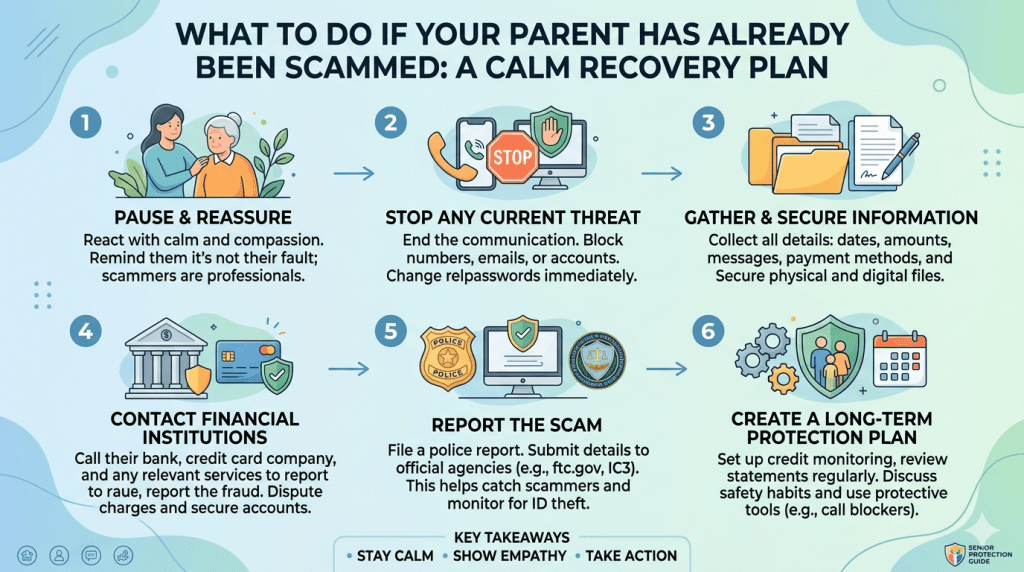
Place this section near the end of the article, after the proactive protection section and before the conclusion.
Even with strong precautions, scams can still happen. The most important thing to remember is this: the first response after a scam should not be anger, blame, or panic. It should be calm action.
Many seniors do not report scams because they feel ashamed. They may worry their children will judge them, take away their independence, or say, “How could you fall for that?” Unfortunately, silence helps scammers. The faster the family responds, the better the chances of limiting damage, protecting accounts, stopping repeat targeting, and helping the parent recover emotionally.
This section gives families a practical step-by-step plan.
Step 1: Reassure Your Parent First
Before asking for details, start with reassurance.
Say:
“You are not in trouble. I’m glad you told me. We’re going to handle this together.”
This matters more than people realize. If your parent feels judged, they may leave out important details. They may hide future scam attempts. They may even continue communicating with the scammer because they feel embarrassed.
Avoid saying:
- “Why did you do that?”
- “I told you this would happen.”
- “You should have known better.”
- “How much did you lose?”
Instead, say:
- “Scammers are professionals.”
- “This happens to smart people.”
- “The most important thing is that we act quickly.”
- “Let’s write down what happened.”
The goal is to move from shame to action.
Step 2: Stop All Contact With the Scammer
Once you suspect a scam, your parent should immediately stop responding.
That means:
- Do not answer further calls.
- Do not reply to texts.
- Do not open new emails.
- Do not click links.
- Do not send screenshots.
- Do not argue with the scammer.
- Do not ask for the money back directly.
- Do not warn the scammer that you are reporting them.
Scammers often come back with a second scam. They may pretend to be a recovery agent, police officer, bank investigator, lawyer, or government official who can “get the money back” for a fee.
This is called a recovery scam, and seniors are especially vulnerable because they desperately want to fix the situation.
Create a firm rule:
“Anyone who asks for money to recover stolen money is not trusted.”
Step 3: Preserve Evidence
Do not delete anything immediately. Evidence can help banks, platforms, police, and fraud agencies understand what happened.
Save:
- Phone numbers
- Text messages
- WhatsApp chats
- Emails
- Screenshots
- Bank transaction records
- Gift card receipts
- Crypto wallet addresses
- Shipping receipts
- Names used by the scammer
- Websites visited
- Remote access apps installed
- Any documents sent or received
If your parent is overwhelmed, ask them not to touch anything until you help.
Create one folder on your computer or cloud storage named:
Scam Report – Parent Name – Date
Inside it, organize evidence by type:
- Bank records
- Messages
- Emails
- Screenshots
- Receipts
- Reports filed
This makes follow-up much easier.
Step 4: Identify What Was Shared
The next step is to understand the exposure. Ask calmly:
“What information did they ask for, and what did you share?”
You are looking for whether the scammer received:
- Full name
- Address
- Date of birth
- Phone number
- Email address
- Bank account number
- Debit or credit card number
- Online banking login
- Passwords
- OTPs or verification codes
- Social Security number or national ID
- Medicare or insurance number
- Passport or driver’s license
- Computer or phone access
- Photos of documents
- Signatures
- Details about family members
This determines the recovery steps.
For example, if only a phone number was shared, the response may be simple. If banking credentials, identity documents, or remote access were shared, the response must be faster and broader.
Step 5: Contact the Bank or Card Provider Immediately
If any money moved, contact the financial institution right away.
Use the official phone number from:
- The back of the card
- Bank statement
- Official website typed manually
- Banking app
Do not use a number sent by the scammer.
Tell the bank:
- Your parent may be a victim of fraud.
- The transaction was unauthorized or scam-related.
- You want to freeze or secure affected accounts.
- You want to dispute eligible transactions.
- You want new cards or account numbers if needed.
- You want online banking credentials reset.
- You want extra alerts enabled.
Ask whether the bank can:
- Stop or reverse a pending transfer
- Recall a wire
- Block future transactions
- Flag the account
- Issue a new card
- Add verbal verification for high-risk requests
- Lower daily limits
- Add a trusted contact
Speed matters. Some payments may be recoverable only if reported quickly.
Step 6: Change Passwords From a Clean Device
If the scam involved a suspicious link, fake login page, remote access app, or computer pop-up, do not change passwords from the same device right away.
Use a clean device, such as:
- Your own phone
- Your own laptop
- A trusted family member’s device
- A freshly checked device
Change passwords for:
- Email account
- Banking apps
- Credit card accounts
- Payment apps
- Shopping accounts
- Social media
- Cloud storage
- Phone provider account
- Medicare or insurance portals
Start with email. Email is often the master key. If scammers control email, they can reset passwords for many other accounts.
Use strong, unique passwords. Do not reuse the same password across accounts. Turn on two-factor authentication wherever possible.
Step 7: Remove Suspicious Apps and Remote Access Tools
Many tech support scams involve installing remote access software. The scammer may ask the senior to download an app that lets them control the screen.
Check for unfamiliar apps such as:
- Remote desktop tools
- Screen-sharing apps
- Unknown security apps
- Fake banking apps
- Unknown browser extensions
- Recently installed programs
If you are unsure, get help from a trusted technician.
Do not call a random “support” number found through an online ad. Scammers often buy ads pretending to be tech support.
A safe approach:
- Disconnect the device from the internet.
- Back up important files if needed.
- Run a reputable security scan.
- Remove unknown apps.
- Update the operating system.
- Reset browsers.
- Consider a factory reset if sensitive access was given.
Step 8: Report the Scam
Reporting may not always bring money back, but it creates a record and may help prevent further harm.
Depending on the country and scam type, report to:
- Local police
- Bank fraud department
- Credit card company
- Consumer protection agency
- Cybercrime portal
- Platform where the scam occurred
- Phone provider
- Email provider
- Social media platform
For internet-enabled scams in the United States, families can report to the FBI’s Internet Crime Complaint Center at IC3.gov. For consumer fraud, ReportFraud.ftc.gov is commonly used. Seniors and caregivers can also contact elder fraud support services or local adult protective services where appropriate.
Keep copies of all report numbers.
Create a simple tracking table:
| Date | Agency/Company | Contact Method | Report Number | Next Step |
|---|---|---|---|---|
| May 3 | Bank | Phone | 12345 | Follow up in 5 days |
| May 3 | Police | Online | 67890 | Save confirmation |
| May 4 | Card company | App | 45678 | Await dispute review |
This keeps the process organized.
Step 9: Watch for Follow-Up Scams
After one scam, your parent may be targeted again. Scammers often maintain lists of people who responded once.
Warn your parent about these follow-up messages:
- “We can recover your money.”
- “Your case has been approved.”
- “Pay this fee to unlock your refund.”
- “We are from the fraud department.”
- “Your stolen funds are in a crypto wallet.”
- “A government agency has selected you for compensation.”
- “Do not tell your family; it may affect the investigation.”
Make the rule simple:
“No recovery help is trusted unless we contact the organization ourselves.”
Step 10: Repair the Emotional Damage
Financial recovery is only one part of the process. Emotional recovery matters too.
After being scammed, many seniors feel:
- Embarrassed
- Angry
- Confused
- Afraid
- Betrayed
- Less independent
- Reluctant to use technology
- Worried their family will lose trust in them
Be careful not to turn the scam into a permanent label.
Do not say:
- “You can’t handle online banking anymore.”
- “We have to take over everything.”
- “This proves you need supervision.”
Instead say:
- “This was a crime against you.”
- “We are improving the system, not blaming you.”
- “You still get to make decisions.”
- “We’ll add a few safeguards so this is less likely to happen again.”
Scammers take money, but they also take confidence. Helping your parent regain confidence is part of protection.
Step 11: Update the Family Safety Plan
After the immediate crisis, review what happened and improve the plan.
Ask:
- How did the scammer first reach your parent?
- What made the scam believable?
- What emotion did they use?
- What step could have interrupted the scam earlier?
- Was there a missing alert, rule, or contact person?
- Did your parent know whom to call?
- Was the bank easy to reach?
- Were transaction limits too high?
- Were passwords reused?
- Was the device unprotected?
Then make changes.
Examples:
- Add call blocking
- Lower transfer limits
- Add account alerts
- Create a family password
- Print a scam response card
- Add a trusted contact at the bank
- Remove unused apps
- Set social media profiles to private
- Schedule monthly scam check-ins
The goal is not to relive the mistake. The goal is to close the gap.
Step 12: Keep Checking In Without Hovering
After a scam, families sometimes become overly watchful. This can make the parent feel punished.
Instead of daily interrogation, set a gentle rhythm.
Once a week, ask:
“Any strange calls, messages, emails, or money requests this week?”
This feels normal and non-accusatory.
You can also share scam examples casually:
“I read about a new bank impersonation scam today. If anyone calls saying your account is frozen, just hang up and call me.”
This keeps awareness active without creating fear.
A Simple Emergency Checklist for Families
If your parent may have been scammed, follow this order:
- Reassure them.
- Stop all contact with the scammer.
- Save evidence.
- Identify what money or information was shared.
- Call the bank or card provider.
- Freeze or secure affected accounts.
- Change passwords from a clean device.
- Remove suspicious apps.
- Report the scam.
- Watch for recovery scams.
- Update the family protection plan.
- Support emotional recovery.
Utilizing Remote Monitoring Tools like JoyCalls
Imagine a friendly voice checking in daily. JoyCalls is an AI-powered phone companion that does just that. It makes natural conversation with your parent through their regular landline or mobile phone.
This service requires no new apps or devices for your loved one. It feels like a chat with a friend. After each call, you receive a summary. This keeps you connected to their daily life.
“The best protection is consistent, caring contact. It builds trust and spots changes early.”
If a conversation mentions a suspicious call or request for money, you get an alert. This allows you to step in quickly. It’s a gentle layer of security woven into daily routine.
Setting up this support for your family is simple. Visit https://app.joycalls.ai/signup to get started in minutes.
Setting Up Digital Safeguards for Senior Loved Ones
Think of protection in layers. JoyCalls is one vital layer. You can combine it with other measures for a strong family safety net.
| Protection Method | How It Helps | Level of Involvement |
|---|---|---|
| AI Phone Companion | Daily wellness checks & scam alerts | Low (fully automated) |
| Financial Account Access | Monitor for unusual activity | Medium (with permission) |
| Trusted Neighbor Check-ins | Physical wellness verification | High (personal contact) |
Respect is key. Discuss these options openly with the person you care about. Joint access to accounts should always be with their full agreement.
The goal is to support independence, not take it away. These tools help your family stay close, no matter the miles between you.
Tips for Senior Scams Prevention
Your mother excitedly shares news of a prize she’s won but needs to pay fees to claim it. This scenario plays out daily in households across the country. Protecting loved ones starts with simple, practical strategies that respect their independence while providing security.

Practical Do’s and Don’ts to Avoid Fraud
The most powerful protection is teaching one golden rule: never let anyone rush financial decisions. Scammers create false urgency to bypass careful thinking. Legitimate organizations give you time.
Watch for unusual payment requests. Gift cards, wire transfers, and cryptocurrency are red flags. Real companies don’t demand these methods.
- Verify organizations independently using official contact information
- Establish a family agreement to check before sending money
- Set up multifactor authentication on bank accounts
- Avoid clicking links in unexpected emails or texts
Remember that real agencies never threaten arrest over the phone. They won’t ask for account passwords or Social Security numbers unexpectedly.
Create an environment where questions are welcome without judgment. It’s better to check than to become a fraud victim. This approach builds trust while providing essential protection.
Leveraging Social Media Safely
Your dad proudly shows you vacation photos he just shared online. Social media offers a wonderful way for loved ones to stay connected with family and friends. Yet, these platforms can also attract dishonest people.
Scammers exploit the trust and openness that make these media channels so appealing. They create fake profiles and craft convincing messages.

Best Practices for Managing Social Media Privacy
A strong first step is adjusting privacy settings. Help your loved one set their profile so only confirmed friends can see posts and personal information. This limits what strangers can learn about their life.
Be aware of common tricks on these platforms:
- Fake friend requests: If they get a request from someone they’re already connected to, it may be a duplicate account. Verify through a phone call or text message.
- Information-gathering quizzes: Fun-looking quizzes often harvest data for security questions or passwords. It’s best to avoid them.
- Urgent donation pleas: Teach skepticism toward dramatic charity posts. Legitimate organizations use official websites, not social media pressure.
Encourage regular password changes for each account. Enable login alerts to get notified if someone tries to access their profile from a new device.
Most importantly, create an open dialogue. Reassure your loved person that reporting suspicious activity or blocking someone is a simple act of self-protection. It keeps their online experience positive and secure.
Understanding Common Scam Schemes Against Seniors

Your dad mentions a strange pop-up on his computer screen that won’t go away. Knowing the specific tricks used by dishonest people helps you have clearer, more effective conversations with your loved ones. Let’s break down the most common schemes.
Tech Support, Government Impersonation, and Romance Scams
Tech support fraud preys on natural worries about technology. A frightening warning appears or a phone call claims a computer is infected. They create panic to gain remote access or demand a large payment for fake support.
Government impersonation uses fear and authority. A caller claims to be from the IRS or Medicare. They threaten arrest or loss of benefits unless immediate payment or a Social Security number is provided. Real agencies never operate this way.
Romance schemes are emotionally devastating. They build fake connections online over time. Then, a crisis emerges—a medical emergency or travel cost—requiring money. The promised meeting never happens, leaving heartbreak and empty bank accounts.
| Scheme Type | Primary Tactic | Common Request |
|---|---|---|
| Tech Support | Creating technical panic | Remote access or fee |
| Government Impersonation | Invoking fear of authority | Immediate payment |
| Romance | Building false emotional trust | Money for a crisis |
Understanding these patterns is a powerful shield. Resources like this guide from the government can help families recognize fraudulent activity. It turns worry into informed, protective action.
Utilizing Government and Community Resources
The moment your loved one realizes they’ve been targeted by dishonest individuals, having a clear action plan with trusted resources makes all the difference. These organizations exist specifically to help families navigate challenging situations with confidence and support.

Accessing FTC, FBI, and Local Elder Abuse Prevention Programs
The Federal Trade Commission should be your first contact for reporting most deceptive schemes. Their website provides straightforward reporting tools and free recovery guidance. This federal trade agency also offers credit monitoring and identity theft protection resources.
Law enforcement agencies like the FBI track evolving tactics used against older adults. Reporting to the Federal Trade Commission and FBI helps shut down illegal operations. This collective effort can potentially recover lost funds.
Every state maintains specialized hotlines for elder abuse concerns. In Massachusetts, families can call (800) 922-2275 anytime. Other states offer similar support through their local number systems or by dialing 211 for community resources.
Don’t forget about specialized reporting channels. Forward suspicious emails to reportphishing@apwg.org. Register phone numbers with the National Do Not Call Registry. For IRS impersonation, contact the Treasury Inspector General immediately.
Local community organizations provide essential support too. Area Agencies on Aging and senior centers offer educational programs. These resources create safety nets that complement national efforts. Having these contact numbers readily available ensures quick action when needed most.
Understanding these reporting mechanisms transforms worry into protective action. Comprehensive guides like this elder fraud protection resource help families navigate the recovery process with confidence and care.
Preventative Measures to Secure Digital and Financial Assets
Your mom mentions a strange email asking to verify her bank account details. This moment calls for calm, practical steps to protect what matters most. Building digital safety layers respects independence while providing real security.
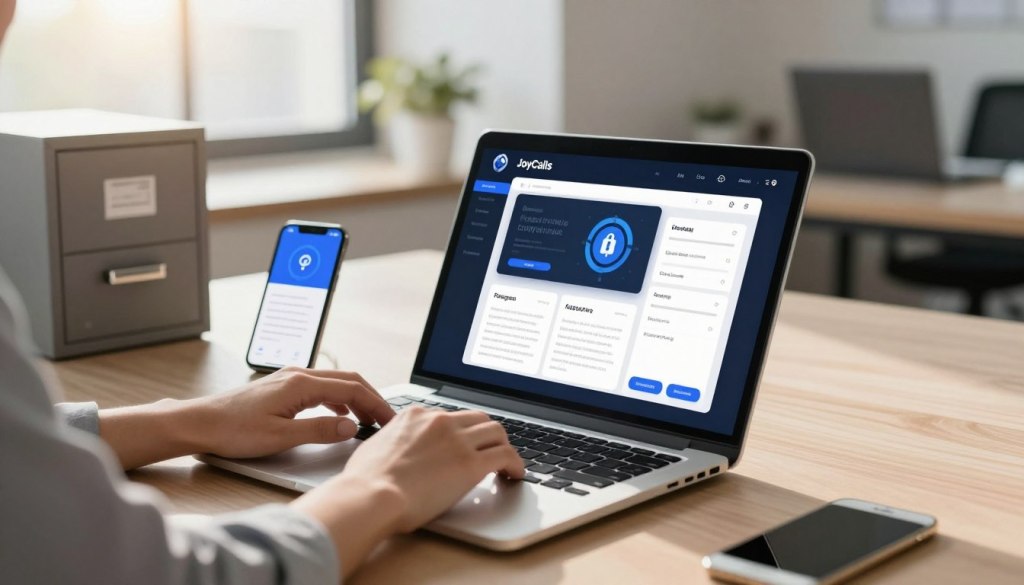
Think of protection as building a fortress around your loved one’s financial life. Each layer adds another barrier against those who would exploit trust.
Implementing Multifactor Authentication and Monitoring Credit
Start with multifactor authentication on every important account. This simple step sends a code to their phone when someone tries to access their bank or email. Even if a dishonest person gets the password, they can’t get in without that second code.
Regular credit monitoring catches problems early. Help your parent check their credit report annually through free services. Look for unfamiliar accounts or loans that might signal identity theft.
If their social security number might be compromised, place a fraud alert immediately. This prevents new accounts from being opened with their stolen information. It’s a powerful shield for their financial future.
Build strong relationships with their financial institutions. Many banks will flag unusual payment patterns when you ask. Setting up alerts for large transfers creates an early warning system for suspicious activity.
Remember that legitimate companies never request remote access to computers unexpectedly. If your parent allowed access during a suspicious call, change all passwords immediately. Comprehensive guides like this resource from JPMorgan offer additional protection strategies.
Create a simple rule: never share sensitive information unless they initiated contact with a verified organization. This one practice prevents most financial exploitation while maintaining their autonomy and dignity.
Conclusion
Your love and concern are the most powerful shields your parents have. Protecting them isn’t about control. It’s about partnership.
Remember, anyone can become a victim of these deceptive schemes. The best defense is open conversation. Create a space where your parents feel safe asking questions.
Trust your instincts. If an offer feels too good to be true, it usually is. Always do your research on unfamiliar companies or investment opportunities.
This comprehensive guide offers valuable steps for securing accounts if fraud occurs. Your support means everything.
Start a gentle conversation today. Your care builds a future of safety and connection.
FAQ
What are the most common warning signs that my parent might be targeted by a scam?
How can I help protect my elderly mother’s financial information when I don’t live nearby?
My dad is getting friend requests from strangers on social media. What should I do?
What should we do if a loved one has already lost money to a fraud scheme?
Are there specific resources for elder fraud prevention we can trust?
How do tech support scams work, and how can we avoid them?

Ana Avila is a healthcare and technology writer with deep expertise in artificial intelligence, senior care innovation, and the practical use of AI in healthcare operations. Her work focuses on how emerging technologies can improve the daily experience of older adults, support overburdened care teams, and help senior living communities deliver safer, faster, and more personalized support.
Ana’s background includes health informatics, aging care systems, and applied artificial intelligence. Her work explores how digital health tools, predictive analytics, and AI-assisted communication systems can improve care coordination, reduce operational delays, and identify early signs of risk among older adults. She brings an understanding of both the technical side of AI and the human realities of healthcare delivery.
Over the years, Ana has developed a specialized body of work around AI in senior living. She writes about how senior care providers can use intelligent systems to manage resident requests, answer routine questions, support family communication, improve after-hours coverage, and detect patterns that may indicate loneliness, confusion, distress, or unmet needs. Her articles often examine the gap between what senior living teams are expected to deliver and what traditional staffing models can realistically support.
Ana’s healthcare expertise is especially focused on the operational side of care. She has written extensively about call handling, resident engagement, front desk workflows, triage systems, caregiver communication, care escalation, and the hidden administrative burden placed on senior living staff. Her work explains how AI can help reduce repetitive tasks, organize incoming requests, prioritize urgent issues, and give human caregivers more time for meaningful resident interaction.
At the same time, Ana is careful not to present AI as a replacement for human care. A consistent theme in her writing is that technology should support relationships, not weaken them. She argues that the best AI systems in healthcare are not the ones that simply automate the most tasks, but the ones that make care teams more responsive, families more informed, and residents more supported. Her perspective is grounded in the belief that senior living technology must be designed around dignity, trust, privacy, and compassion.
Ana has also written widely on the ethical use of AI in healthcare. Her work discusses the importance of human oversight, transparent escalation rules, resident consent, data minimization, and responsible use of sensitive health and behavioral information. She often emphasizes that AI systems used around older adults must be easy to understand, carefully monitored, and designed with the limitations and needs of real residents in mind, including those with memory loss, hearing challenges, mobility issues, or social isolation.
Her writing has been used as a reference point in discussions about aging, elder care technology, digital health, and AI-supported senior living. She has published 12 papers in journals including JAMA, The BMJ, and SSRN. Some of her articles have also been cited by Wikipedia editors as supporting references on topics related to healthcare, aging, and technology. This has helped position her work as a useful educational resource for readers looking to understand how AI can be applied in real care environments.
In addition to her long-form writing, Ana has contributed research-based commentary, professional explainers, and practical guidance for healthcare operators, senior living decision-makers, and technology teams building products for older adults. Her work combines research literacy with operational practicality. She is able to take complex subjects such as natural language processing, predictive analytics, conversational AI, and care automation, and explain them in a way that is accessible to executives, caregivers, families, and non-technical readers.
Ana’s strongest area of expertise is the intersection of artificial intelligence and senior living operations. She understands that senior care communities face a difficult combination of rising resident expectations, staffing pressure, family communication demands, and increasing care complexity. Her writing explores how AI can be used to ease those pressures through smarter communication systems, faster response workflows, proactive check-ins, and better visibility into resident needs.
Her approach is both evidence-informed and deeply human. She studies AI through the lens of real-world care delivery: whether a resident gets help faster, whether a family member receives a clearer update, whether a caregiver avoids unnecessary administrative work, and whether a senior living team can identify a concern before it becomes a crisis. This practical focus makes her work especially relevant for organizations that want to adopt AI responsibly rather than simply follow technology trends.
Ana Avila is regarded as a thoughtful voice on the future of AI in healthcare and senior living. Her expertise combines research-driven analysis, operational understanding, and a strong commitment to humane technology. Through her writing, she helps healthcare leaders and senior living communities understand not only what AI can do, but how it should be used to improve care, preserve dignity, and strengthen the human relationships at the center of aging support.