
Does worrying about your parent’s health feel like a second full-time job? You’re not alone. That knot in your stomach when you wonder if Mom took her pills is a heavy weight. It’s a real health risk that keeps many family members up at night.

The statistics are sobering. Nearly half of all adults miss doses. For older adults managing multiple prescriptions, the challenge is even greater. This lack of adherence leads to thousands of hospitalizations each year.

But there is genuine hope. Simple technology exists to help. The right tools can be a lifeline, promoting independence and safety. This isn’t about complicated gadgets. It’s about finding solutions that work for your family’s real life.

We know you’re busy and stretched thin. You can’t be there for every single dose. That’s exactly why finding the right support system matters so much. Whether your parent is tech-savvy or prefers their familiar phone, there are options. Companion solutions like daily phone check-ins meet them where they are, with no judgment.

This guide cuts through the noise. We focus on the actually easy choices. The ones that support your loved one’s health without adding more stress to your life. Managing well-being should bring peace of mind, not more worry.

Key Takeaways

  • Missing prescribed doses is a serious health risk, especially for seniors managing multiple pills.
  • Technology can provide simple, effective support for medication adherence.
  • Solutions exist for every comfort level, from smartphone apps to phone-based systems.
  • The goal is to find a tool that reduces stress for both caregivers and older adults.
  • Effective management gives family members peace of mind and supports senior independence.
  • Exploring simple medication-tracking apps can be a great first step.
  • For a non-app alternative, consider an AI-powered daily check-in system that uses a regular phone.

Understanding the Need for Medication Reminder Apps for Seniors

Picture your mom’s kitchen counter, cluttered with pill bottles, each with a different schedule. It’s a lot to handle. For many older individuals, this daily routine is a real struggle.

An elderly woman sitting at a kitchen table, looking thoughtfully at a colorful array of pill bottles, representing the challenges of medication management. In the foreground, an open laptop displays a user-friendly medication reminder app interface. The middle ground features an organized pill organizer, emphasizing the importance of tracking medications, alongside a small calendar marked with reminders. In the background, soft, warm lighting illuminates the room, creating a cozy atmosphere. A window reveals a serene garden, symbolizing tranquility amidst the complexity of managing health. Capture the realism and details of everyday life, using a slightly downward angle to focus on the woman’s contemplative expression, evoking a sense of reflection and awareness about medication needs.

Challenges in Managing Medications for Older Adults

Small print on bottles is hard to read. Memory can fade, making complex schedules confusing. The fear of making a mistake is constant. This stress can make people feel like they’re losing their independence.

“I just want to manage my own health without feeling like a burden.”

This feeling is common. When managing multiple prescriptions feels overwhelming, it’s easy to understand why research shows a significant number of older adults have trouble with adherence. This directly impacts their well-being.

How Technology Eases Medication Adherence

Thankfully, help is available. Modern tools are designed to assist quietly. They send gentle alerts for doses. They can track what’s been taken. This gives both the user and their family peace of mind.

This kind of support bridges a crucial gap. It allows a person to maintain control over their health while giving caregivers reassurance. The right tool acts as a silent partner.

Common ChallengeHow Supportive Tech HelpsResulting Benefit
Forgetting complex schedulesCustomizable alerts and remindersImproved adherence and less anxiety
Difficulty reading labelsLarge, clear visual cues and audio alertsIncreased confidence and independence
Fear of being a burdenDiscreet tracking and family notificationsPeace of mind for everyone involved

The goal is to find a system that reduces stress, not adds to it. For some, this might be a simple app. For others, it could be a service that offers daily companionship and support through a regular phone call. The best solution fits seamlessly into an individual’s life.

Key Features and Benefits of Using Medication Reminder Apps

What if technology could quietly support your loved one’s daily routine without making them feel watched or controlled? The best tools work like a thoughtful partner, blending seamlessly into life.

Customizable Alerts and Schedules

Generic beeps at odd hours don’t work. Personalized prompts make all the difference. Imagine reminders timed with morning coffee or before favorite TV shows.

Visual cues using actual pill pictures help when medication names confuse. This clarity builds confidence. The system adapts to your parent’s rhythm, not the other way around.

A close-up view of a customizable medication scheduling app interface displayed on a smartphone. In the foreground, the smartphone screen shows vibrant, color-coded medication categories with reminders, dosage schedules, and icons for various pill types. The middle ground features a soft, blurred hand of a senior in professional casual attire, gently interacting with the app. The background is a cozy living room environment with warm, inviting lighting, including a small table with medical supplies, a pill organizer, and a calming plant. The overall atmosphere conveys a sense of ease and accessibility, emphasizing user-friendly technology designed for seniors. The lens should have a slight depth of field to draw focus to the app interface while softly blurring the environment.

Integration with Health Tracking and Caregiver Support

These tools do more than prompt pill-taking. They create a complete wellness picture. Blood pressure readings and symptom notes stay organized in one place.

The real peace comes from connection features. You receive gentle notifications if a dose is missed. No constant checking calls needed. This preserves dignity while ensuring safety.

“Knowing I can see Mom’s schedule without intruding gives me peace during busy workdays.”

Shared lists keep everyone informed during doctor visits. Prescription refill alerts prevent last-minute pharmacy runs. These supportive features work together like a safety net.

FeatureUser BenefitFamily Benefit
Visual pill remindersClear understanding of which pill to takeReduced confusion during care transitions
Caregiver notificationsMaintained independence with backup supportPeace of mind without constant checking
Health tracking integrationComplete wellness management in one placeBetter information for medical appointments

For those preferring simpler technology, phone-based check-in systems offer similar reassurance using familiar devices.

Product Roundup: Top Medication Reminder Apps for Seniors

Real families across the country have found peace of mind through various approaches to managing their loved ones’ daily health needs. The right choice depends on your parent’s comfort with technology and specific situation.

A vibrant and informative scene showcasing various medication reminder apps on smartphones and tablets. In the foreground, several devices with app interfaces displaying colorful and user-friendly designs that highlight features like alarms, medicine schedules, and easy-to-understand graphics. The middle layer features a textured wooden table with scattered pill bottles, a small notepad, and a pen, suggesting a sense of organization and care. In the background, a cozy living room with soft lighting creates a warm, inviting atmosphere, hinting at a senior lifestyle. Opt for a slightly angled perspective to emphasize the devices and elements, capturing a sense of accessibility and user-friendliness. The overall mood is positive and supportive, appealing to seniors looking for practical health solutions.

Overview of Popular Apps like Medisafe, MyMeds, and Pillboxie

Medisafe connects family members directly through its Medfriend feature. You’ll know immediately if a dose is missed. MyMeds offers straightforward alerts without overwhelming features.

Pillboxie uses visual learning—showing actual pill pictures to eliminate confusion. For tracking multiple family members, CareZone organizes everyone’s prescriptions in one place.

MyTherapy creates a complete health picture by tracking symptoms alongside pill schedules. Dosecast handles even the most complex changing regimens.

User Reviews and Success Stories from the United States

Families report dramatic improvements in adherence. Missed doses dropped from nearly half the time to just 5% within two weeks of consistent use.

“The visual reminders gave my dad confidence he was taking the right pill at the right time.”

Emergency contact storage provides added security. Many appreciate having help just a tap away during uncertain moments.

Tips for Choosing the Right App for Senior Care

Consider your parent’s actual comfort level with smartphones. Not every older adult wants to navigate apps, no matter how user-friendly.

For those preferring their regular landline, JoyCalls offers daily check-ins through natural conversation. This approach feels like connection rather than monitoring.

The best system is the one your loved one will actually use consistently. Always consult with doctors about any health management tools to ensure they complement the overall care plan.

How to Make a Medication Reminder App Actually Work in Daily Life

Choosing an app is only the beginning. The harder part is making sure it fits into everyday life so well that it becomes natural, not irritating. That matters even more for seniors, because even a good tool can fail if it feels confusing, disruptive, or too dependent on perfect memory and perfect timing.

This is where many families get stuck. They download an app with good intentions, spend ten minutes entering medications, and assume the job is done. Then the reminders start coming at inconvenient times, the phone is on silent, the alerts feel easy to ignore, and within a week the app becomes just another icon on the screen. That is not a technology problem alone. It is usually a setup problem.

A medication reminder system works best when it is built around the person’s actual habits, eyesight, hearing, comfort with devices, and daily routine. Seniors do not need more digital complexity. They need a system that feels calm, clear, and forgiving. They need prompts that make sense in the moment, not reminders that demand constant re-learning. And caregivers need a setup that reduces worry instead of creating more follow-up work.

The goal should not be to build a perfect medication system on day one. The goal should be to build a usable system that a senior can trust. That usually means starting simple, reducing decisions, and making the reminder process match real life as closely as possible.

Start With the Routine, Not the App

A common mistake is choosing settings based on the prescription label alone. The medication may say “take once daily,” but the real question is: when is this person most likely to reliably respond?

For one senior, the best time may be right after brushing teeth. For another, it may be during breakfast while sitting at the kitchen table. For someone else, it may need to happen only once they are fully awake and settled into the day. The app should follow the routine that already exists, not try to force a new one.

A better setup approach is to ask a few simple questions first:

What part of the day already happens consistently?

Look for habits that happen almost every day:

Morning anchor points

  • waking up
  • brushing teeth
  • making tea or coffee
  • eating breakfast
  • reading the newspaper
  • sitting in a favorite chair

Midday anchor points

  • lunch
  • a daily walk
  • a favorite TV program
  • caregiver check-in time

Evening anchor points

  • dinner
  • changing into night clothes
  • evening prayers
  • locking doors
  • placing the phone on the bedside table

Medication reminders are more reliable when they are attached to something familiar. Seniors are far more likely to follow through when a reminder feels connected to daily life rather than appearing as a random interruption.

Build Around Low-Energy Moments

Many older adults have certain times of day when they feel tired, rushed, unsteady, or mentally foggy. That matters. If a reminder is set for a time when attention is naturally lower, the chance of missing or delaying a dose goes up.

For example, a reminder scheduled during afternoon napping hours, while getting dressed, or during a busy transition period may not work well even if it seems technically correct. It is better to choose a time when the senior can pause, read the prompt, reach the medication, and respond without stress.

The best reminder time is not always the earliest or most “organized” time. It is the time with the highest chance of success.

Set Up the App for Clarity, Not Just Completion

Many apps allow a lot of customization, but more options are not always better. For seniors, clarity beats cleverness every time.

Use Plain-Language Labels

Do not rely only on the formal medication name if that is not how the person recognizes it. Instead of naming a medication only by a long prescription term, use labels that match how the senior already thinks about it.

Examples:

  • “Morning blood pressure pill”
  • “Blue cholesterol tablet”
  • “After-dinner heart medicine”
  • “Half tablet before bed”

This does not replace the official medication list for medical purposes. It simply makes the reminder easier to act on in the moment. Seniors are often faster and more confident when the prompt sounds familiar rather than clinical.

Add Visual Cues Wherever Possible

If the app supports pill images, color coding, or notes, use them carefully. A senior who takes several medications may respond much better to a clear visual match than to text alone.

Helpful cues can include:

  • pill color
  • bottle location
  • dose size
  • meal timing
  • “with water”
  • “after food”
  • “do not lie down immediately after taking”

A reminder should do more than say “take medication.” It should reduce hesitation. The fewer mental steps required, the better.

Turn Off Unnecessary Features

Some apps include refill tracking, health journals, interaction warnings, symptom logs, and other extras. These may be useful for some households, but they should not all be activated at once unless they are truly needed.

When seniors see too many buttons, tabs, warnings, or notifications, they may stop trusting the app entirely. Start with the smallest useful version:

  • medication name
  • reminder time
  • dose confirmation
  • missed-dose alert if needed
  • caregiver notification only if appropriate

Everything else can be added later. Simplicity is not a compromise. It is often the reason the system works.

Create a “One-Glance” Medication Environment

Even the best app cannot fix a confusing physical setup. If medications are stored in three different rooms, in similar bottles, with poor lighting and inconsistent routines, reminders will not solve the whole problem.

The physical environment should support the digital reminder.

Keep Medication in a Safe but Obvious Place

The best storage spot is usually:

  • easy to reach
  • well lit
  • close to the routine anchor
  • consistent every day
  • away from moisture, heat, and child access when relevant

For many seniors, that may be a kitchen counter area, bedside table, or a designated medication shelf. The key is consistency. If the app reminds the person at breakfast, the medication should not be in another room inside a drawer they rarely open.

Pair the App With a Pill Organizer When Appropriate

Apps and pill organizers often work better together than either one alone. The app answers when, and the organizer answers what.

A weekly organizer can:

  • reduce bottle confusion
  • make it easier to see whether a dose was already taken
  • support caregiver checks
  • lower the risk of double dosing

This is especially helpful for seniors managing multiple daily prescriptions. The organizer does not replace the reminder app, but it makes the app’s alert easier to act on correctly.

Improve Lighting and Readability

A surprising number of medication problems are really visibility problems. If the senior cannot comfortably read the screen, see the bottle label, or distinguish one compartment from another, adherence drops.

A few practical fixes can make a major difference:

  • enlarge phone text size
  • increase screen brightness
  • use high-contrast settings
  • keep a lamp near the medication station
  • add large-print labels if possible
  • avoid storing medications in dark cabinets

The easier it is to see, the less cognitive effort is required.

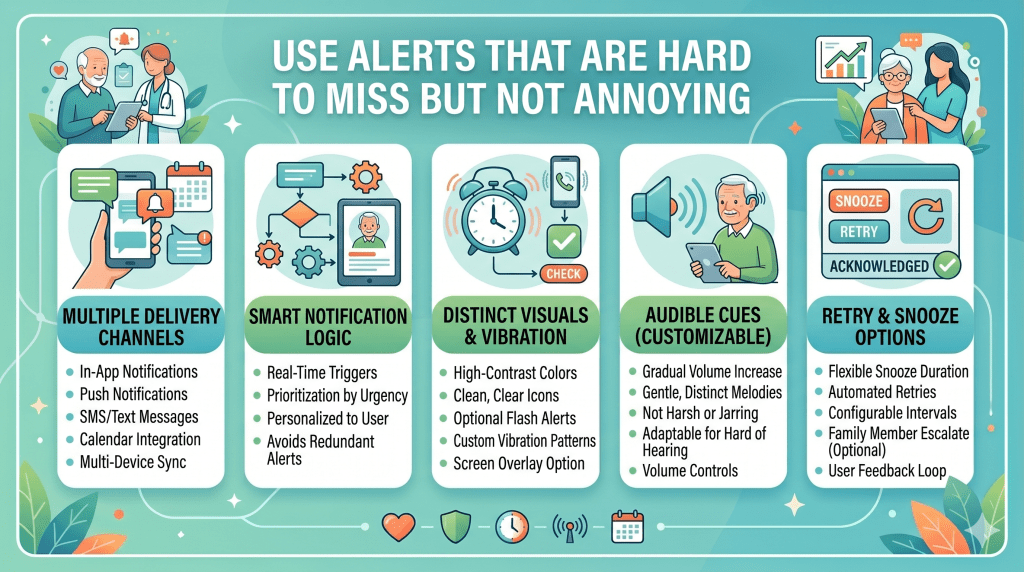
Use Alerts That Are Hard to Miss but Not Annoying

A reminder that is too soft gets ignored. A reminder that is too harsh gets dismissed. The right alert should be noticeable, calm, and repeatable.

Choose the Right Alert Type

Seniors vary widely in what they respond to best. Some notice sound immediately. Others are more likely to see a screen popup or feel a vibration. Some need repeated prompts spaced a few minutes apart.

Test these options in real life:

  • sound only
  • vibration plus sound
  • spoken reminders
  • persistent notification until marked done
  • repeat reminder after 10–15 minutes

The right choice depends on hearing, vision, and device habits. A senior who leaves the phone in another room may need a louder sound. Someone who dislikes noise may respond better to vibration and visual prompts. Someone who uses a landline more comfortably may need a phone-based reminder service instead of an app altogether.

Avoid Alert Fatigue

Too many notifications can make a person tune everything out. This is especially risky when the phone already produces messages from family, news apps, shopping apps, and social media.

Medication alerts need priority. That often means reducing unrelated notifications if possible. A phone full of noise trains people to ignore every sound, including the important one.

It also helps to keep reminder wording consistent. If the message changes constantly or includes too much text, it feels less familiar. A short, steady prompt is easier to trust.

Build a Backup Plan for Missed Doses

No system is perfect. A senior may be asleep, in the bathroom, outside, on a call, or simply distracted. What matters is not whether a dose is ever missed. What matters is whether the system makes recovery easier and safer.

Decide in Advance What Happens if a Reminder Is Missed

This should be discussed before there is a problem. Depending on the medication and physician guidance, the household should know:

  • whether to wait for a second reminder
  • whether a caregiver gets notified
  • whether the senior marks it late
  • whether a written note should be made
  • whether the doctor’s instructions say to skip or take later

The app should not become a guessing game. If a dose is missed, the next steps should feel calm and predictable.

Use Gentle Caregiver Escalation

Family involvement can be helpful, but too much surveillance can feel disrespectful. The best approach is usually a light safety net rather than constant oversight.

A reasonable progression might look like this:

  1. senior gets first reminder
  2. second reminder appears after a short delay
  3. app logs no confirmation
  4. caregiver gets a simple notification only if necessary

This protects independence while still offering backup. Seniors are more likely to accept support when it feels respectful and limited.

Keep a Printed Medication List Nearby

Even if the reminder system is digital, a printed medication list remains useful. It helps during:

  • doctor visits
  • pharmacy questions
  • hospital admissions
  • phone troubleshooting
  • temporary power or device issues

The list should include:

  • medication name
  • dose
  • timing
  • reason for taking it
  • prescribing doctor
  • allergy notes if relevant

Digital tools are excellent, but paper still matters in real-world care.

Make the First Week a Practice Week

One of the smartest things a family can do is treat the first week as a trial, not a final setup. This removes pressure and makes it easier to fix problems early.

Watch for Friction Points

During the first several days, notice:

  • Was the reminder heard?
  • Was the phone nearby?
  • Did the message make sense?
  • Was the medication easy to reach?
  • Did the senior know how to confirm the dose?
  • Was the alert too early, too late, or too frequent?
  • Did the app create confusion about whether the dose had already been taken?

These small observations matter more than reviews in an app store. An app is only “easy” if it is easy for this specific person in this specific home.

Adjust Quickly

Do not wait a month to improve a weak system. If the reminder time is wrong, move it. If the text is hard to read, enlarge it. If the confirmation button is unclear, simplify the screen. If the senior resents using the smartphone, consider whether a lower-tech option would serve better.

Success often comes from small corrections, not major overhauls.

Help Seniors Stay in Control of the Process

Medication support should strengthen dignity, not weaken it. Many older adults are more willing to use reminders when they feel included rather than managed.

Ask for Preferences, Not Just Compliance

Instead of saying, “You need this app so you stop forgetting,” try a more collaborative approach:

  • “Would mornings or evenings feel easier for reminders?”
  • “Do you prefer a sound, vibration, or phone call?”
  • “Would you like the reminder to use the pill name or a simple description?”
  • “Do you want family notifications only if something is missed?”

These questions communicate respect. That matters. Seniors often resist systems that feel imposed on them, even when the tool itself is helpful.

Preserve Privacy Where Possible

Not every older adult wants children, siblings, or caregivers seeing every medication event. Some want support without feeling monitored. Others may welcome fuller oversight. There is no single correct level of involvement.

The right balance is the one that creates safety without making the senior feel watched all day. A good medication setup should support autonomy wherever possible.

Know When an App Is Not the Best Fit

This is important. Sometimes the problem is not that the senior has “failed” to use the app. Sometimes the app is simply the wrong format.

A smartphone reminder may not be the best choice when:

  • the phone is rarely carried
  • hearing or vision limitations make the device stressful
  • the senior forgets how to unlock or navigate the phone
  • alerts cause confusion or anxiety
  • there is strong resistance to app-based tools
  • a landline or human voice prompt feels more natural

In those cases, a phone-call reminder service, caregiver-supported routine, automatic dispenser, or simplified check-in system may work better. The best medication support is not the most advanced one. It is the one the senior will actually respond to calmly and consistently.

A Simple Weekly Check-In That Keeps the System Working

Even a good medication reminder setup benefits from a short weekly review. This does not need to be complicated.

Once a week, take five to ten minutes to check:

  • are all medications still current?
  • have any doses or timings changed?
  • were any reminders missed repeatedly?
  • are refill dates approaching?
  • is the phone volume still on?
  • is the senior comfortable with the system?
  • does anything feel annoying, confusing, or unnecessary?

This small review prevents minor issues from becoming major problems. It also gives seniors a chance to say what is and is not working before frustration builds.

The Best Medication System Feels Reassuring, Not Heavy

When a reminder system is set up well, it does not dominate the day. It quietly supports it. The senior does not feel lectured by technology. The caregiver does not feel forced into constant checking. The medication routine becomes lighter, clearer, and more dependable.

That is what “easy” should actually mean.

Not flashy. Not feature-packed. Not impressive on paper.

Just clear enough to follow, gentle enough to accept, and reliable enough to protect health day after day.

When a Medication Reminder App Is Not Enough: How to Choose the Right Level of Support

One of the biggest mistakes families make is assuming that medication adherence is only a technology problem. It is not. In many homes, the issue is not just remembering that it is time to take a pill. The real issue is everything that happens around that moment. A senior may hear the reminder and still feel uncertain. They may wonder whether they already took the dose. They may feel dizzy and want to wait. They may not remember which bottle to open. They may not want to deal with the phone. Or they may simply press away the alert because they are tired of notifications.

That is why the best medication support system is not always the most advanced app. Sometimes an app is exactly the right tool. Sometimes it helps for a while and then stops working. And sometimes the better answer is something more human, more familiar, or more structured.

Families often feel pressure to “choose the best app,” but a better question is this: what level of support does this senior actually need right now? Once that question is answered honestly, the right system becomes much easier to choose.

This is especially important for older adults, because medication management is rarely happening in isolation. It sits alongside mobility changes, eyesight changes, hearing loss, memory shifts, loneliness, post-hospital recovery, caregiver burnout, and household routines that may already be stretched thin. A reminder system should fit into that reality. It should not ignore it.

There Are Different Levels of Medication Support

Not every older adult needs the same kind of help. One person may only need a gentle prompt once in the morning. Another may need stronger structure around multiple doses, refill timing, and missed-dose follow-up. Another may do best with a real voice checking in because they respond better to people than screens.

Thinking in “levels of support” is much more useful than thinking in “apps versus no apps.”

Level 1: Independent but Occasionally Forgetful

This is the senior who still manages most things independently. They may be organized, mentally sharp, and motivated to stay on top of their health, but they occasionally miss a dose because life gets in the way. Maybe they get distracted. Maybe they nap through a reminder. Maybe their medication schedule changed recently and the new pattern has not become automatic yet.

For this person, a straightforward app may be enough. What matters most is:

  • simple alerts
  • clear medication names
  • easy confirmation of doses
  • large text and readable design
  • a schedule that fits real routines

At this level, the app is serving as a light support tool, not a rescue tool. It should feel easy, not medicalized. The senior should still feel fully in charge.

Level 2: Independent but Managing a More Complicated Regimen

This is the person who may be capable, but their medication schedule is no longer simple. They may be taking several prescriptions at different times of day. Some may need to be taken with food. Others may need spacing. A refill delay or one missed dose can create confusion.

Here, a reminder app can still work, but it often needs stronger structure around it. The senior may benefit from:

  • a pill organizer
  • a shared medication list
  • refill reminders
  • occasional caregiver visibility
  • a weekly review routine

At this level, the app should not stand alone. It should be part of a small, reliable system. Otherwise the senior may be technically “reminded” but still feel overwhelmed.

Level 3: Mild Cognitive or Functional Strain Is Starting to Show

This is where many families become uneasy. The senior may still say they are fine, and they may genuinely want to stay independent, but small warning signs are appearing. They forget whether they already took a dose. They mix up bottles. They dismiss alerts without acting. They struggle to update the app when medications change. They may not be unsafe every day, but the system is beginning to depend too much on everything going right.

This is often the point where families keep trying new apps when the real need is more support, not more software.

At this level, the best approach may include:

  • caregiver notifications for missed doses
  • simplified physical setup
  • fewer manual steps
  • automatic dispensers in some cases
  • regular check-ins
  • a voice-based or phone-based system if screen use is inconsistent

The goal here is not to take control away. The goal is to prevent the senior from carrying more cognitive load than they comfortably can.

Level 4: High-Risk or High-Support Situations

Some situations call for more than reminders. Recent hospital discharge, dementia, frequent confusion, living alone with unstable health, complex medication changes, or repeated missed doses may require a system that includes human oversight or stronger daily accountability.

In these situations, a reminder app by itself may create false confidence. The family thinks there is a system in place, but the senior is still not safely supported.

At this level, families may need:

  • caregiver-managed medication setup
  • direct check-ins
  • pharmacy blister packs or synchronized refills
  • automatic dispensing tools
  • phone-based reminder systems
  • clear escalation when doses are missed
  • medical review if adherence is consistently failing

An app can still be part of the setup, but it should not be the only line of defense.

How to Tell Whether the App Is Truly Working

Many families assume the system is fine because the app is installed. But installation is not success. Use is not even success. The real test is whether the system is reducing confusion, missed doses, and family stress in everyday life.

A medication support method is working when the senior can respond to it calmly, consistently, and correctly most of the time.

Signs the App Is a Good Fit

A reminder app is likely working well if the senior:

  • hears or notices reminders consistently
  • understands what the alert means immediately
  • can find the medication without stress
  • rarely asks, “Did I already take this?”
  • does not seem irritated by the app
  • can manage schedule changes with little confusion
  • follows through without repeated rescue from family

When those conditions are true, the app is doing its job. There is no reason to complicate the system.

Signs the App Is Technically Present but Functionally Failing

An app may not be enough if:

  • reminders are ignored regularly
  • the phone is often in another room or out of battery
  • the senior accidentally marks doses complete
  • there is repeated confusion after alerts go off
  • the person resists using the phone at medication time
  • medication changes create major disruption
  • family members still feel the need to check constantly

This is where families often waste time blaming the senior, blaming the app, or trying a different interface. But the deeper issue is usually mismatch. The support method does not match the person’s current capacity, comfort, or daily environment.

Why Human-Factor Fit Matters More Than App Features

Many medication apps look impressive on paper. They advertise tracking, analytics, health data, refill warnings, medication databases, interaction checks, and caregiver dashboards. Those features may sound reassuring, but they are only useful if the senior can comfortably live with them.

Older adults do not need the most feature-rich system. They need the least complicated system that still reliably protects their health.

Familiarity Often Wins Over Innovation

A familiar routine is often more effective than a “smart” tool. A senior who has always answered the phone reliably may do better with voice-based reminders than with a mobile app, even if the app is beautifully designed. A senior who does not like navigating menus may do better with a pillbox and daily check-in than with a self-managed digital dashboard.

This is not resistance to progress. It is good design thinking. The most usable system is the one that works with existing behavior instead of trying to replace it entirely.

Emotional Response Matters

Families sometimes overlook how a tool feels. But emotional response is a major part of adherence. If the app feels childish, intrusive, confusing, or judgmental, the senior may disengage from it quietly. They may say, “I’m using it,” while actually avoiding it.

A better system feels:

  • calm
  • respectful
  • predictable
  • private enough
  • easy to recover from when mistakes happen

These qualities matter just as much as reminder accuracy.

When a Human Voice Works Better Than an App

There are many seniors who do not actually need “technology” in the way families imagine it. What they need is structure, reassurance, and a prompt they will respond to naturally.

For some older adults, a regular phone-based check-in works better than a screen because it removes several points of friction at once. There is no need to unlock a device, interpret an interface, remember how to navigate the app, or make sense of a notification. The interaction feels more like part of daily life and less like a task.

This can be especially useful when the senior:

  • prefers a landline or basic phone
  • feels lonely as well as forgetful
  • responds better to spoken communication
  • dislikes smartphone notifications
  • needs gentle accountability, not just alerts
  • is more likely to pick up a call than tap an app

That does not mean apps are ineffective. It means that in some homes, a more human-feeling format is simply more realistic.

Choosing the Right System by Scenario

Instead of asking “What is the best medication reminder app?” it helps to ask “What kind of day-to-day situation are we solving?”

If the senior is organized but occasionally distracted

Choose a simple reminder app with large text and a very limited number of features. Avoid overbuilding the setup. The aim is light support.

If the senior has multiple medications and frequent schedule changes

Choose a system with strong scheduling, refill awareness, and a physical organizer. Family visibility may help, but keep it respectful. The aim is structured support.

If the senior lives alone and the family worries about missed doses

Choose a setup with backup notifications or regular check-ins. The aim is not surveillance. It is reducing the time between a missed dose and family awareness.

If the senior dislikes smartphones

Do not force an app just because it seems modern. Choose phone-based reminders, pill organizers, or another lower-tech system that the person will actually follow. The aim is acceptance and consistency.

If the senior is becoming confused about whether medication was already taken

Treat this as a sign that a reminder alone may not be enough. Introduce clearer physical organization, confirmation methods, and possibly caregiver-supported systems. The aim is reducing double-dose risk and uncertainty.

If family members are spending too much time checking in manually

Choose a system that reduces emotional and logistical load. This may be an app with selective alerts or a check-in method that feels lighter but still dependable. The aim is sustainability for the caregiver, not just the senior.

The Best System Is the One That Can Survive a Bad Day

Families often evaluate medication tools based on good days. But the real test is what happens on a bad day.

What happens when the senior sleeps late? When the phone battery dies? When a new prescription is added? When they feel unwell? When they are irritated, tired, or distracted? When the caregiver is busy? When the pharmacy timing changes? When the regular routine is disrupted by an appointment or social visit?

A strong medication support system should still hold together when life is imperfect. It should not require flawless memory, flawless technology use, and flawless timing.

That is why the best systems usually include three things:
a clear prompt, an easy action, and a backup plan.

If any one of those is missing, the setup may look good but fail under normal life pressure.

A Practical Decision Rule for Families

If you are not sure whether an app is enough, use this simple rule:

If the senior can reliably understand, respond to, and complete medication tasks after a reminder without confusion or repeated rescue, an app may be sufficient.

If the reminder happens but the senior still cannot consistently complete the task safely and calmly, the family does not need a “better reminder.” They need a higher-support system.

That shift in thinking can save a lot of frustration. It stops the cycle of downloading new tools when the real answer is better fit, stronger routine, or more human support.

The Real Goal Is Not App Adoption. It Is Safe Consistency.

Families sometimes become overly focused on getting the senior to use a particular app. But the real goal is not app adoption. It is not screen engagement. It is not “successfully using technology.” The real goal is simple: helping the older adult take the right medication, at the right time, with less stress and more dignity.

Sometimes an app does that beautifully.

Sometimes an app needs to be paired with a better routine.

Sometimes a different format works better entirely.

The smartest caregiving decision is not choosing the most popular tool. It is choosing the level of support that the senior can actually live with day after day.

And that is what makes a medication system truly easy: not the number of features it offers, but the number of problems it quietly removes.

How to Match the Reminder System to the Senior, Not Just the Medication Schedule

One reason medication reminder systems fail is that families focus too much on the medicine and not enough on the person taking it. The medication schedule may be accurate on paper, but if the reminder system does not match the senior’s eyesight, hearing, confidence with devices, attention span, mobility, or daily rhythm, it will still break down.

This is where a lot of well-meaning families get frustrated. They do everything “right” from a technical standpoint. They download a highly rated app. They input the prescriptions correctly. They turn on alerts. They even connect the caregiver account. But the reminders still get missed, ignored, snoozed, or dismissed. Then everybody starts thinking the senior is being resistant, careless, or forgetful, when in reality the system simply does not fit the person.

That distinction matters.

A reminder system should feel like support, not friction. If a senior needs three extra steps just to read the alert, open the app, figure out what it means, and confirm the dose, that is too much effort to demand every single day. If the phone is hard to hear, hard to unlock, or hard to trust, the system may look modern but still fail in normal home life.

The better approach is to build from the senior outward. Start with how they live, how they process information, and what tends to get in the way. Then choose the reminder method, the setup style, and the amount of caregiver involvement that actually matches that reality.

The Most Important Question Is Not “Which App Is Best?”

The better question is: what makes reminders easy or hard for this specific person?

For one older adult, the challenge is visual. For another, it is hearing. For another, it is low confidence with smartphones. For another, it is not memory at all, but inconsistent meal timing. For another, it is the emotional resistance of feeling managed.

When families stop asking “Which app should we use?” and start asking “What usually causes the dose to get missed?” they get much better results.

Start by Identifying the Real Barrier

Before choosing settings or devices, take a closer look at what is actually causing the problem. Many medication issues seem like memory problems at first, but that is not always the full story.

Barrier 1: The senior does not notice the reminder

This is often treated as forgetfulness, but it may really be:

  • low phone volume
  • too many notifications
  • phone left in another room
  • hearing difficulty
  • screen alerts that disappear too quickly
  • reminders happening during naps, TV time, or bathroom routines

If the prompt itself is not being noticed consistently, no app feature matters very much after that.

Barrier 2: The senior notices the reminder but does not act on it

This is a different problem. The alert may be heard, but the senior still delays or avoids the next step. That can happen because:

  • the medication is stored too far away
  • the label is hard to read
  • they are unsure which pill to take
  • the task feels annoying
  • they want to “do it in a minute” and then forget
  • they feel overwhelmed by multiple bottles

In that case, the reminder is not the main issue. The action pathway is.

Barrier 3: The senior acts, but there is confusion afterward

This is where you hear statements like:

  • “Did I already take it?”
  • “I think I took the morning one.”
  • “Was that today’s dose or yesterday’s?”
  • “I took something, but I’m not sure which one.”

This points to a tracking and confirmation problem, not just a reminder problem. The person may need a clearer physical system, a better confirmation habit, or some caregiver backup.

Barrier 4: The senior dislikes the whole process

This is more common than families realize. A medication reminder tool may be technically usable but emotionally disliked. The person may feel:

  • nagged
  • watched
  • infantilized
  • embarrassed about needing help
  • irritated by repetitive alerts
  • anxious about pressing the wrong thing

If that emotional resistance is ignored, adherence often slips quietly. Seniors do not always announce that they hate the system. They often just stop engaging with it consistently.

Build the Setup Around the Senior’s Actual Needs

Once the main barrier is clearer, it becomes much easier to choose the right reminder style.

For Seniors With Vision Challenges

If vision is the biggest issue, the system should reduce the amount of reading required at medication time.

That means the setup should focus on:

  • large text
  • strong contrast
  • very few on-screen choices
  • pill organizers that make the dose visually obvious
  • brighter lighting near the medication area
  • simple labels that are easier to recognize quickly

The goal here is not to make the screen slightly better. It is to remove visual strain from the routine as much as possible.

A family should also look beyond the app itself. Even if the reminder text is large, the medication process may still fail if:

  • bottle labels are tiny
  • compartments are hard to distinguish
  • the medicine is stored in dim light
  • the senior has to lean over or squint to read anything

For seniors with visual strain, a reminder system should not rely on fine print or subtle visual cues. Clear shapes, clear timing, and a predictable routine matter more than attractive design.

For Seniors With Hearing Challenges

If hearing is the main issue, families often make the mistake of simply increasing alert volume and hoping that solves everything. Sometimes it helps. Sometimes it does not.

A better system combines multiple cues:

  • stronger volume
  • vibration
  • persistent visual reminders
  • alerts timed when the senior is usually wearing hearing aids, if relevant
  • backup check-ins if reminders are often missed

If the person regularly turns the phone volume down, leaves it face down, or keeps it at a distance, louder sound alone may not fix the problem. The reminder must be noticeable in the way the person actually lives.

For some seniors, a spoken call or voice-based prompt may work better than a standard mobile notification because it feels more direct and more natural to respond to.

For Seniors With Dexterity or Mobility Challenges

Medication management is not only about remembering. Sometimes the person remembers perfectly well but struggles with the physical process.

They may have difficulty:

  • opening bottles
  • handling small tablets
  • using touchscreens accurately
  • scrolling or tapping small buttons
  • walking across the house to get the medication
  • bending to reach where it is stored

In these situations, families should simplify the physical routine just as much as the digital one.

Helpful changes might include:

  • keeping medication in an easier-to-reach spot
  • using a weekly organizer instead of opening bottles repeatedly
  • choosing an app with large tap areas and minimal navigation
  • reducing the number of manual steps required to mark a dose complete
  • moving the reminder time to a moment when the senior is already seated comfortably near the medication

If the body is tired, stiff, or unsteady, even a “simple” routine can feel like too much. Ease has to include physical effort, not just memory.

For Seniors With Mild Memory or Attention Changes

This is where families often overestimate what a reminder can do by itself.

A reminder is only the first cue. If the person gets distracted between hearing the alert and taking the medication, the system needs to bridge that gap. That usually means:

  • fewer steps
  • more obvious storage
  • a strong visual or physical cue
  • very consistent timing
  • a pill organizer that shows whether the dose was taken
  • a follow-up prompt if the first one is not confirmed

For mild memory strain, the most helpful systems are usually repetitive in a good way. They rely on sameness. Same time, same place, same sequence, same action. The more the process changes, the more fragile it becomes.

This is also where caregivers should be careful not to confuse “I can still do it myself” with “I can manage a highly variable digital system.” A senior may still want independence, but they often need a simpler and more stable environment around that independence.

For Seniors Who Are Emotionally Resistant to Help

Not every medication problem is technical. Sometimes the biggest barrier is identity.

Many older adults do not want to feel dependent. They do not want a child hovering over them, and they do not want a tool that seems to confirm that they are declining. If the reminder system feels like evidence of weakness, they may quietly reject it.

In these cases, language matters. Positioning matters. Tone matters.

It helps to frame the system as:

  • a routine helper
  • a way to reduce stress
  • a way to make the day simpler
  • a backup for busy days
  • a tool that supports independence rather than replaces it

It also helps to include the senior in small decisions:

  • preferred reminder time
  • preferred wording
  • app vs call vs organizer
  • whether family gets notified
  • where medicine is kept
  • how doses are confirmed

People cooperate more with systems they helped shape.

Match the Reminder Style to the Senior’s Daily Rhythm

A system may be logically correct and still practically wrong if it ignores daily rhythm.

Morning People vs Slow Starters

Some seniors are mentally sharp early in the day. Others need time before they feel settled. A reminder at 7:00 a.m. may work beautifully for one person and fail for another, even if the prescription technically allows both.

If a senior tends to wake slowly, feel stiff in the morning, or postpone tasks before breakfast, the reminder should not be placed at the earliest possible minute just to look organized. It should be placed where follow-through is most likely.

Homebodies vs Frequently Out-and-About Seniors

Some older adults are home almost all day. Others attend appointments, social visits, walks, worship, or community activities. Reminder systems need to account for this.

If doses are often scheduled during time outside the home, consider:

  • whether medication needs to travel with them
  • whether the phone is reliably carried
  • whether the senior can take the dose privately and comfortably
  • whether backup reminders are needed

A system that only works on quiet days at home is not actually reliable.

Seniors With Irregular Meal Patterns

Many medications are easiest to remember when tied to meals, but not every older adult eats at fixed times. Some skip breakfast. Some snack instead of eating structured meals. Some eat late. Some have appetite changes due to health or medication side effects.

In those cases, tying reminders only to “breakfast” or “dinner” may create inconsistency. It may be better to tie them to a different stable event such as:

  • after washing up
  • after morning tea
  • after evening TV news
  • before bedtime reading
  • during a regular caregiver call

The right anchor is the one that actually happens.

Create the Simplest Possible Success Path

The more thinking required, the more fragile the system becomes. A strong reminder setup should make the right action feel almost automatic.

That usually means the sequence should look something like this:

  1. The reminder arrives clearly.
  2. The senior immediately understands what it refers to.
  3. The medication is easy to access.
  4. The correct dose is easy to identify.
  5. The person can confirm completion with little effort.
  6. There is a backup if the step is missed.

If any part of this chain is weak, adherence suffers.

What Families Often Overcomplicate

Many well-intentioned setups become harder than they need to be because they include:

  • too many reminder sounds
  • too many app screens
  • multiple storage spots
  • medication names the senior never uses in real conversation
  • several people updating the system differently
  • long instructions inside the reminder text
  • unnecessary features turned on from day one

The result is a system that feels “complete” to the caregiver but not “easy” to the senior.

Simplicity is not laziness here. It is strategy.

Use a Short Trial Period Before Finalizing Anything

Families do not need to build the perfect medication system immediately. They need to observe what actually happens over several days and adjust based on reality.

A short test period works well because it reveals the hidden issues:

  • Was the reminder noticed?
  • Was the medicine nearby?
  • Did the senior understand the message?
  • Did they feel confident after taking it?
  • Was there confusion later about whether the dose was complete?
  • Did the system feel helpful or annoying?

That information is far more valuable than guessing.

A good mindset is to treat the first week as calibration. The family is not asking, “Did we choose correctly forever?” The family is asking, “What is making this easier, and what is still creating friction?”

That keeps the process calm and constructive.

A Practical Matching Guide for Families

When families feel overwhelmed, it helps to reduce the decision into a few simple matches.

If the senior mainly forgets because of distraction

Use a simple reminder system with repeated prompts and a very obvious medication location.

If the senior struggles with seeing labels or screens

Prioritize large print, lighting, strong contrast, and physical organization over extra app features.

If the senior hears poorly or leaves the phone far away

Use multi-sensory alerts or move toward voice-based or phone-based systems.

If the senior gets confused after the reminder

Use clearer confirmation steps, pill organizers, and some caregiver visibility.

If the senior dislikes smartphones

Do not force an app-centered approach. Choose what they will actually respond to.

If the senior has complex medications and the family is anxious

Use a layered system: reminders, physical organization, refill planning, and selective caregiver backup.

This kind of matching is far more useful than simply picking the most popular app in the app store.

The Best Reminder System Should Feel Smaller Over Time

This may sound surprising, but a good medication system should gradually feel less noticeable, not more.

At the beginning, families often expect technology to be the center of the solution. Over time, though, the best setups become part of the background. The routine starts feeling natural. The senior does not have to think as hard. The caregiver does not check as often. The medication station looks calmer. The prompts feel familiar instead of disruptive.

That is usually the real sign that the system fits.

Not that it has the most features.
Not that it looks advanced.
Not that it impressed the family at setup.

But that it has become easy enough to live with.

What “Easy” Should Really Mean for Seniors

When families say they want an easy medication reminder system, they often mean several things at once:

  • easy to hear or see
  • easy to understand
  • easy to physically complete
  • easy to trust
  • easy to repeat every day
  • easy to recover from if something goes wrong
  • easy on the caregiver too

That is why no single app is automatically the answer. Ease is personal. It depends on the senior’s abilities, preferences, routines, and emotional comfort.

The right system is the one that reduces friction at the exact points where that person tends to struggle.

And once families start thinking that way, medication support becomes much less about technology choice and much more about practical fit.

Conclusion

What matters most isn’t the complexity of the tool, but how well it fits into your loved one’s life and brings you both comfort. Finding the right support system is an act of love that shows how much you care.

The solutions we’ve explored offer genuine peace of mind. Whether it’s visual prompts or simple alerts, the goal is consistent medication management that preserves independence. For those comfortable with technology, exploring essential pill reminder options can transform daily routines.

Remember that not every solution requires a smartphone. If your parent prefers their regular phone, JoyCalls provides gentle reminder calls through natural conversation. This approach feels like connection rather than monitoring.

Taking this step demonstrates your commitment to your family’s well-being. The right choice—whether an app or AI companion—supports your loved one’s health with dignity. Explore how JoyCalls can help as part of your caregiving strategy.

FAQ

How do these apps help with tracking multiple prescriptions?

They let users build a complete drug list. You can enter each dose and schedule. The app then sends alerts for every pill at the right time. This helps older adults stay on top of their health needs.

Can family members get notifications if a dose is missed?

Yes, many apps offer caregiver support. You can set it up so that family members get an alert if a scheduled medication isn’t taken. This provides peace of mind for everyone involved.

Are these tools difficult for seniors to use on their phone?

The best apps are designed for simplicity. They have large buttons, clear text, and simple menus. This makes medication management much easier for older adults, even if they are new to technology.

What if my parent doesn’t have a smartphone?

Some services work with basic phones through automated calls, like JoyCalls. For those with devices, many apps are available. The key is finding a solution that fits the user’s comfort level with technology.

Do these apps track side effects or health changes?

Several advanced options include health tracking features. Users or caregivers can note how they feel after taking a drug. This helps in managing overall well-being alongside adherence.


Other Articles related to this article:

Medication Adherence Tips From Pharmacists (Simple, Proven)
Medication Reminders for Diabetes, BP, and Heart Meds (Systems That Stick)
Remote Medication Monitoring for Elderly Parents (What’s Realistic)
Medication Errors at Home: The Most Common Mistakes (And Fixes)
Side Effects vs Nonadherence: What Caregivers Should Watch For
The Best Time to Take Meds: Building a Habit Around Meals
Automatic Pill Dispensers: Do They Really Improve Adherence?
Medication Refills: Simple System to Never Run Out
How to Talk to a Stubborn Parent About Taking Meds
Polypharmacy in Seniors: Managing Too Many Meds Safely
Medication Reminders for Vision or Hearing Problems (Easy Fixes)
Medication Adherence for Dementia: Routines That Reduce Stress
Blister Packs and Bubble Packs: Are They Worth It for Seniors?
Pharmacy Sync: How to Align Refills on the Same Day
How to Keep an Updated Medication List (Template + Tips)
Text Message Medication Reminders for Seniors (Pros and Cons)
AI Medication Reminders: What They Can and Can’t Do
Medication Adherence for Seniors: Why Doses Get Missed
Post-Hospital Medication Plan: Avoiding Confusion After Discharge
Best Medication Reminder Methods (No Smartphone Needed)
Phone Call Medication Reminders: Do They Work Better Than Apps?
Pill Organizer 101: How to Choose the Right One for Seniors
Medication Management for Seniors Living Alone (Safety Plan)
Weekly Pill Planner Setup (Step-by-Step, 10 Minutes)
Daily Check-In Routine for Seniors Who Hate Being Checked On
How to Create a Medication Schedule That Actually Works
Medication Adherence Checklist for Caregivers (Fully Explained + Printable)
What to Do When Your Parent Says “I Already Took The Medicine”
How to Prevent Double Dosing in Seniors
Medication Reminder Apps for Seniors: What’s Actually Easy
How to Help Elderly Parents Remember Their Meds (Simple System)
Daily Check-In Routine for Seniors With Hearing Issues (Make It Easier)
Weekly Review: How to Spot Patterns From Daily Check-Ins
How to Start a Daily Check-In Routine in One Day (Fast Setup)
Daily Phone Check-In Services for Seniors: What to Look For
AI Check-In Calls for Seniors: How They Work (And What They Don’t Do)
The Best Daily Check-In Apps and Tools (And Simple No-App Options)
Daily Check-In Routine That Builds Real Connection (Not Just Monitoring)
How to Share Daily Caregiving Updates With Siblings (Without Miscommunication or Drama)
How to Set Boundaries With Daily Check-Ins (So It Doesn’t Take Over Your Life)
Daily Mood Check-Ins for Seniors: What to Watch For
Daily Check-In Routine After Hospital Discharge (First 14 Days)
How Often Should You Check In on Elderly Parents?
Daily Check-In Routine for Meals and Hydration (Quick Method)
Daily Check-In Routine for Seniors Living Alone (Safety + Connection)
How to Track Daily Check-Ins Without Feeling Like a Spreadsheet
Daily Check-In Routine for Medication Adherence (Without Nagging)
How to Build a Check-In Routine That Seniors Won’t Resist
Caregiver Check-In Schedule Template (Daily + Weekly)
Daily Check-In Routine for Elderly Parents (Simple Plan)
The 2-Minute Daily Check-In Script (No Awkward Talk)
The “No Answer” Escalation Plan for Daily Check-Ins
Daily Check-In Routine for Chronic Conditions (BP, Diabetes, COPD)
Daily Check-In Routine for Fall Risk (What to Ask Daily)
Daily Wellness Check Calls: What to Ask (7 Questions)
Daily Check-In Routine for Long-Distance Caregivers
What to Do If Your Parent Misses a Check-In (Step-by-Step)
Daily Check-In Routine for Dementia: Simple, Calm, Consistent
Daily Check-In Text vs Phone Call: Which Is Better for Seniors?
Morning vs Evening Check-Ins: What Works Best for Seniors
Caregiver Guilt: When You Can’t Be There to Keep Them Company
Senior Loneliness and Anxiety: Why They Feed Each Other
Does an AI Companion Help Senior Loneliness? What to Expect
How to Build a “Circle of Care” to Reduce Isolation (Neighbors, Friends, Family)
Volunteering for Seniors: The Best Way to Feel Connected Again
Loneliness in Men vs Women After 65: What Changes?
Senior Centers vs Community Groups: What Works Better for Loneliness?
“No One Needs Me”: How Purpose Reduces Loneliness in Aging
How to Make Phone Calls Feel Less “Check-In” and More Like Real Connection
Loneliness in Assisted Living: Why It Still Happens and What Helps
Loneliness or Depression? How to Spot the Difference in Older Adults
The Health Risks of Loneliness in Seniors (Heart, Brain, Immunity)
Loneliness in Older Adults: Signs, Causes, and What Helps
Loneliness in Seniors Without Smartphones: Low-Tech Ways to Stay Connected
Best Hobbies for Lonely Seniors (Easy to Start, Low Energy)
Social Isolation vs Loneliness: What’s the Difference in Seniors?
Retirement Loneliness: Why It Happens and How to Fix It
How to Help Seniors Make Friends After 60 (Practical Steps)
How to Create a Weekly Social Routine for an Elderly Parent
After a Spouse Dies: Loneliness in Widowhood (What Actually Helps)
How to Tell If Your Aging Parent Is Lonely (Even If They Say They’re Fine)
The “Quiet Withdrawal” Problem: When Seniors Stop Calling Back
How Often Should You Talk to Your Elderly Parents to Prevent Loneliness?
How to Help a Parent Who Refuses Social Activities
How to Help a Lonely Elderly Parent When You Live Far Away
Social Isolation in Seniors Living Alone: A Safety + Loneliness Plan
Senior Loneliness at Night: Why Evenings Feel Worse
Daily Check-In Calls for Seniors: Do They Reduce Loneliness?
Conversation Ideas for Seniors Who Feel Lonely (No Awkward Small Talk)
Loneliness and Dementia: Does Being Alone Speed Up Memory Loss?
Best Low-Tech Safety Devices for Seniors Living Alone
Home Safety Setup for Long-Distance Caregiving (Room-by-Room)
How to Track Meals and Hydration From Another City
Caregiver Guilt When You Live Far Away (How to Cope)
Smartwatch vs Phone Check-Ins: What Works Better for Seniors?
Scams Targeting Seniors: How to Protect Parents Remotely
When It’s Time for Assisted Living (Long-Distance Decision Guide)
How to Choose a Paid Caregiver When You Live Far Away
Weekly Care Plan Template for Aging Parents
Fall Risk: How to Reduce It When You’re Not There