
Sarah glanced at her phone during a busy work meeting. Another hour had passed, and that familiar worry crept in. Is Dad okay alone at home today? Like millions of adult children, she balanced career demands with caring for an aging parent.
The daily anxiety felt overwhelming. Was her father safe? Had he taken his medication? Traditional phone calls helped, but they often felt intrusive. Sometimes Dad forgot to answer. Other times, Sarah worried she was interrupting his day.
This isn’t just about gadgets or devices. It’s about finding solutions that respect independence while providing peace of mind. Modern monitoring technology offers quiet background support. Automated systems can work silently without constant interruptions.
We’ll explore what truly works better for family connections. You’ll understand the real differences between traditional methods and newer approaches. Our comparison focuses on benefits and limitations of each option.
Whether your loved one embraces technology or prefers simplicity, there’s a solution that can ease worries. The right choice helps older adults maintain confidence while aging independently.
Key Takeaways
- Daily worry about aging parents is common among busy adult children
- Traditional check-in methods can feel intrusive or be easily forgotten
- Modern technology offers discreet monitoring that works automatically
- The best solution balances safety with respect for independence
- Different approaches work better for different family situations
- Understanding benefits and limitations helps make informed choices
- Effective solutions reduce anxiety while supporting confident aging
Introduction: The Importance of Check-Ins for Senior Safety
The silence from a parent’s home can be louder than any phone ring, filling a caregiver’s day with unspoken questions. Is everything okay? Did they remember their medication? This quiet worry is a shared experience for millions of families.
Regular contact is about more than just monitoring. It’s a vital thread of connection. It shows loved ones they are cared for, not just watched.
Impact on Caregivers and Family Peace of Mind
For caregivers, knowing a parent is safe is priceless. That certainty can turn a day filled with anxiety into one of focused productivity. The emotional weight of constant concern affects sleep, work, and overall well-being.
A simple, reliable check-in system provides a foundation of safety. It replaces fear with reassurance.
Enhancing Senior Independence and Confidence
Meanwhile, older adults value their freedom deeply. They want to live confidently in their own home. The right support empowers this independence; it doesn’t diminish it.
Finding a solution that respects both needs is key. It gives families comfort while honoring a parent’s lifestyle. Interestingly, while most older adults use a smartphone, very few use wearable tech. This shows there’s room for different approaches.
The goal is always the same: supporting a full, independent life while offering gentle help when needed.
Try JoyCalls Free
No app or new device needed. Start with a free 7-day trial.
In-Depth Comparison: smartwatch for seniors vs phone
Every family faces the delicate balance of ensuring safety while respecting independence as loved ones age. The choice between traditional communication and modern monitoring reflects deeper care philosophies.

Traditional phone check-ins offer familiar, personal connection. They require no new technology—just consistent effort from both parties. However, they depend on everyone being available simultaneously.
Modern wearable technology provides continuous background monitoring. These devices work automatically, offering protection even when your loved one cannot reach a phone. The biggest difference lies in active versus passive approaches.
| Feature | Phone Check-Ins | Wearable Devices |
|---|---|---|
| Monitoring Style | Active – requires initiation | Passive – works continuously |
| Technology Required | Basic phone service | Device with cellular connectivity |
| Emergency Response | Dependent on answering calls | Automatic alert systems |
| Independence Level | High – familiar routine | Very high – discreet monitoring |
| Caregiver Peace | Scheduled reassurance | 24/7 background security |
Some wearable options operate independently without smartphone pairing. This is crucial for older adults who prefer simplicity. Devices with built-in cellular connectivity eliminate technical complexity.
For comprehensive location tracking capabilities, specialized devices often outperform basic phone solutions. They provide reliable monitoring that works around busy schedules.
The ideal approach often combines both methods. Emotional connection through regular calls paired with the safety net of wearable technology creates complete care coverage.
Key Features of Wearable Medical Alert Devices
What if your loved one could have constant monitoring without feeling watched or interrupted? Today’s wearable technology offers exactly that—discreet protection that respects independence.
These modern medical alert devices are a world away from the bulky pendants of the past. They’re lightweight, stylish, and comfortable enough for daily wear. This means consistent protection when it matters most.
Health Monitoring and Step Tracking
The health features extend beyond emergency response. Continuous heart rate monitoring provides valuable insights throughout the day. It can alert caregivers to irregularities that might need attention.
Step tracking serves a dual purpose. It encourages active living while revealing changes in daily patterns. A sudden drop in activity could signal health concerns or emotional changes.
Try JoyCalls Free
No app or new device needed. Start with a free 7-day trial.
Emergency SOS and Fall Detection
The centerpiece of any medical alert system is the emergency SOS button. One press connects directly to trained professionals who can assess the situation and dispatch help immediately.
Fall detection technology represents a major safety advancement. Advanced sensors automatically detect when someone has fallen and can’t get up. This feature works even if the wearer is unconscious.
This automatic fall detection is particularly valuable for older adults living alone. Unlike phone check-ins that require active participation, these alert systems provide continuous monitoring and protection.
Evaluating Medical Alert Systems and Their Technologies
The evolution of safety technology has transformed how families protect their aging loved ones. Today’s medical alert systems offer comprehensive protection that goes far beyond basic emergency buttons.

Understanding the different types of alert systems available helps you choose the right level of protection. Traditional home-based systems provided limited coverage, while modern mobile options use cellular technology for protection anywhere.
The core value lies in professional monitoring by trained staff who provide personalized response. This distinguishes dedicated medical alert systems from consumer devices that simply dial 911.
| Feature | Traditional Systems | Modern Systems |
|---|---|---|
| Coverage Area | Home only | Anywhere with cellular service |
| Monitoring Type | Basic emergency button | 24/7 professional response |
| Technology Level | Simple pendant design | GPS, fall detection, health tracking |
| User Interface | Basic button press | Simplified senior-friendly design |
Advanced technology now includes GPS tracking and automatic fall detection. These features create comprehensive care solutions beyond emergency response.
When evaluating systems, consider lifestyle needs and comfort with technology. The investment in proper medical alert systems provides priceless peace of mind while respecting independence.
Insights from the Medical Guardian MGMove Review
The Medical Guardian MGMove stands out as a thoughtful solution that bridges the gap between constant worry and respectful independence. This wearable device offers comprehensive protection while maintaining the dignity of older adults.

What makes this watch special is how it empowers both the wearer and their family. It provides peace of mind without feeling intrusive.
Robust Caregiver Monitoring Features
Through the MyGuardian portal and mobile app, caregivers gain valuable insights. You can view your loved one’s location, activity patterns, and even send medication reminders directly to the watch.
This monitoring system allows you to stay connected without constant phone calls. The features include text messaging and real-time tracking capabilities.
For families seeking detailed comprehensive Medical Guardian reviews, the MGMove’s caregiver tools receive high praise. The response team is available 24/7 for emergencies.
Discreet Design and Practical Use
The device looks like a regular timepiece, not a medical device. This discreet design respects the wearer’s privacy while providing essential medical alert protection.
Battery life lasts approximately 24 hours, requiring daily charging. The 1.25-inch screen is clear though may challenge those with vision concerns.
Pricing includes a $199.95 equipment fee plus $42.95 monthly. Optional fall detection adds $10 monthly for enhanced safety.
Examining the Bay Alarm Medical SOS Smartwatch
True independence means not being tethered to technology you don’t understand or want to use. The Bay Alarm Medical SOS Smartwatch embraces this philosophy with a straightforward approach that eliminates technical barriers.

This device works completely independently—no smartphone pairing required. Built-in 4G connectivity means your loved one gets protection without carrying a phone. The large, clear icons make navigation simple even for those with vision challenges.
Standalone Functionality Without Smartphone Pairing
The dedicated emergency button connects directly to Five Diamond-certified monitoring centers. Trained agents receive immediate GPS location data and medical profiles. This differs from consumer devices that simply dial 911.
Family members appreciate the activity tracking features. The step counter provides insights into daily movement patterns. Caregivers can monitor this information through a dedicated app.
At $159 upfront and $42.95 monthly, this represents an affordable medical alert solution. Optional fall detection adds $10 for enhanced safety. The magnetic charger simplifies daily charging despite the 18-hour battery life.
For parents overwhelmed by technology, this watch offers protection without complexity. The 1.25-inch screen displays essential functions clearly. It’s designed specifically for those who value simplicity above all else.
Advanced Technology in Apple Watch Series 9
For families considering premium technology options, the Apple ecosystem offers unique health monitoring capabilities. This sophisticated watch represents cutting-edge innovation in wearable technology.
The device goes beyond basic timekeeping to provide comprehensive wellness insights. It’s designed for users who appreciate advanced features and seamless integration.

Multi-Function Health and Safety Tools
The Apple Watch Series 9 includes remarkable health tracking capabilities. The ECG function can detect irregular heart rhythms, providing valuable data for medical professionals.
Fall detection and emergency SOS features offer additional safety layers. These tools work together to create a comprehensive monitoring system.
“Technology should empower without overwhelming. The right device respects both capability and comfort level.”
However, this advanced watch requires either iPhone pairing or a cellular plan. The complexity may challenge those less familiar with smart technology.
| Feature | Apple Watch Series 9 | Dedicated Medical Devices |
|---|---|---|
| Primary Purpose | Multi-function lifestyle device | Emergency response system |
| Health Monitoring | ECG, heart rate, sleep tracking | Basic vital signs |
| Emergency Response | Connects to 911 directly | Trained monitoring center |
| Ease of Use | Multiple apps and settings | Single-button simplicity |
For tech-comfortable users, the Apple Watch offers incredible versatility. It’s ideal for those wanting comprehensive health tracking alongside communication features.
The device represents a premium option with advanced capabilities. It suits active individuals who value detailed health data and connectivity.
Spotlight on Alert1 and Comparable Emergency Devices
Budget-conscious families often find that straightforward emergency devices offer exactly what they need without unnecessary complexity. Alert1 represents this practical approach to safety monitoring.
The Alert1 On-the-Go Wrist watch focuses on essential features rather than advanced technology. It provides reliable medical alert protection right out of the box. No complicated setup or app registration required.
This simplicity is perfect for older adults who become frustrated with technology. The device connects directly to certified U.S.-based emergency response agents. They’re available 24/7 with GPS tracking capabilities.
What makes Alert1 stand out? The shower-proof design means protection continues during daily activities. Basic step tracking encourages activity without overwhelming data. Optional fall detection adds an extra safety layer.
The competitive pricing makes these alert systems accessible for families on fixed incomes. However, frequent charging requirements mean consistency is essential for continuous protection.
“Reliable emergency response shouldn’t require a technology degree. Simple solutions often provide the most consistent peace of mind.”
For families seeking basic SOS functionality without advanced health monitoring, Alert1 offers a balanced approach. It respects both budget constraints and the need for dependable emergency response.
Benefits of GPS, Fall Detection, and Health Monitoring
The true power of today’s safety devices lies in how three key technologies work together seamlessly to protect loved ones around the clock. These features create multiple layers of security that operate quietly in the background.

Each technology serves a unique purpose while complementing the others. This integrated approach provides comprehensive care that respects independence.
Reliable GPS Tracking and Location Sharing
When an emergency occurs, precise location information becomes critical. Advanced GPS tracking ensures response teams know exactly where to find your loved one.
This technology works automatically when the help button is pressed or a fall is detected. It eliminates the stress of explaining locations during stressful situations.
Advanced Fall Detection Algorithms
Modern fall detection uses intelligent sensors and cloud-based learning. These systems distinguish between normal movements and actual falls with remarkable accuracy.
The detection algorithms reduce false alarms while ensuring real emergencies trigger immediate alert responses. This monitoring works even if the person cannot press for help.
| Technology | Primary Benefit | Key Feature | Impact on Safety |
|---|---|---|---|
| GPS Tracking | Precise location identification | Automatic activation | Faster emergency response |
| Fall Detection | Automatic emergency recognition | Smart algorithm verification | 24/7 accident protection |
| Health Monitoring | Pattern trend analysis | Continuous data collection | Proactive health insights |
Together, these technologies create a safety net that supports active living while providing peace of mind. The combination addresses both immediate emergencies and long-term wellness.
User Experience: Ease of Use and Interface Considerations
The most sophisticated device offers little protection if it sits unused in a drawer. When emergencies happen, confusion can delay critical help. That’s why interface design matters more than technical specifications for many older adults.

Simple designs with clear buttons build confidence. Complex menus create frustration. The right balance respects both safety needs and personal comfort with technology.
Simple Interfaces Versus Complex Setups
Dedicated emergency devices focus on essential features. Large touchscreens and single-touch buttons eliminate navigation stress. This approach follows proven user-friendly design principles that prioritize accessibility.
Multi-function smartwatch options offer incredible capabilities. However, their complexity can overwhelm. Notifications, apps, and settings may confuse during stressful moments.
The learning curve directly impacts consistent use. Devices that work immediately encourage daily wear. Those requiring configuration often remain unused.
When evaluating options, consider actual user capabilities. If a demonstration causes frustration, emergency situations will likely worsen confusion. The best device feels intuitive from the first use.
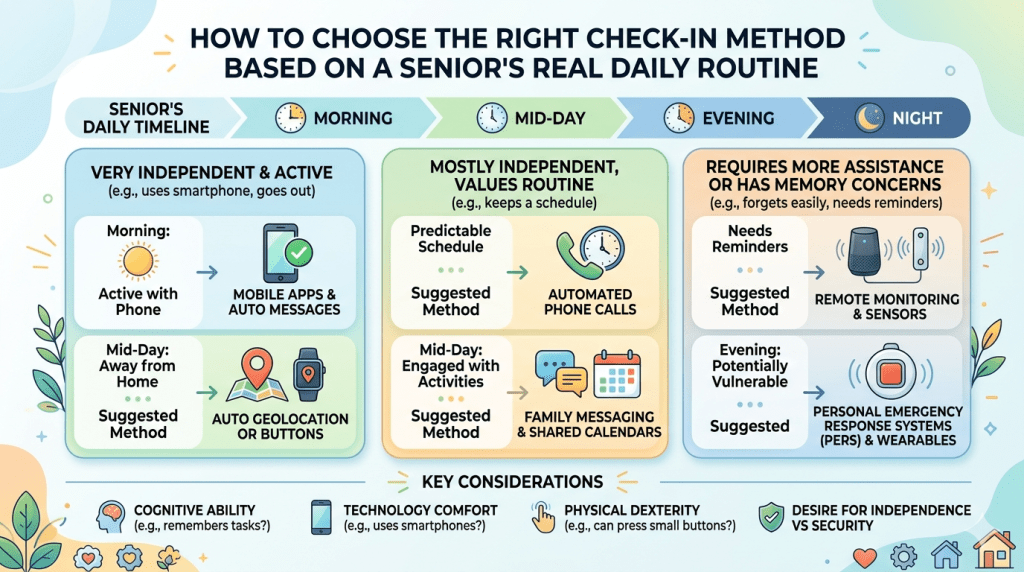
How to Choose the Right Check-In Method Based on a Senior’s Real Daily Routine

A smartwatch or phone check-in system should not be chosen only by comparing features on paper. The better question is: which option will actually fit into the senior’s day without creating stress, confusion, or resistance?
For many families, this is where the decision becomes clearer. A smartwatch may look safer because it stays on the wrist, includes fall detection, and can provide GPS support. A phone check-in may feel more natural because it is familiar, conversational, and emotionally warmer. But neither option works well if it does not match the person’s habits, comfort level, health needs, and independence goals.
The best check-in system is not the one with the longest feature list. It is the one the older adult will use consistently, understand easily, and accept without feeling watched or controlled.
Start With the Senior’s Current Habits, Not the Technology
Before choosing between a smartwatch and phone check-ins, families should observe what already happens naturally.
Does your parent keep their phone nearby during the day? Do they answer calls reliably? Do they charge their phone every night? Do they enjoy wearing a watch? Do they remove jewelry or accessories as soon as they get home? Do they become irritated by notifications? Do they prefer scheduled routines or spontaneous conversations?
These small daily habits matter more than many families realize.
For example, if a senior already wears a wristwatch every day, switching to a smartwatch or medical alert watch may feel natural. It becomes part of an existing routine. But if they dislike anything on their wrist, even the best smartwatch may end up on a nightstand.
Similarly, if your parent keeps their phone in a handbag, kitchen drawer, or bedroom while they move around the house, phone check-ins may not provide reliable safety coverage. A missed call may simply mean the phone was out of reach, not that something is wrong. That uncertainty can increase caregiver anxiety instead of reducing it.
A useful first step is to spend three to five days noticing patterns. Do not frame it as an inspection. Just pay attention. When is the phone nearby? When is it ignored? Is the senior comfortable answering unknown numbers? Do they silence the phone often? Are they able to read messages clearly? Do they remember to return missed calls?
These observations help families avoid buying a solution that looks good online but fails in real life.
Match the Method to the Senior’s Risk Level
Not every older adult needs the same type of check-in system. A healthy, active senior who lives with a spouse may need a very different setup than someone who lives alone, has balance issues, or recently returned home after surgery.
Phone check-ins may be enough when the senior is generally independent, has low fall risk, answers calls reliably, and mainly needs companionship or reassurance. In this case, the value of the check-in is emotional as much as practical. A daily call can reduce loneliness, maintain connection, and give family members a regular sense of how the person sounds and feels.
A smartwatch or wearable alert device becomes more important when there is a higher safety risk. This includes seniors who live alone, have a history of falls, experience dizziness, take medications that affect balance, have memory changes, or may not be able to reach a phone during an emergency. In these situations, relying only on phone calls can leave dangerous gaps.
The article already explains that smartwatches and wearable medical alert devices can offer continuous background support, while phone calls depend on active participation and availability. That distinction is important. A phone call can confirm that someone is okay at a specific moment. A wearable device can offer support between those moments, especially if the senior cannot initiate contact.
For many families, the right answer is not “watch or phone.” It is a layered system. Use phone check-ins for connection and conversation. Use a wearable or automated support system for safety coverage when no one is actively talking.
Consider Whether the Senior Needs Safety, Companionship, or Both
Families often use the word “check-in” to mean several different things. But a safety check-in and an emotional check-in are not the same.
A safety check-in answers questions like: Did Mom get up today? Is Dad moving around normally? Did something happen while no one was there? Can help be reached quickly?
A companionship check-in answers different questions: Does Mom feel lonely? Did Dad have someone to talk to today? Is there a regular voice in their life that helps them feel remembered, valued, and emotionally supported?
A smartwatch is usually stronger for safety. It can stay with the person, provide emergency access, track movement, and sometimes detect falls. But it does not replace meaningful conversation.
A phone call is usually stronger for emotional connection. A familiar voice can notice mood changes, confusion, sadness, irritation, or fatigue in a way that data cannot. But a call cannot help if the senior falls in the bathroom two hours later and the phone is in another room.
This is why families should define the purpose of the check-in before choosing the tool.
If the main concern is loneliness, grief, isolation, or lack of daily conversation, phone-based check-ins may be more helpful. If the main concern is falls, wandering, medical emergencies, or delayed response, a smartwatch or medical alert device may be more appropriate. If both concerns exist, the strongest plan may combine automated safety support with regular phone-based companionship.
Use a “Least Intrusive First” Approach
Many seniors resist monitoring because it can feel like a loss of independence. Even when families have good intentions, the senior may hear, “You can’t be trusted alone anymore.” This can create defensiveness, embarrassment, or refusal.
A more respectful approach is to start with the least intrusive option that still addresses the real risk.
For a senior with low safety concerns but high family worry, a scheduled phone check-in may be enough. The call can be framed as connection, not supervision: “I’d love to hear your voice every morning,” rather than “I need to make sure you’re okay.”
For a senior with moderate risk, families might add a simple wearable emergency button or smartwatch while keeping phone calls focused on conversation. The device should be presented as a backup, not a symbol of weakness. For example: “This is so you can reach help quickly if you ever need it, not because we think you can’t manage.”
For a senior with higher risk, a more structured system may be needed. This could include a medical alert smartwatch, fall detection, GPS location sharing, and scheduled check-ins. Even then, families should explain what is being monitored, who receives alerts, and when family members will step in.
Transparency builds trust. Hidden monitoring or vague explanations can damage the relationship. Older adults deserve to know how the system works and how their information will be used.
Build the Check-In Around Predictable Daily Moments
A check-in system works better when it attaches to routines the senior already has.
For phone check-ins, choose a time that feels natural. After breakfast, before an afternoon walk, or early evening may work better than random calls throughout the day. Predictability reduces the feeling of interruption. It also makes missed check-ins easier to interpret.
For smartwatch use, connect charging and wearing habits to daily activities. For example, charge the watch during breakfast, while watching an evening show, or during a regular seated rest period. The goal is to avoid long charging windows when the senior may be moving around without protection.
Families should also decide what counts as a successful check-in. For a phone call, is a two-minute conversation enough? Is a voicemail acceptable? Should the senior call back within a certain time? For a smartwatch, is daily wearing the goal? Should step changes trigger a conversation? Should fall alerts go to family, a monitoring center, or both?
Clear expectations prevent panic. Without a plan, every missed call can feel like an emergency. With a plan, families know what to do next.
A simple escalation plan might look like this:
First, call once. If there is no answer, wait ten minutes and call again. If there is still no answer, send a text or voice message. Then contact a neighbor, caregiver, or nearby family member. If there are signs of real danger, contact emergency services.
This kind of plan helps caregivers respond calmly instead of emotionally.
Do a Trial Period Before Making a Final Decision
A smartwatch or phone check-in routine should be tested before the family fully commits to it. A two-week trial can reveal problems that are not obvious at the start.
During the trial, ask practical questions. Did the senior remember to wear the device? Did they find calls comforting or annoying? Were there too many notifications? Was the screen readable? Did the watch feel heavy? Was charging manageable? Were family members reassured, or did the system create more alerts and more worry?
For phone check-ins, track whether calls are answered consistently. Also notice the quality of the conversations. Does the senior sound engaged, or do they seem rushed? Are calls becoming a burden? Would shorter, more frequent calls work better than one long call?
For smartwatch check-ins, watch for comfort and compliance. A device only works when worn. If the senior removes it for sleep, showers, or errands, the family needs to know when the safety gaps happen.
At the end of the trial, involve the senior in the decision. Ask what felt helpful, what felt irritating, and what they would realistically continue using. This conversation is not just polite; it improves long-term success.
Watch for Signs That the Current System Is No Longer Enough
A check-in method that works today may not work six months from now. Aging needs can change gradually. Families should review the system regularly, especially after a fall, illness, hospital stay, medication change, memory change, or move to a new living arrangement.
Phone check-ins may no longer be enough if the senior starts missing calls frequently, forgetting conversations, leaving the phone uncharged, or becoming confused about how to answer. They may also be insufficient if caregivers feel anxious between calls because the senior’s fall risk has increased.
A smartwatch may no longer be enough if the senior refuses to wear it, cannot charge it consistently, struggles with the screen, or becomes overwhelmed by alerts. In that case, a simpler medical alert device, automated phone check-in, caregiver call service, or in-home support may be more appropriate.
The goal is not to force one solution forever. The goal is to keep adjusting the support system so it remains useful, respectful, and realistic.
Make the Senior Feel Supported, Not Managed
The emotional framing of check-ins matters. Seniors are more likely to accept support when it protects their independence rather than threatens it.
Instead of saying, “We need to monitor you,” try saying, “We want you to keep living comfortably at home, and this gives everyone a little more peace of mind.”
Instead of saying, “You have to wear this,” try, “Would this make it easier for you to reach help without depending on the phone?”
Instead of saying, “You didn’t answer, so we panicked,” try, “Let’s agree on what we should do if a call is missed, so none of us has to worry unnecessarily.”
This language keeps dignity at the center. It reminds everyone that check-ins are not about control. They are about confidence, safety, and connection.
The Most Practical Choice Is Usually the One With the Fewest Points of Failure
When comparing smartwatch and phone check-ins, families should look for weak points.
A phone check-in can fail if the phone is in another room, the ringer is off, the battery is dead, the senior is asleep, or they cannot physically reach the device.
A smartwatch can fail if it is not worn, not charged, too complicated, uncomfortable, or rejected by the senior.
The best system reduces these failure points. For some families, that means a simple phone-based check-in at the same time every day. For others, it means a dedicated medical alert smartwatch with fall detection and professional monitoring. For many, it means combining both.
A helpful rule is this: use phone calls for relationship, and use wearable or automated tools for backup safety. Phone calls provide warmth, conversation, and emotional reassurance. Smartwatches and alert devices provide faster access to help when a call is not possible.
When families understand this difference, the decision becomes less about choosing sides and more about building the right support network.
A Simple Decision Guide for Families
Choose phone check-ins if your loved one answers reliably, keeps the phone nearby, has low fall risk, enjoys conversation, and mainly needs daily connection.
Choose a smartwatch or wearable alert device if your loved one lives alone, has fall risk, forgets the phone, goes outside independently, needs emergency access, or would benefit from GPS and automatic alerts.
Choose both if your loved one needs emotional connection and safety coverage. This is often the most balanced option because it protects independence while reducing caregiver worry.
Most importantly, choose the method your loved one will actually use. A basic system used every day is better than an advanced system ignored after a week. The right check-in plan should make the senior feel safer, not smaller. It should help family members feel informed, not constantly alarmed. And it should support the larger goal: helping older adults remain independent, connected, and respected for as long as possible.
Creating a Senior Check-In Plan That Actually Works Week After Week
Choosing between smartwatch and phone check-ins is only the first step. The real success comes from building a simple, repeatable plan that seniors and family members can follow without confusion.
Many families start with good intentions. They buy a device, set up calls, create reminders, and assume the system will take care of everything. But after a few weeks, problems appear. The watch is not charged. Calls are missed. Family members disagree about when to worry. The senior feels nagged. Caregivers feel guilty. What was supposed to reduce anxiety can accidentally create more of it.
That is why every check-in method needs a clear plan behind it. A good senior check-in plan should answer four practical questions:
Who is checking in?
When does the check-in happen?
What should the senior do?
What happens if there is no response?
Without these answers, even the best technology can feel unreliable.
Keep the Routine Simple Enough to Repeat
The best check-in routines are boring in the best possible way. They happen at predictable times, require very little effort, and do not depend on memory alone.
For phone check-ins, avoid vague arrangements like “Call whenever you get time.” That may work for a few days, but it often becomes inconsistent. A better approach is to agree on a regular window, such as every morning after breakfast or every evening before dinner.
This gives the senior a predictable rhythm. It also helps the family understand what is normal. If Mom usually answers between 9:00 and 9:30 every morning, a missed call at that time means more than a missed call at a random hour.
For smartwatch check-ins, the routine should focus on wearing and charging. A smartwatch that is not worn is not a safety tool. A smartwatch that is not charged is just another object on the table.
The senior should have one clear charging habit. For example, charge it while bathing, during breakfast, or while watching a regular evening show. Avoid charging it overnight if nighttime fall risk is a concern. Many seniors get up during the night, and that is exactly when they may need protection.
The simpler the routine, the more likely it will survive beyond the first week.
Decide What Counts as a Normal Day
Families often worry because they do not know what “normal” looks like anymore. One missed call, one low-step day, or one unanswered message can feel alarming when there is no baseline.
Before depending on any check-in system, take time to understand the senior’s usual daily pattern.
What time do they wake up?
When do they usually eat?
Do they nap?
Do they go outside daily?
Do they keep their phone nearby?
Do they prefer quiet afternoons?
Do they sometimes ignore calls when watching television?
This matters because check-in systems should support the senior’s life, not interrupt it constantly.
For example, if an older adult usually naps from 2:00 to 4:00, that is not the right time for a daily check-in call. If they attend a weekly religious service, community group, or therapy appointment, family members should not panic when location or activity patterns look different during that time.
With smartwatch systems, families should be careful not to overreact to every number. A lower step count may mean fatigue, bad weather, visitors at home, or simply a quiet day. It does not always mean danger. The most useful signal is usually a pattern, not a single reading.
A good baseline helps everyone respond wisely.
Create an Escalation Plan Before There Is a Problem
The most stressful moment is not always the missed check-in itself. It is the uncertainty that follows.
Should you call again?
Should you contact a neighbor?
Should you drive over?
Should you call emergency services?
Families should make these decisions before emotions are high.
A practical escalation plan might look like this:
If the first call is missed, wait ten minutes and call again.
If the second call is missed, send a short text or voice message.
If there is still no response, contact a nearby trusted person.
If there are additional warning signs, such as a fall alert, unusual silence, known illness, or recent confusion, take quicker action.
This plan should be shared with the senior. That way, they understand what will happen if they do not answer. It also prevents the senior from feeling surprised or embarrassed if someone checks on them.
For smartwatch alerts, the escalation plan should be even clearer. Families should know who receives fall alerts, who receives location updates, and who is responsible for responding first. If everyone assumes someone else is handling it, precious time can be lost.
The plan should also include false alarms. Seniors may accidentally press buttons, trigger alerts while sitting down quickly, or forget to cancel an alert. Families should treat false alarms calmly. If every false alarm becomes a lecture, the senior may stop using the device altogether.
Choose One Primary Family Contact
One common mistake is involving too many people without assigning responsibility. Adult children, spouses, neighbors, and caregivers may all care deeply, but too many voices can make the system messy.
A better approach is to choose one primary contact and one backup contact.
The primary contact manages the daily rhythm. The backup steps in if the primary person is unavailable. This reduces confusion and prevents the senior from receiving too many calls from different people.
For example, one daughter may handle weekday morning check-ins, while a son handles weekends. Or one family member may receive smartwatch alerts, while another is responsible for visiting if needed.
The key is clarity.
Seniors should not feel like they are reporting to a committee. They should know who will call, when they will call, and what to expect.
Make the Check-In Feel Like Care, Not Surveillance
Even a well-designed system can fail if the senior feels monitored instead of supported.
The language families use matters.
Instead of saying, “We need to track you,” say, “This helps us know you are safe without interrupting you all day.”
Instead of saying, “You forgot to wear your watch again,” say, “Let’s find a time to charge it that feels easier.”
Instead of saying, “You didn’t answer and scared everyone,” say, “Let’s adjust the plan so missed calls are less stressful for all of us.”
The goal is to protect dignity. Many older adults fear becoming a burden. If check-ins make them feel like a problem to be managed, they may resist even helpful support.
Phone check-ins should include real conversation, not just safety questions. Ask about meals, memories, hobbies, weather, neighbors, television shows, or plans for the day. A check-in should not feel like an inspection.
Smartwatch use should also be framed positively. It is not a sign that the senior is helpless. It is a tool that helps them remain independent with more confidence.
Review the Plan Every Month
A senior check-in plan should not be set once and forgotten. Needs change.
A monthly review can be simple. Ask:
Is the current method still easy to use?
Are calls happening at the right time?
Is the smartwatch being worn consistently?
Are there too many false alarms?
Does the senior feel supported?
Does the family feel reassured?
Has anything changed medically, emotionally, or socially?
This review does not need to be formal. It can be a calm family conversation. The important thing is to keep adjusting before small frustrations become major resistance.
For instance, if the senior keeps missing morning calls, the solution may not be a new device. It may simply be that mornings are too busy. If the smartwatch is often uncharged, the problem may be the charging schedule, not the senior’s willingness.
Small changes can make the whole system work better.
Combine Human Connection With Practical Safety
The strongest check-in plans usually include both emotional and practical support.
A smartwatch may help during emergencies, but it cannot replace the comfort of hearing a familiar voice. A phone call may provide warmth and reassurance, but it cannot detect a fall when the phone is across the room.
Families should avoid treating this as a competition between technology and human care. Seniors often need both.
The smartwatch can act as the quiet safety layer. Phone check-ins can act as the emotional connection layer. Together, they reduce risk while preserving warmth.
This is especially important for seniors who live alone. Safety is not only about emergency response. It is also about feeling remembered, valued, and connected to the world.
Common Mistakes Families Make With Senior Check-Ins (And How to Avoid Them)
Even with the best intentions, many senior check-in systems fail not because of the device or method chosen, but because of small, avoidable mistakes in how they are implemented.
Families often assume that once they have chosen between a smartwatch or phone check-ins, the problem is solved. In reality, the long-term success of any check-in system depends on how thoughtfully it is used in everyday life.
Understanding these common mistakes can help families build a system that truly supports seniors instead of creating frustration, confusion, or unnecessary stress.
Mistake 1: Choosing Technology Without Involving the Senior
One of the most common mistakes is making the decision entirely on behalf of the senior without including them in the conversation.
Family members often focus on safety and efficiency. They compare features, read reviews, and select what seems like the most advanced or reliable option. But if the senior does not feel comfortable with the choice, they may quietly resist using it.
This resistance does not always look obvious. It may show up as forgetting to wear the smartwatch, not answering calls, ignoring alerts, or saying “I’ll use it later.” Over time, the system becomes unreliable, and both sides feel frustrated.
The better approach is to involve the senior early. Ask simple, respectful questions:
Would you prefer a device you wear or a daily phone call?
What feels easier for you to use?
What would make you feel safer without feeling restricted?
When seniors feel heard, they are much more likely to cooperate and engage with the system. The goal is not just safety—it is willing participation.
Mistake 2: Overcomplicating the Setup
Many modern devices come with multiple features—GPS tracking, fall detection, step tracking, reminders, messaging, and more. While these features can be helpful, using too many at once can overwhelm seniors.
A complicated system often leads to confusion. Seniors may not remember which button to press, what a notification means, or how to respond. This can create anxiety instead of reassurance.
For example, a smartwatch that sends constant notifications may cause the senior to remove it altogether. Similarly, a phone check-in system with multiple apps, reminders, and alerts may become too difficult to manage.
The best approach is to start simple.
If using a smartwatch, begin with only essential features such as emergency calling or fall detection. Introduce additional features gradually, only if they add clear value.
If using phone check-ins, keep the process straightforward. One call at a fixed time is more effective than multiple reminders across different platforms.
Simplicity improves consistency, and consistency is what makes any check-in system effective.
Mistake 3: Assuming One Method Will Work Forever
A system that works today may not work six months or a year from now.
As seniors age, their needs, habits, and comfort levels can change. A person who once answered calls regularly may begin missing them due to hearing changes, memory issues, or fatigue. Someone who was comfortable with a smartwatch may later find it too complex or uncomfortable.
Families sometimes ignore these changes because they assume the original system is “good enough.” But this can lead to gaps in safety and growing frustration.
It is important to revisit the system regularly and adjust it when needed.
For example, if phone check-ins are being missed more often, it may be time to introduce a wearable device. If a smartwatch is being ignored, a simpler medical alert device or assisted call system may be more suitable.
Flexibility is key. The goal is not to stick to one solution—it is to adapt as needs evolve.
Mistake 4: Reacting Emotionally to Missed Check-Ins
Missed calls or alerts can create immediate anxiety for family members. It is natural to worry, especially when a loved one lives alone. However, reacting too quickly or emotionally can make the situation worse.
For instance, calling repeatedly, raising your voice when the senior finally answers, or expressing panic can make them feel pressured or guilty. Over time, this may lead them to avoid calls altogether.
It is important to separate concern from reaction.
A missed check-in does not always mean something is wrong. The senior may have been resting, watching television, or simply not near the phone.
This is why having a predefined escalation plan (as discussed earlier) is so important. It allows families to respond calmly and logically instead of emotionally.
When the senior does respond, keep the tone relaxed. Instead of saying, “Why didn’t you answer?” try, “Just wanted to check in—everything okay?”
This keeps the interaction supportive rather than stressful.
Mistake 5: Treating Check-Ins as a Task Instead of a Relationship
Another common mistake is turning check-ins into a mechanical routine.
If every call sounds like a checklist—“Did you eat? Did you take your medicine? Are you okay?”—the senior may begin to feel like they are being monitored rather than cared for.
Over time, this can reduce engagement. Calls may become shorter, less meaningful, or even avoided.
A better approach is to treat check-ins as conversations, not inspections.
Ask open-ended questions. Share small updates from your own day. Talk about familiar topics—family memories, hobbies, local events, or even something light like a television show or weather change.
These conversations serve an important purpose beyond safety. They help maintain emotional well-being, which is just as important for seniors as physical safety.
A meaningful conversation can also reveal subtle changes in mood, cognition, or health that data alone cannot capture.
Mistake 6: Ignoring Comfort and Practical Usability
Families often focus on features but overlook comfort and ease of use.
A smartwatch may have excellent safety features, but if it feels heavy, irritating, or difficult to operate, the senior may not wear it consistently.
Similarly, a phone check-in system may seem simple, but if the phone’s volume is too low, the screen is hard to read, or the interface is confusing, it becomes unreliable.
Comfort and usability are not minor details—they are essential.
Before finalizing any solution, test it in real conditions. Ask:
Is the watch comfortable for long hours?
Can the senior easily read the screen?
Is the phone volume loud enough?
Are buttons clearly visible and easy to press?
Does the device require frequent charging?
Small usability issues can have a big impact on whether the system is used consistently.
Mistake 7: Relying Too Much on Technology Alone
Technology is helpful, but it should not replace human judgment and connection.
A smartwatch may show normal activity levels, but it cannot fully capture emotional well-being. A phone check-in may confirm that the senior answered, but it does not guarantee they are physically safe throughout the day.
Families sometimes become overly dependent on devices, assuming that as long as the system is in place, everything is fine. This can lead to missed warning signs.
The most effective approach is to use technology as a support tool, not a replacement for care.
Combine data with conversation. Combine alerts with observation. Combine devices with relationships.
This balanced approach provides a more complete understanding of the senior’s well-being.
Mistake 8: Not Preparing for Emergencies in Advance
Many families install a system but do not clearly define what to do in an actual emergency.
If a fall alert is triggered, who responds first?
If the senior cannot be reached, who visits them?
If emergency services are needed, who calls and provides information?
Without clear answers, valuable time can be lost during critical moments.
Every check-in system should include a simple emergency plan.
Write down key contacts, including neighbors, nearby relatives, and local emergency numbers. Ensure that all involved family members know their roles.
For smartwatch users, confirm where alerts are sent and how quickly they are received. For phone check-ins, ensure that missed calls are followed by a clear sequence of actions.
Preparation reduces confusion and improves response time when it matters most.
Mistake 9: Ignoring the Emotional Side of Independence
Perhaps the most overlooked mistake is failing to consider how check-ins affect a senior’s sense of independence.
Even well-intentioned systems can feel intrusive if they are not handled carefully. Seniors may worry that they are losing control over their lives or becoming overly dependent on others.
This emotional response can lead to subtle resistance.
Families should approach check-ins as a way to support independence, not limit it.
Explain how the system helps the senior stay in their own home longer, move around more freely, and access help when needed.
Reinforce that the goal is not to monitor every movement but to provide a safety net.
When seniors understand that check-ins are there to protect their independence, they are more likely to accept and use them.
Practical Considerations: Cost, Battery Life, and Comfort

A safety device’s effectiveness hinges on three simple questions: Can we afford it? Will they wear it? Does it last through the day?
Subscription Fees and Equipment Pricing
Medical alert systems typically involve both equipment fees and monthly subscriptions. Upfront costs range from $99-$199, while monitoring services cost $30-$60 monthly. These subscriptions provide professional 24/7 response.
Consumer options like the Apple Watch have higher initial prices ($399-$699) but no monitoring fees. However, cellular plans around $10 monthly are needed for full emergency functionality.
Many features are add-ons. Fall detection typically adds $10 monthly. Caregiver apps may cost $3-$5 extra. This creates potential subscription creep over time.
Design, Wearability, and Battery Performance
Battery life is critical for consistent protection. Devices requiring daily charging depend on established routines. Longer battery life provides a safety buffer for forgetful users.
Physical comfort matters enormously. If the watch is heavy or irritating, it won’t be worn consistently. Screen size affects usability—larger displays help those with vision challenges.
Water-resistant design is essential since many falls occur in bathrooms. Protection must continue during showering when vulnerability is highest.
When calculating costs, consider the total investment over time. Higher upfront costs with lower monthly fees might be more economical than cheap equipment with expensive subscriptions.
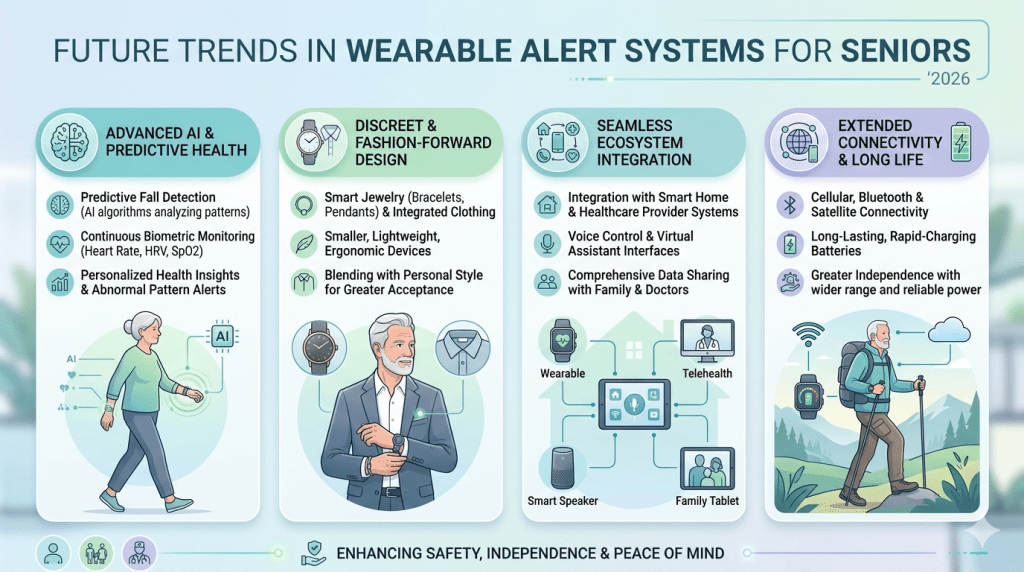
Future Trends in Wearable Alert Systems for Seniors

Tomorrow’s alert systems won’t just respond to crises—they’ll predict them, creating a new era of preventive care for aging adults. The future of safety technology is moving toward intelligent, less intrusive systems that provide protection while respecting independence.
Artificial intelligence is revolutionizing fall detection and health monitoring. These advanced features will reduce false alarms while catching real emergencies earlier. Predictive analytics will soon identify health pattern changes before they become crises.
Integration across devices means your loved one’s watch, home sensors, and even their car could create a comprehensive safety network. Voice-activated technology and simplified interfaces will make devices more accessible for those with limited dexterity or vision.
Longer battery life addresses current limitations, with future devices potentially lasting weeks between charges. More sophisticated health monitoring will bring hospital-grade capabilities to home wearable technology.
Despite these advances, the core need remains unchanged. Older adults want to age independently with dignity, and families want peace of mind knowing their loved ones are safe.
Conclusion
The journey to peace of mind begins with recognizing that every family’s needs are beautifully unique. There’s no single “best” option that works for all seniors and their caregivers.
Traditional phone calls provide precious emotional connection. Modern smartwatches offer automated safety with fall detection and professional help. The ideal solution often combines both approaches.
Services like JoyCalls beautifully bridge this gap. They provide AI-powered companionship while keeping families connected. This maintains dignity while ensuring loved ones feel supported at home.
Remember, the best system is one your parent will actually use consistently. Their comfort determines success more than any feature list. Learn more about creating meaningful connections at https://app.joycalls.ai/signup.
Whatever path you choose, the goal remains the same: supporting independent life with dignity and peace of mind for everyone involved.