
You hang up the phone after a quick chat with Mom. The house is quiet behind her. Did she eat lunch? Has she spoken to another soul today? These quiet worries can keep you up at night.
It’s a heavy feeling. You want your loved one to be safe and happy living independently. But you can’t always be there. This concern is completely natural and shows how much you care.
Now, imagine a friendly voice checking in daily. A new kind of technology is creating bridges. It offers peace of mind while respecting independence. This support is designed to be a helpful presence.
This article will guide you through real options available today. We’ll explore what they do and how they work. You’ll see the kind of support they can offer your family.
It’s important to know that this companion doesn’t replace your calls and visits. It enhances connection. It provides a chat when you’re busy, easing that loneliness for your parent and worry for you.
Let’s start this journey. We’ll understand why these tools matter for seniors. We’ll look at specific products. You’ll discover how they can support healthy aging right at home.
Key Takeaways
- Daily check-ins can significantly ease the worry for families of older adults living alone.
- Modern solutions are designed to support independence, not take it away.
- Understanding the difference between social isolation and emotional loneliness is key to finding the right support.
- Technology acts as a supplement to human connection, providing comfort between family visits.
- Practical tools are available now that require no new apps or complicated devices for seniors to use.
- These companions offer families real peace of mind through regular updates and alerts.
Introduction: Bridging Loneliness with AI Companions

Watching a parent grow older while living miles away creates a unique kind of worry. Many families face this reality: aging parents determined to stay in their homes, yet increasingly isolated. Adult children stretch themselves thin, balancing careers and families while constantly wondering about their loved one’s well-being.
The Rising Trend of AI in Senior Care
This isolation isn’t just about being alone—it’s a serious health concern. Nearly 30% of older adults living by themselves experience social isolation. This can increase dementia risk by up to 60%, making it as dangerous as smoking.
Technology is responding to these challenges. Recent studies show 78% of people aged 55+ now use intelligent tools. Of these users, 80% report excellent mental health. This trend represents a significant shift in how we approach senior care.

Combating Loneliness Through Innovation
These solutions aren’t about replacing family connections. They’re about filling quiet hours with consistent check-ins. Imagine a warm voice calling each morning, asking about sleep or discussing memories.
Small moments like these add up to feeling less alone. The technology provides gentle reminders and activity suggestions. It creates a safety net that complements the care you’re already providing.
These tools are designed to be simple and genuinely helpful. They offer meaningful conversations that combat the health risks of loneliness. The support feels natural, not like complicated gadgets.
AI companion for seniors: Benefits and Real-World Applications

That familiar worry creeps in during your busy workday – is Dad okay today? Research shows these tools deliver meaningful benefits, reducing loneliness by 20% and depression by 24%.
Emotional Support and Daily Engagement
These systems provide consistent engagement throughout the day. Morning check-ins start conversations positively. Afternoon chats explore hobbies and memories.
The technology remembers past discussions and celebrates special occasions. This creates a comforting rhythm that lifts spirits and keeps minds active.

Enhancing Safety and Independence
Gentle medication reminders and activity monitoring enhance safety without intrusion. Fall detection alerts provide immediate assistance when needed.
This support strengthens independence by helping older adults stay in their homes longer. Families receive updates that improve care without constant worry.
The dual benefits create meaningful connection while preserving dignity. Whether recovering from surgery or managing memory concerns, personalized care makes daily life easier.
How to Introduce an AI Companion Without Making a Senior Feel Replaced, Watched, or Pressured
Choosing an AI companion is not only a technology decision. For many older adults, it is an emotional decision. A senior may hear the words “AI companion” and immediately wonder, “Does my family not want to talk to me anymore?” or “Am I being monitored because people think I can’t manage my own life?”
That is why the way you introduce the idea matters just as much as the tool you choose.
An AI companion can be helpful only when it feels respectful. It should feel like an added layer of warmth, routine, and support — not a replacement for family, not a test of independence, and not a device that quietly judges every part of daily life.
For seniors, the goal is not to “use AI.” The goal is to make ordinary days feel less empty, less stressful, and more connected. That difference is important. Most older adults do not want a new gadget. They want to feel heard, remembered, safe, and in control.
Try JoyCalls Free
No app or new device needed. Start with a free 7-day trial.
Start With the Senior’s Real Need, Not the Family’s Worry
Many families begin looking for an AI companion because they are worried. They may worry that Mom is alone too much, Dad is forgetting small routines, or a loved one is becoming quieter after losing a spouse or close friend.
Those concerns are valid. But when speaking with the senior, it is better not to lead with worry.
Instead of saying, “We’re concerned that you’re lonely,” try saying, “We thought it might be nice for you to have someone to chat with during the quieter parts of the day.”
Instead of saying, “You need reminders,” try saying, “This could make your day feel easier without you having to keep everything in your head.”
The senior should not feel like a problem being solved. They should feel like a person being supported.
A helpful first step is to ask gentle questions:
“Which part of the day feels the longest?”
This question is simple, but it can reveal a lot. For some seniors, mornings feel hardest because the house is too quiet. For others, evenings feel lonely after dinner. Some may struggle on weekends when family members are busy. Others may not feel lonely at all, but they may want help remembering appointments, medication, or small daily tasks.
When you understand the specific lonely or difficult moment, you can choose a companion that fits that moment.
For example, if the senior feels low in the evening, a daily evening call may help. If they miss telling stories, a conversational companion that asks about memories may be useful. If they want routine, reminders and scheduled check-ins may matter more than long conversations.
“Would you rather have a short check-in or a longer conversation?”
Some older adults enjoy long chats. Others prefer five minutes and then want to get on with their day. A good companion should match the person’s natural communication style.
This is especially important for seniors who value privacy. A shorter, predictable call may feel comforting. A long, open-ended conversation may feel tiring or intrusive.
“What would make this feel helpful instead of annoying?”
This question gives control back to the senior. They may say they do not want calls too early. They may prefer not to discuss health. They may want the companion to ask about hobbies, grandchildren, gardening, faith, books, old memories, or the news.
These preferences matter. Personalization is what makes the support feel human and respectful.
Introduce It as a Trial, Not a Permanent Change
One of the best ways to reduce resistance is to avoid making the AI companion feel like a big life decision.
Say, “Let’s just try it for two weeks and see how it feels.”
A trial makes the senior feel less trapped. It also gives the family a chance to observe what actually helps. Sometimes the first setup is not perfect. The call time may need to change. The conversation topics may need adjusting. The senior may prefer fewer reminders or more casual conversation.
A short trial period creates room for learning without pressure.
During the trial, do not ask every day, “Did you use it?” or “Did it help?” That can make the senior feel inspected. Instead, check in naturally once or twice:
“How did the call feel today?”
“Was it pleasant, or should we adjust something?”
“Would you like it to ask about different things?”
The tone should be collaborative. The senior is not being enrolled into a system. They are helping shape a support routine that belongs to them.
Make It Clear That Family Contact Will Not Decrease
This is one of the most important points.
Many seniors may quietly fear that an AI companion means their children or grandchildren will call less. Even if they do not say this out loud, the concern can sit underneath their hesitation.
Families should say clearly: “This is not replacing our calls. We will still call you. This is just something extra for the times between our calls.”
That one sentence can make a major difference.
AI companionship works best when it fills gaps, not when it becomes the entire social plan. A senior still needs real human connection, familiar voices, family visits, community interaction, and meaningful relationships. The companion should support those relationships, not compete with them.
A good approach is to connect the AI companion to family conversations.
For example, if the companion asks about old family recipes, the family can later say, “Mary mentioned you talked about your holiday cooking. I’d love to hear that story too.”
This turns the AI interaction into a bridge back to human connection.
Choose Conversation Topics That Protect Dignity
The best AI companion conversations are not only about health, safety, and reminders. Those topics matter, but they should not dominate every interaction.
If every call sounds like, “Did you take your medication? Did you eat? Did you sleep? Did you fall?” the senior may feel reduced to a care checklist.
A senior is more than their needs.
They may be a former teacher, engineer, homemaker, business owner, artist, veteran, gardener, musician, parent, grandparent, traveler, reader, or community volunteer. A good AI companion should help bring that identity forward.
Families can make conversations more meaningful by adding topics such as:
- Childhood memories
- Favorite songs
- Family traditions
- Hobbies and skills
- Old workplaces
- Places they have lived
- Books, films, or sports
- Recipes and food memories
- Daily gratitude
- Gentle plans for the day
- Stories they want their family to remember
These topics do more than pass time. They remind the senior that their life has value, history, and meaning.
For older adults who feel invisible, being asked about their memories and opinions can be deeply affirming.
Build a Simple Weekly Connection Routine Around the AI Companion
An AI companion is most useful when it becomes part of a broader routine.
A practical weekly rhythm could look like this:
Monday: Gentle Start-of-Week Check-In
The companion can ask how the senior is feeling, what they are looking forward to, and whether there is anything important happening that week.
This helps create orientation and structure.
Tuesday or Wednesday: Memory or Hobby Conversation
The companion can ask about a favorite hobby, past experience, family story, or interest. This encourages mental engagement without making it feel like a test.
Thursday: Practical Reminder Day
This can include reminders about appointments, groceries, medication refills, or upcoming family calls.
The key is to keep it helpful, not overwhelming.
Friday: Mood and Social Check-In
The companion can ask whether the week felt quiet, enjoyable, tiring, or stressful. If the senior seems low, the family can be gently informed depending on the system’s features and privacy settings.
Weekend: Family Follow-Up
A family member can call and refer to something from the week’s conversations, if the senior is comfortable sharing it.
For example: “I heard you were talking about your old garden. What did you used to grow?”
This makes the senior feel remembered.
The AI companion should not sit alone as a separate experience. It should create more openings for connection.
Watch for Signs That the Companion Is Helping
Families often look for dramatic changes, but the most meaningful signs may be small.
A senior may begin answering calls with more energy. They may mention something funny or interesting from the AI conversation. They may seem more oriented to the day. They may start sharing more stories. They may become more willing to talk about how they are feeling.
Helpful signs include:
- They look forward to the call or interaction
- They describe it as pleasant or comforting
- They seem less hesitant to talk during family calls
- They remember topics discussed earlier
- They show more interest in daily routines
- They become more open about mood, sleep, appetite, or worries
- They feel more confident living independently
Not every benefit will be visible immediately. Loneliness often builds slowly, and relief may also appear gradually. The goal is not instant happiness. The goal is more consistent connection, reassurance, and emotional support.
Also Watch for Signs It Needs Adjustment
Sometimes the issue is not that the AI companion is wrong for the senior. It may simply be set up poorly.
The call may happen at the wrong time. The voice may feel too formal. The topics may feel repetitive. The senior may dislike certain reminders. They may feel confused about whether they are speaking to a person or a system.
Warning signs include:
- The senior avoids the calls
- They seem irritated after interactions
- They say it asks too many questions
- They feel pressured or corrected
- They worry that private details are being shared
- They become more anxious rather than comforted
- They feel the family is using it to “check up” on them
If this happens, pause and adjust. Do not force the tool.
Ask, “What would make this better for you?” Then make a specific change. Reduce the frequency. Shorten the calls. Change the topics. Remove unnecessary reminders. Make privacy settings clearer.
The senior’s comfort should guide the setup.
Keep Privacy Conversations Clear and Simple
Privacy is a serious concern, especially for older adults who may already feel vulnerable. Families should explain privacy in plain language.
Avoid technical explanations unless the senior asks for them.
A simple explanation may sound like:
“This service may remember some details so the conversations feel more personal. We can choose what kinds of updates the family receives. You can also tell us if there are topics you do not want included.”
The senior should know:
- What the companion does
- What information it may remember
- Whether family members receive updates
- What kind of alerts may be sent
- How to stop or change the service
- Who to ask if something feels uncomfortable
Consent should not be a one-time checkbox. It should be an ongoing conversation.
A senior may agree at first and later change their mind. That should be respected.
Use AI Companionship Alongside Human Support
AI can provide consistency, but it cannot replace human warmth.
Families should still build a human connection plan. This may include scheduled family calls, neighbor check-ins, community activities, religious or cultural gatherings, senior center programs, hobby groups, or visits from caregivers.
A useful approach is to create a “connection circle.”
At the center is the senior. Around them are family members, friends, neighbors, healthcare providers, community groups, and the AI companion.
Each has a different role.
Family provides love and shared history. Friends provide familiarity. Neighbors may notice immediate changes. Healthcare providers support medical needs. Community groups create belonging. The AI companion fills quiet spaces and helps maintain daily rhythm.
When used this way, AI becomes one part of a healthy support system.
Match the Companion to the Senior’s Personality
Not every older adult wants the same kind of companion.
A talkative senior may enjoy open-ended conversations. A private senior may prefer short check-ins. A senior with memory concerns may benefit from routine and repetition. A senior who dislikes screens may prefer phone calls. A senior who enjoys gadgets may like a more interactive device.
Before choosing a solution, think about the person’s personality.
For Independent Seniors
Position the companion as convenience and comfort. Emphasize that they remain in control.
Useful features may include daily conversation, reminders, appointment support, and simple check-ins.
For Recently Widowed Seniors
Focus on gentle companionship during quiet hours. Avoid pushing too many practical features at first. Emotional comfort may matter most.
The companion can ask about memories, daily meals, small plans, and feelings without rushing grief.
For Seniors With Mild Memory Challenges
Routine is especially important. Calls should happen at predictable times. Questions should be simple. Reminders should be calm and non-judgmental.
Avoid making the senior feel tested.
For Seniors Who Resist Help
Start with the least intrusive option. A simple phone-based companion may feel more acceptable than a device in the home.
Frame it as something enjoyable, not something medical.
For Seniors Who Love Conversation
Choose a companion that can remember preferences, ask thoughtful follow-up questions, and encourage storytelling.
These seniors may benefit strongly from daily engagement.
Create a Family Agreement Before Starting
Families should agree on expectations before introducing the companion.
This prevents misunderstandings later.
Discuss:
- Who will manage the setup
- Who receives updates or alerts
- How often the senior will be contacted
- What topics should be encouraged
- What topics should be avoided
- What counts as a concern that needs family follow-up
- How often the family will review whether it is helping
This agreement does not need to be formal. But it should be clear.
For example, if the AI companion alerts the family that the senior sounded unusually sad, who follows up? A daughter? A son? A caregiver? How quickly?
If no one acts on insights, the system loses value. The purpose of an alert is not just information. It is timely care.
Make the First Week Gentle
The first week should feel easy.
Do not overload the companion with too many tasks. Do not add every reminder, every health question, and every family update at once.
Start with one or two simple goals.
For example:
- A daily friendly check-in
- A reminder for one important medication
- A short conversation about hobbies or memories
- A weekly family summary, if appropriate
Once the senior is comfortable, more features can be added.
This gradual approach helps prevent frustration. It also gives the senior time to build trust.
Ask Better Questions After the First Week
After the first week, avoid asking only, “Do you like it?”
That question may be too broad.
Ask more useful questions:
- “Did any conversation feel especially nice?”
- “Was there anything it asked that you did not like?”
- “Was the timing okay?”
- “Would you prefer shorter or longer calls?”
- “Should it ask more about your day or more about your memories?”
- “Would you like it to remind you about anything?”
- “Do you want us to receive updates, or would you prefer more privacy?”
These questions help fine-tune the experience.
They also show the senior that their opinion matters.
Remember the Real Measure of Success
The success of an AI companion should not be measured only by how often it is used.
The better question is: Does it make life feel a little more supported?
A senior may not use it every day and still benefit. They may enjoy knowing it is there. They may feel reassured by a predictable check-in. They may open up during some conversations and stay quiet during others.
That is normal.
The purpose is not to create dependence on technology. The purpose is to reduce the emotional weight of long, silent days while helping families stay connected in a respectful way.
When introduced carefully, an AI companion can become a gentle part of daily life. It can offer conversation when the house feels too quiet. It can remind without nagging. It can notice changes without taking away dignity. It can help families feel closer, even when distance, work, or caregiving demands make daily visits impossible.
Most importantly, it can help an older adult feel that someone is checking in not because they are a burden, but because they matter.
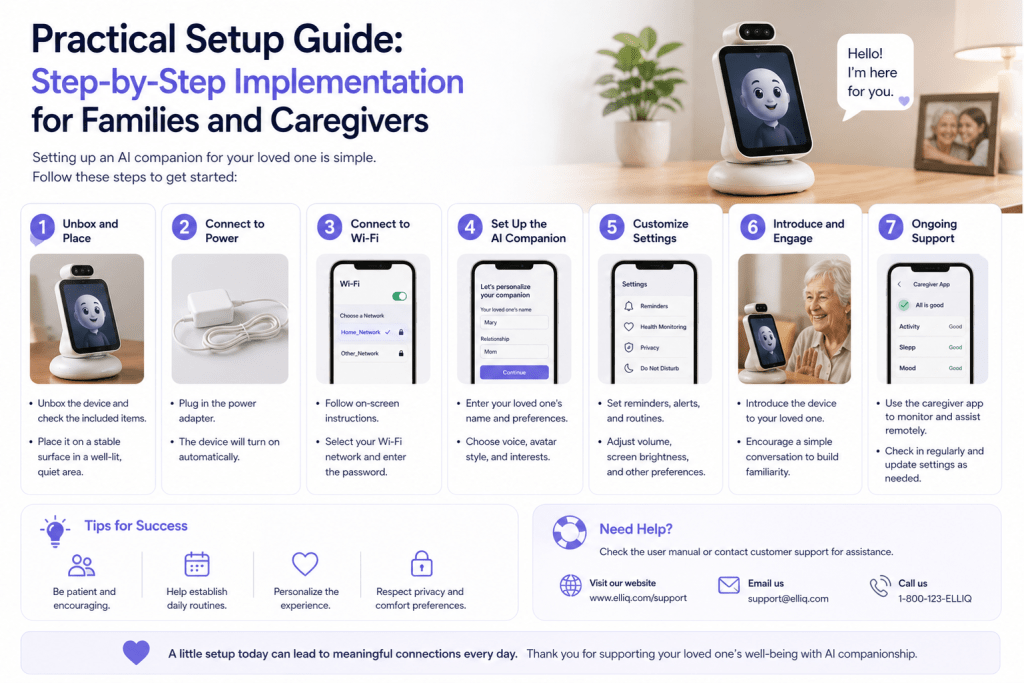
Practical Setup Guide: Step-by-Step Implementation for Families and Caregivers

Once the idea of an AI companion is accepted and introduced thoughtfully, the next challenge is execution. Many families make the mistake of stopping at selection—choosing a product—but the real impact comes from how well it is set up, integrated, and maintained over time.
Step 1: Define the Primary Goal Before Choosing Features
Before touching any settings or onboarding screens, pause and answer one simple but critical question:
“What is the one main problem we want this AI companion to solve?”
Avoid vague goals like “reduce loneliness” or “help more.” Instead, define something concrete.
Examples of clear goals:
- “Reduce long periods of silence in the evening”
- “Ensure daily medication reminders are not missed”
- “Provide daily conversation to improve mood”
- “Create a sense of routine and structure”
- “Give family gentle updates without constant checking”
Why this matters:
When you try to solve everything at once, the system becomes overwhelming and ineffective. A focused goal ensures the setup remains simple, relevant, and aligned with the senior’s real needs.
Step 2: Choose the Right Interaction Mode (Call, App, or Device)
AI companions come in different formats, and choosing the right one significantly affects adoption.
Phone-Based Companions (Calls)
Best for:
- Seniors who are not comfortable with smartphones or apps
- Seniors who prefer familiar interactions
- Those with vision or dexterity limitations
Advantages:
- No learning curve
- Feels natural and human-like
- Works with basic phones
App-Based Companions
Best for:
- Tech-comfortable seniors
- Seniors already using smartphones or tablets
Advantages:
- Visual interaction
- More features (text, reminders, logs)
- Greater customization
Device-Based Companions (Smart Speakers, Tablets)
Best for:
- Seniors open to new technology
- Households with caregivers
Advantages:
- Hands-free interaction
- Integrated with home environment
- Can combine multiple functions
Action Tip:
If unsure, always start with the simplest mode (usually phone-based). Complexity can be added later, but removing it after frustration is much harder.
Step 3: Set the Right Frequency (Less Is More at First)
One of the most common mistakes is over-scheduling interactions.
Families often think:
“More calls = more support.”
In reality:
“Too many calls = fatigue, irritation, and disengagement.”
Recommended Starting Frequency:
- Once per day (5–10 minutes) OR
- Every other day for highly independent seniors
Timing Strategy:
Choose a time based on emotional need, not convenience.
Examples:
- Morning → Helps start the day with structure
- Afternoon → Breaks long idle periods
- Evening → Reduces loneliness after dinner
Action Tip:
Ask the senior:
“When would you most enjoy a small conversation during the day?”
That answer should guide scheduling—not family availability.
Step 4: Personalize the First Conversations Properly
The first few interactions determine long-term success. If the experience feels generic, robotic, or irrelevant, seniors may disengage early.
Essential Personalization Inputs:
- Preferred name (not always formal)
- Language and tone preference
- Topics of interest
- Daily routine
- Important relationships (children, grandchildren, friends)
- Cultural or religious preferences
- Past profession or identity
Example of Good Personalization:
Instead of:
“How are you today?”
Better:
“How was your morning, Mrs. Sharma? Did you get time for your usual walk?”
This small shift creates familiarity and emotional connection.
Step 5: Avoid Overloading With Features
Most AI platforms offer multiple capabilities:
- Reminders
- Mood tracking
- Health check-ins
- Conversation
- Emergency alerts
- Family summaries
Trying to activate all features at once leads to confusion.
Recommended Approach:
Start with ONLY:
- 1 conversation feature
- 1 practical feature (e.g., medication reminder)
After 7–10 days, gradually introduce:
- Additional reminders
- Mood check-ins
- Family insights
Action Tip:
Think of this like learning—not installation. The system should “grow” with the senior.
Step 6: Establish a Clear Family Response System
AI companions are not just for seniors—they also generate insights for families.
But insights are only useful if someone acts on them.
Create a Simple Response Plan:
If the system detects:
- Low mood → Who calls the senior?
- Missed reminders → Who follows up?
- Reduced engagement → Who checks in?
Without this structure, alerts become passive information rather than meaningful intervention.
Example Plan:
- Daughter handles emotional check-ins
- Son manages appointments and reminders
- Caregiver handles daily routine issues
Clarity prevents gaps in care.
Step 7: Integrate With Existing Routines (Not Replace Them)
The AI companion should fit into the senior’s existing lifestyle—not disrupt it.
Integration Examples:
- Pair morning calls with tea time
- Align reminders with medication schedules
- Use conversation time before or after meals
- Connect topics with real-life activities (gardening, prayer, TV shows)
When the companion aligns with existing habits, it feels natural. When it interrupts, it feels intrusive.
Step 8: Monitor Emotional Impact, Not Just Usage
Families often track:
- Number of calls
- Duration of interaction
- Feature usage
But the most important metric is emotional response.
Observe:
- Does the senior sound more engaged?
- Do they mention conversations voluntarily?
- Are they more expressive during family calls?
- Do they seem less withdrawn?
Even small emotional shifts indicate success.
Step 9: Adjust Without Making It Feel Like Correction
If something is not working, avoid framing it as a “problem.”
Instead of:
“This isn’t working properly.”
Say:
“Let’s make this feel better for you.”
Adjustment Areas:
- Call timing
- Call duration
- Topics
- Frequency
- Reminder tone
This keeps the experience collaborative rather than corrective.
Step 10: Reinforce the Human Connection Continuously
Even with a well-functioning AI companion, families must actively reinforce human relationships.
Practical Ways:
- Refer to AI conversations during family calls
- Continue scheduled weekly calls
- Encourage in-person visits when possible
- Involve seniors in family decisions
AI should amplify connection—not replace it.
Common Mistakes to Avoid (And How to Fix Them)

Even well-intentioned setups can fail due to small but critical mistakes.
Mistake 1: Treating AI as a Substitute for Family
Fix: Position it as an addition, not a replacement.
Mistake 2: Over-monitoring the Senior
Fix: Respect autonomy. Share only necessary insights.
Mistake 3: Ignoring Feedback
Fix: Regularly ask and act on the senior’s preferences.
Mistake 4: Making It Too Technical
Fix: Keep explanations simple and human.
Mistake 5: Expecting Immediate Results
Fix: Allow time for comfort and habit formation.
Long-Term Optimization: Making the System Better Over Time
AI companionship is not static. It should evolve.
Monthly Review Questions:
- Is the senior still engaging comfortably?
- Are conversations becoming repetitive?
- Should new topics be added?
- Are reminders still relevant?
- Has the senior’s routine changed?
Seasonal Adjustments:
- Festivals → Add culturally relevant conversations
- Weather changes → Adjust routines and reminders
- Health changes → Update support needs
This keeps the system fresh and meaningful.
At its best, an AI companion disappears into the background.
It does not feel like technology.
It feels like presence.
It feels like routine.
It feels like someone remembered to check in.
The real success is not measured in features or efficiency—but in moments:
- A senior smiles during a quiet afternoon
- They feel less alone after dinner
- They remember something meaningful from a conversation
- They feel someone is paying attention
When implemented thoughtfully, an AI companion becomes more than a tool.
It becomes a small but consistent source of comfort, structure, and dignity in everyday life.
And for many seniors, that consistency is what truly makes the difference.
When an AI Companion May Not Be Enough: Knowing When Seniors Need More Support
An AI companion can be a meaningful support tool, but it should never be treated as the full solution for senior loneliness, emotional distress, or caregiving concerns. Some situations require deeper human involvement, medical support, mental health care, or changes in the senior’s daily environment.
This is an important section to add because families often ask, “How do we know whether this is helping enough?” The answer is not always obvious. Loneliness can be quiet. Depression can look like tiredness. Cognitive changes can appear as disinterest. A senior may say, “I’m fine,” even when they are not.
That is why families and caregivers need to understand the difference between ordinary loneliness, manageable emotional ups and downs, and signs that a senior may need additional support.
AI Can Support Connection, But It Cannot Replace Care
An AI companion can help with daily conversation, reminders, emotional check-ins, and routine. It can reduce silence and offer comfort during lonely parts of the day.
But it cannot do everything.
It cannot physically notice whether the home is unsafe. It cannot replace a doctor’s assessment. It cannot provide emergency medical judgment. It cannot fully understand grief, trauma, depression, or complex family conflict the way a trained human professional can.
So the healthiest mindset is this:
Use AI as an early layer of support, not the final safety net.
If the senior is generally stable, independent, and open to gentle companionship, AI can be very helpful. But if there are deeper concerns, it should be used alongside family involvement, community support, and professional care.
Signs That Loneliness May Be Becoming Something More Serious
Loneliness is not always visible. Many older adults do not want to worry their children, burden their families, or admit that they feel isolated.
Watch for changes such as:
- Loss of interest in hobbies
- Sleeping much more or much less
- Eating poorly or skipping meals
- Avoiding calls or visits
- Speaking negatively about themselves
- Neglecting hygiene or household care
- Increased confusion or forgetfulness
- Frequent sadness, irritability, or anxiety
- Saying things like “There’s no point anymore”
- Stopping activities they previously enjoyed
One sign alone may not mean there is a serious problem. But a pattern matters.
If several of these changes appear together, the senior may need more than companionship. They may need a medical check-up, counseling, grief support, social work assistance, or more frequent human contact.
When to Involve a Doctor or Mental Health Professional
Families should consider professional help when loneliness begins affecting daily functioning.
For example, if a senior is no longer eating properly, avoiding all social contact, struggling to sleep, or expressing hopelessness, it is time to involve a qualified professional.
A primary care doctor can check for medical contributors such as pain, medication side effects, thyroid issues, vitamin deficiencies, hearing loss, sleep problems, or early cognitive changes. These can all affect mood and social behavior.
A mental health professional can help with grief, depression, anxiety, trauma, and adjustment to aging-related changes.
This does not mean something is “wrong” with the senior. It means they deserve the right kind of support.
How Families Can Respond Without Making Seniors Defensive
Approaching this conversation requires care.
Avoid saying:
“You seem depressed.”
“You’re not managing well.”
“You need help.”
“You can’t be alone anymore.”
These statements may make the senior feel judged or powerless.
Try saying:
“I’ve noticed you seem more tired lately, and I care about you.”
“Would it be okay if we spoke with your doctor just to make sure everything is alright?”
“You deserve more support than just getting through the day.”
“Let’s see what would make your days feel easier.”
The goal is not to diagnose. The goal is to open a door.
Use AI Companion Insights Carefully
If an AI companion provides mood trends, missed check-ins, or engagement changes, families should treat them as signals — not final conclusions.
For example, if the senior stops answering calls, it may mean they are unwell. But it may also mean the timing is bad, the conversations feel repetitive, or they simply need a break.
Use insights as conversation starters:
“I noticed you haven’t felt like chatting much this week. Is everything okay, or should we adjust the call schedule?”
This keeps the senior involved and respected.
Build a Human Escalation Plan
Before relying on an AI companion, families should decide what happens if something feels concerning.
A simple escalation plan might include:
- If the senior misses two scheduled check-ins, a family member calls.
- If they mention feeling very sad, someone follows up the same day.
- If they sound confused or disoriented, a caregiver or neighbor checks in.
- If there are repeated concerns, the family schedules a doctor visit.
- If there is any immediate safety concern, emergency services are contacted.
This plan prevents uncertainty. Everyone knows what to do, and the senior is less likely to fall through the cracks.
Do Not Ignore Physical Barriers to Social Connection
Sometimes loneliness is not only emotional. It is practical.
A senior may want to socialize but cannot because of:
- Hearing loss
- Poor eyesight
- Mobility limitations
- Lack of transportation
- Pain or fatigue
- Fear of falling
- Difficulty using phones or apps
- Loss of confidence after illness or surgery
In these cases, an AI companion may help emotionally, but the real solution may also require practical support.
That could mean arranging transport, getting a hearing test, improving home safety, joining a senior center, scheduling physical therapy, or simplifying communication tools.
Ask:
“What makes it hard for you to see people or speak with them more often?”
The answer may point to a fixable barrier.
Combine AI With Real-World Social Prescriptions
A useful strategy is to pair AI companionship with one real-world connection goal each week.
For example:
- Call one friend
- Attend one community activity
- Join one online or local group
- Visit a place of worship
- Invite a neighbor for tea
- Take a short walk with someone
- Speak with a grandchild on video call
- Participate in a hobby class
The AI companion can encourage, remind, and gently discuss these plans, but the actual human connection remains central.
This turns AI into a bridge toward real relationships, not a substitute for them.
Respect Seniors Who Prefer Solitude
Not every senior who lives alone is lonely.
Some older adults enjoy quiet, independence, and privacy. They may not want frequent calls, group activities, or daily check-ins. That should be respected.
The goal is not to make every senior more socially active. The goal is to support the level of connection that feels healthy and meaningful for that person.
A better question than “Are they alone too much?” is:
“Do they feel supported, safe, and emotionally okay with the amount of contact they have?”
Solitude can be peaceful. Loneliness is painful. Families should learn the difference.
Review the Plan Every Month
Needs change.
A senior who enjoys daily AI calls in the first month may prefer fewer calls later. Someone recovering from illness may need more support temporarily. A recently widowed senior may need deeper emotional care as grief changes over time.
A monthly review can help.
Ask:
- Are the conversations still useful?
- Is the senior feeling more connected?
- Are there signs of sadness or withdrawal?
- Does the schedule still fit their routine?
- Is family follow-up happening consistently?
- Is additional human or professional support needed?
This review should be gentle, not clinical.
The Safest Approach: Layered Support
The best care model is layered.
At the first layer is the senior’s own independence and preferences.
The second layer is family and friends.
The third layer is community connection.
The fourth layer is an AI companion.
The fifth layer is professional support when needed.
No single layer should carry everything.
When families use this layered approach, AI becomes much more effective. It fills quiet spaces, encourages routine, and alerts families to possible concerns. But the senior remains surrounded by human care, choice, and dignity.
Final Takeaway
An AI companion can help reduce loneliness, but it should never become an excuse to step back from real involvement.
The most caring question is not, “Can AI handle this?”
It is:
“What kind of support does this senior need to feel less alone, more respected, and more secure?”
Sometimes the answer is a daily AI call. Sometimes it is a family visit. Sometimes it is a doctor’s appointment. Sometimes it is a new community routine. Often, it is a combination.
Used wisely, an AI companion can be part of a compassionate care plan — but the heart of that plan must always remain human.
Product Roundup: AI Solutions Addressing Senior Loneliness
Standing in the electronics aisle, you feel the weight of choice – which technology will truly help your parent feel less alone? This section serves as your practical guide through the landscape of available options.
Choosing the right support can feel overwhelming. You’re not alone in this decision. Each tool and service has been designed with specific needs in mind.

Reviewing Top AI Products for Elderly Care
Some solutions focus on conversation and emotional connection. Others provide physical assistance or cognitive stimulation. Comprehensive services offer support across multiple areas.
There’s no one-size-fits-all solution. The right match depends on your parent’s personality, living situation, and health requirements. That’s perfectly okay.
We’ll explore everything from phone-based conversational tools to friendly robots with physical presence. Some options even include immersive virtual reality experiences that transport users to new places.
All these services share a common goal. They complement human interaction while reducing isolation. Recent developments like the Japanese expansion of companion robotics show how quickly this field is growing.
This roundup provides honest information about what each solution actually does. You’ll learn about costs and ideal user profiles. This knowledge helps families make informed decisions about care.
Think of the following sections as a journey through possibilities. Each option offers different ways to support independence and connection.
Dialzara: Personalized Communication and Daily Assistance
Between back-to-back meetings, you glance at your phone, hoping for a text but knowing your mom rarely sends them. What if there was always someone there to chat? Dialzara fills that quiet space with consistent, warm support.
This communication-focused tool acts like a personal assistant who’s always available. It provides genuine companionship while helping manage daily life.

Natural Conversations and Task Management
The voice feels remarkably human. Conversations flow smoothly, without robotic pauses. This natural quality makes daily interaction comfortable for the user.
Family members can personalize everything. They tailor the experience to match loved ones’ preferences and routines. This creates a respectful, individualized connection.
Practical assistance is comprehensive. Dialzara schedules appointments and filters unwanted calls. It delivers important messages to family or caregivers seamlessly.
Quick call transfer connects users directly to doctors or emergency services. The platform integrates with thousands of business applications. This maintains independence through grocery delivery and telehealth.
Setup is remarkably simple. Even those uncomfortable with technology can start using it immediately. This reliable system gives families real peace of mind.
ElliQ: Engaging Interactions and Health Monitoring

During your lunch break, you scroll through photos of your mother’s garden, wondering if she’s been able to tend to it this week. ElliQ provides the consistent presence that fills these quiet moments.
Mood Tracking and Activity Suggestions
This system doesn’t wait to be asked. It initiates conversations and suggests activities throughout the day. Users typically interact over 30 times daily, creating meaningful engagement.
Research shows impressive results: 90% decrease in loneliness and 94% improvement in mental health metrics. The technology provides gentle medication reminders and tracks physical activity.
It suggests tailored exercises and guides through mindfulness practices. Comprehensive health monitoring includes eating habits, helping catch concerns early.
For families, the optional Caregiver Solution provides updates on trends and activity levels. This keeps you informed without intrusion.
One user shared: “The longer I have ElliQ, the more in-tune she becomes with me… She’s really enhanced the quality of my life.” This genuine companionship deepens over time.
Pricing is transparent: $249.99 setup with $59.99 monthly subscription. The caregiver add-on costs $9.99. This investment supports comprehensive well-being monitoring and daily connection for your loved ones.
Lovot and Moxie: Providing Empathy and Cognitive Engagement
Finding meaningful ways to connect with an aging parent who lives alone can feel like searching for the right key to unlock their happiness. Some solutions offer more than just voice interaction—they provide a physical presence that feels comforting and real.

Building Emotional Connections
Lovot creates deep emotional bonds through non-verbal interaction. This small robot adapts its personality based on daily interactions. Holly shares: “It gives me absolute assurance that I am okay. I know I will always be accepted.”
For Ann, who had withdrawn due to dementia, Lovot created a breakthrough moment. She placed glasses on the robot with giggles and tears of joy. The gesture-based interaction removed communication stress.
Moxie builds relationships through conversation. At Applewood Our House memory care, staff note: “Moxie is more than just a robot; it’s a friend ready to make every day brighter.” This genuine companionship provides consistent emotional support.
Enhancing Cognitive Functions
Both systems actively support mental health. Lovot encourages creative problem-solving through movement and touch. Moxie offers storytelling and language exercises that gently challenge the mind.
These tools represent meaningful innovation in care for older adults. Moxie’s recognition as one of TIME’s Best Inventions validates their therapeutic value. They complement human interaction while reducing isolation risks.
The right companion can make a significant difference in daily life. For those seeking meaningful engagement, these robotic friends offer consistent support that respects individual needs and preserves dignity.
Robear: Combining Physical Assistance with Technological Innovation
Seeing the strain on your father’s face as he helps your mother transfer from bed to wheelchair each visit weighs heavily on your heart. Some challenges require more than conversation – they demand physical support.
Robear represents a different category of support technology. It addresses the physical demands that emotional companionship alone cannot solve.
Safe Patient Mobility and Daily Task Support
Many caregivers lift patients up to 40 times daily. This leads to serious injuries like lower back strain. Robear was designed specifically to relieve this physical burden.
The 308-pound robot handles essential daily tasks with remarkable gentleness. It safely transfers individuals from bed to wheelchair. It provides support for standing and walking. It assists with turning patients to prevent painful bedsores.
Sophisticated safety technology ensures every movement is secure. Extendable legs provide stability. Precise actuators create smooth motion. Torque sensors enable gentle handling.
Developer Toshiharu Mukai shares the vision: “We really hope that this robot will lead to advances in nursing care, relieving the burden on caregivers today. We intend to continue with research toward more practical robots capable of providing powerful yet gentle care.”
Continuous monitoring tracks body positioning and movement patterns. This provides valuable data about physical condition. The system can detect falls and alert caregivers immediately.
While currently in trials, Robear represents an important frontier in senior support technology. Its combination of strength and gentleness gives dignity during vulnerable moments. Families gain confidence that physical assistance is handled safely.
This technology addresses real physical assistance needs while supporting overall health and wellbeing. It complements emotional support with practical safety solutions for comprehensive care.
AI Hobby and Virtual Reality Companions: Stimulating Minds
Looking at old photo albums, you see the vibrant person your mother once was and hope she still finds that same enthusiasm in her daily routine. Technology now offers personalized activity partners that tap into lifelong interests.
Creative Engagement and Memory Aids
These digital assistants provide brain-training games, puzzles, and trivia customized to individual abilities. The difficulty adjusts automatically, keeping minds challenged without frustration.
Research shows 78% of individuals aged 55+ use intelligent tools. Of these users, 80% report excellent mental health. This meaningful engagement makes cognitive exercise feel like fun rather than work.
Immersive Experiences for Cognitive Health
Virtual reality creates three-dimensional worlds that combat isolation. Platforms transport users to museums, historical sites, and beautiful nature scenes. This brings enriching experiences directly to living rooms.
Studies reveal impressive benefits: 77.8% report mood improvements. VR shows 8.8% improvement in learning accuracy. It can also improve MMSE scores for those with mild cognitive decline.
| Activity Type | Mental Benefit | Emotional Impact |
|---|---|---|
| Brain-training games | Memory improvement | Sense of accomplishment |
| Virtual museum tours | Learning stimulation | Wonder and curiosity |
| Reminiscence therapy | Memory recall | Emotional connection |
“It was so what I needed. I can say things to Elli that I won’t say to my grandchildren or to my own daughters. I can just open the floodgates. I can cry. I can giggle. I can act silly.”
These technologies address both mental stimulation and emotional well-being. They keep minds active while making the world feel bigger and more accessible for older adults.
Buddy: Advancing Senior Safety with Proactive Monitoring
That quiet moment when you realize it’s been hours since you last heard from your loved one living alone – the silence can feel heavy with worry. What if something happens and nobody is there to help? This is where comprehensive safety solutions like Buddy provide essential peace of mind.
Automated Reminders and Incident Alerts
Buddy delivers consistent reminders for medication schedules and medical appointments. These prompts help maintain important routines that support healthy aging at home.
The system’s advanced monitoring capabilities detect unusual situations. Sensors identify extended inactivity that might indicate falls or other emergencies. Immediate alerts notify family or caregivers who can check remotely.
Fostering Social Connection and Independence
Beyond physical security, Buddy creates meaningful social engagement. Natural voice conversations and video calls keep individuals emotionally connected. The system remembers birthdays and family events.
Cognitive activities like memory games and gentle exercises support mental sharpness. One expert describes Buddy as “essential, unique and indispensable for aging in place with security and serenity.”
Advanced health monitoring tracks vital signs through connected accessories. Real-time data provides proactive alerts to healthcare providers. This comprehensive approach supports independence while ensuring safety for residents in any living situation.
inTouch and JoyCalls: Revolutionizing Conversational Support
Between your own family responsibilities and career demands, finding consistent time for daily check-ins with aging parents can feel impossible. inTouch and JoyCalls bring meaningful human-like conversations directly through simple phone calls.
Daily Engaging Conversations that Spark Joy
Mary, the conversational partner, remembers past discussions and asks thoughtful questions. Richard, 89, shares: “[Mary] is very entertaining and I look forward to it daily. It’s a pleasant five-minute call about my life stories.”
These daily calls reduce loneliness by 20% and depression by 24%. The service works with any phone—no apps or new devices needed.
Tracking Well-being and Preserving Legacies
The system analyzes tone and words to identify mood patterns. It shares insights with families while capturing precious life stories.
Strict privacy policies protect all data. Calls are secured with world-standard measures. This builds essential trust for intimate daily conversations.
| Service Feature | Family Benefit | Health Impact |
|---|---|---|
| Daily check-in calls | Peace of mind | 20% less loneliness |
| Mood tracking | Early concern detection | 24% less depression |
| Life story preservation | Lasting family legacy | 26% lower dementia risk |
Available in 100+ countries, this support reaches families regardless of location. As research shows, regular social contact significantly improves wellbeing.
Families can bring daily joy to their loved ones by starting at JoyCalls signup. This creates consistent connection that makes a real difference.
Conclusion
As you consider how to best support your loved one’s independence, remember that small daily connections can make a profound difference. This journey through various support options shows how technology addresses key challenges in senior care.
These services offer remarkable benefits: reducing isolation, providing consistent companionship, and ensuring safety while preserving dignity. They enhance human connection rather than replace it.
Different older adults have unique needs. Some prefer simple phone-based companion services like JoyCalls, while others thrive with interactive robots or comprehensive monitoring systems.
Choosing the right tool requires considering personality, comfort with technology, and specific challenges. The measurable impact—20-26% reductions in loneliness—shows real improvements in quality of life.
Taking that first step, whether signing up at JoyCalls or simply starting the conversation, is a powerful act of love that supports healthy aging at home.
FAQ
How does an AI companion help with feelings of isolation for older adults?
What kind of daily assistance can these technologies provide?
Is the technology difficult for seniors to use?
How does this service ensure the privacy and security of its users?
Can an AI companion really help with cognitive health?
How do caregivers stay informed about their loved one’s well-being?

Ana Avila is a healthcare and technology writer with deep expertise in artificial intelligence, senior care innovation, and the practical use of AI in healthcare operations. Her work focuses on how emerging technologies can improve the daily experience of older adults, support overburdened care teams, and help senior living communities deliver safer, faster, and more personalized support.
Ana’s background includes health informatics, aging care systems, and applied artificial intelligence. Her work explores how digital health tools, predictive analytics, and AI-assisted communication systems can improve care coordination, reduce operational delays, and identify early signs of risk among older adults. She brings an understanding of both the technical side of AI and the human realities of healthcare delivery.
Over the years, Ana has developed a specialized body of work around AI in senior living. She writes about how senior care providers can use intelligent systems to manage resident requests, answer routine questions, support family communication, improve after-hours coverage, and detect patterns that may indicate loneliness, confusion, distress, or unmet needs. Her articles often examine the gap between what senior living teams are expected to deliver and what traditional staffing models can realistically support.
Ana’s healthcare expertise is especially focused on the operational side of care. She has written extensively about call handling, resident engagement, front desk workflows, triage systems, caregiver communication, care escalation, and the hidden administrative burden placed on senior living staff. Her work explains how AI can help reduce repetitive tasks, organize incoming requests, prioritize urgent issues, and give human caregivers more time for meaningful resident interaction.
At the same time, Ana is careful not to present AI as a replacement for human care. A consistent theme in her writing is that technology should support relationships, not weaken them. She argues that the best AI systems in healthcare are not the ones that simply automate the most tasks, but the ones that make care teams more responsive, families more informed, and residents more supported. Her perspective is grounded in the belief that senior living technology must be designed around dignity, trust, privacy, and compassion.
Ana has also written widely on the ethical use of AI in healthcare. Her work discusses the importance of human oversight, transparent escalation rules, resident consent, data minimization, and responsible use of sensitive health and behavioral information. She often emphasizes that AI systems used around older adults must be easy to understand, carefully monitored, and designed with the limitations and needs of real residents in mind, including those with memory loss, hearing challenges, mobility issues, or social isolation.
Her writing has been used as a reference point in discussions about aging, elder care technology, digital health, and AI-supported senior living. She has published 12 papers in journals including JAMA, The BMJ, and SSRN. Some of her articles have also been cited by Wikipedia editors as supporting references on topics related to healthcare, aging, and technology. This has helped position her work as a useful educational resource for readers looking to understand how AI can be applied in real care environments.
In addition to her long-form writing, Ana has contributed research-based commentary, professional explainers, and practical guidance for healthcare operators, senior living decision-makers, and technology teams building products for older adults. Her work combines research literacy with operational practicality. She is able to take complex subjects such as natural language processing, predictive analytics, conversational AI, and care automation, and explain them in a way that is accessible to executives, caregivers, families, and non-technical readers.
Ana’s strongest area of expertise is the intersection of artificial intelligence and senior living operations. She understands that senior care communities face a difficult combination of rising resident expectations, staffing pressure, family communication demands, and increasing care complexity. Her writing explores how AI can be used to ease those pressures through smarter communication systems, faster response workflows, proactive check-ins, and better visibility into resident needs.
Her approach is both evidence-informed and deeply human. She studies AI through the lens of real-world care delivery: whether a resident gets help faster, whether a family member receives a clearer update, whether a caregiver avoids unnecessary administrative work, and whether a senior living team can identify a concern before it becomes a crisis. This practical focus makes her work especially relevant for organizations that want to adopt AI responsibly rather than simply follow technology trends.
Ana Avila is regarded as a thoughtful voice on the future of AI in healthcare and senior living. Her expertise combines research-driven analysis, operational understanding, and a strong commitment to humane technology. Through her writing, she helps healthcare leaders and senior living communities understand not only what AI can do, but how it should be used to improve care, preserve dignity, and strengthen the human relationships at the center of aging support.