


An AI companion for seniors can provide friendly conversation, reminders, games, and a predictable daily routine. For an older adult who lives alone—or a family caregiver who cannot call every day—that extra contact can be valuable.
The realistic answer is more nuanced than “AI cures loneliness” or “AI keeps the brain sharp.” Research on conversational agents for older adults is promising, but still developing. Some studies report improvements in loneliness or depressive symptoms, while reviews also note small samples, varied technology, and limited long-term evidence.
An AI companion is best understood as an additional layer of support. It can fill quiet moments and make routine contact easier. It should not replace family, friends, clinicians, home-care professionals, or emergency services.
What is an AI companion for seniors?
An AI companion is a conversational system designed to interact with an older adult through voice, text, a screen, a smart speaker, a robot, or an ordinary phone call.
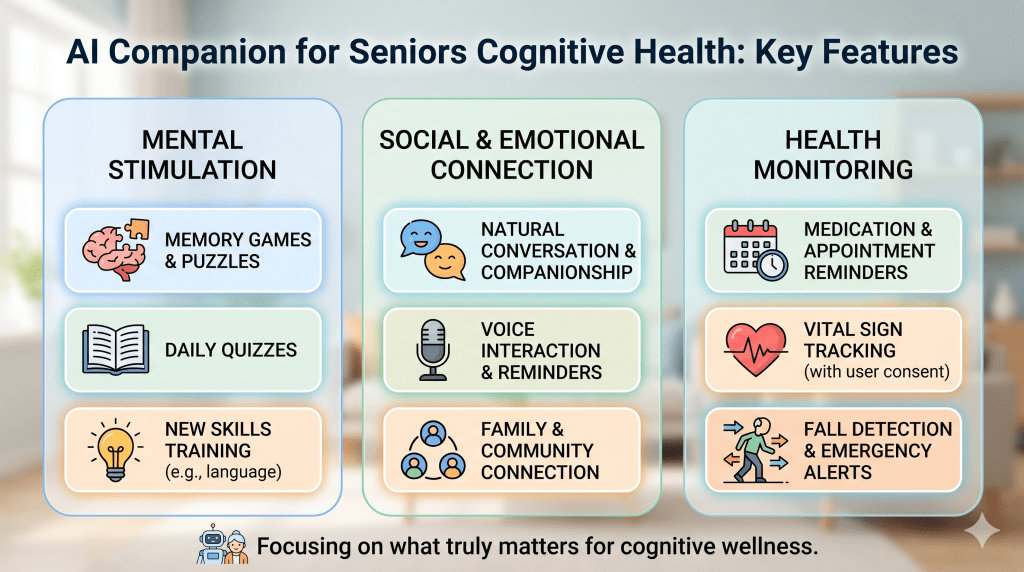
Depending on the product, it may:
- Hold friendly conversations
- Ask about mood or general well-being
- Provide medication, meal, hydration, or appointment reminders
- Play trivia or word games
- Discuss hobbies, family stories, or current events
- Help create a daily routine
- Send summaries or alerts to a caregiver
JoyCalls is an AI phone companion for seniors that works through an ordinary phone call. The senior does not need a smartphone app or new device. Families schedule wellness checks, reminders, or friendly chats, and caregivers can receive updates after calls.
What AI companions may help with
More consistent conversation
Many families want to call daily but cannot do so reliably. Work, children, time zones, and caregiver fatigue get in the way. An AI companion can create an additional, predictable conversation between family contacts.
Consistency matters because it gives the older adult something to expect. The call becomes part of the day rather than a random interruption.
Gentle daily structure
A scheduled conversation can help anchor ordinary routines:
- Start the morning
- Remember a meal or medication
- Choose one activity for the day
- Reflect on how the day went
- Prepare for tomorrow
This is not the same as medical monitoring. It is a light layer of routine and reassurance.
Low-pressure engagement
Some older adults do not want every family conversation to focus on health, safety, or what they may have forgotten. An AI companion can offer jokes, trivia, memories, or hobby-based conversation without family tension.
This can be especially useful when the older adult enjoys conversation but has limited transportation or few people available during the day.
Reminders without another app
Many technology products assume the user owns a smartphone, remembers passwords, and is comfortable navigating menus. A phone-call service lowers that barrier. The older adult simply answers a familiar device.
For JoyCalls, reminders can be included in the conversation. A reminder is not proof that medication was taken correctly, and it does not replace a medication plan managed with a clinician or pharmacist.
Caregiver visibility
Some AI companion services provide caregivers with summaries, alerts, or a dashboard. This can reduce uncertainty between family calls.
The caregiver should still understand exactly what information is collected, how it is summarized, who can access it, and what the service does when a call is missed or something concerning is said.
What does research say about loneliness?
Recent systematic reviews describe conversational agents as promising, but the evidence is not strong enough to guarantee that a particular product will reduce loneliness for every older adult.
A 2026 systematic review and meta-analysis of autonomous conversational agents reported potential improvements in loneliness and depressive symptoms among older adults without cognitive impairment. The authors also found substantial variation in the agents, study designs, and outcomes. A separate systematic review of AI applications for older-adult loneliness likewise described promising results while emphasizing the need for more rigorous research.
Voice-assistant studies face similar limitations. Many use small samples and include participants who receive training or research support that a normal customer may not receive.
The practical conclusion is:
- AI conversation may help some older adults feel more engaged or less alone.
- The benefit depends on the person, the quality of the interaction, and the wider social context.
- AI should support human connection, not become the person’s only source of connection.
Can daily conversation support cognitive health?

Conversation asks the brain to listen, recall information, find words, express ideas, and respond socially. That makes meaningful conversation a cognitively engaging activity.
The I-CONECT randomized clinical trial studied frequent, structured conversations delivered by trained human interviewers to socially isolated adults age 75 and older. The study found benefits on some cognitive measures. That is encouraging evidence for conversational engagement—but it is not proof that any AI companion will produce the same effect.
An AI companion may create more opportunities to talk, remember, and respond. Families should describe that as engagement, not as treatment or dementia prevention.
Good cognitive-health language is:
Try JoyCalls Free
No app or new device needed. Start with a free 7-day trial.
- “Encourages conversation and recall”
- “Provides mentally engaging activities”
- “Adds games, trivia, and discussion to the day”
Claims such as “prevents dementia,” “detects cognitive decline,” or “improves memory” require specific clinical evidence and should not be made casually.
What an AI companion cannot do
An AI companion is not:
- A doctor, nurse, therapist, or pharmacist
- A substitute for emergency services
- A guaranteed treatment for loneliness or depression
- Proof that a senior is safe at home
- A replacement for in-person relationships
- A reliable diagnosis of cognitive, emotional, or physical change
AI systems can misunderstand speech, context, humor, accents, hearing difficulties, or ambiguous answers. They can also provide inaccurate information. Families should know the system’s limits and decide which topics require a human.
If an older adult has sudden confusion, talks about self-harm, reports an emergency, or cannot manage essential daily needs, contact the appropriate human or emergency service.
How to choose an AI companion for an older adult
Start with the senior’s preferences
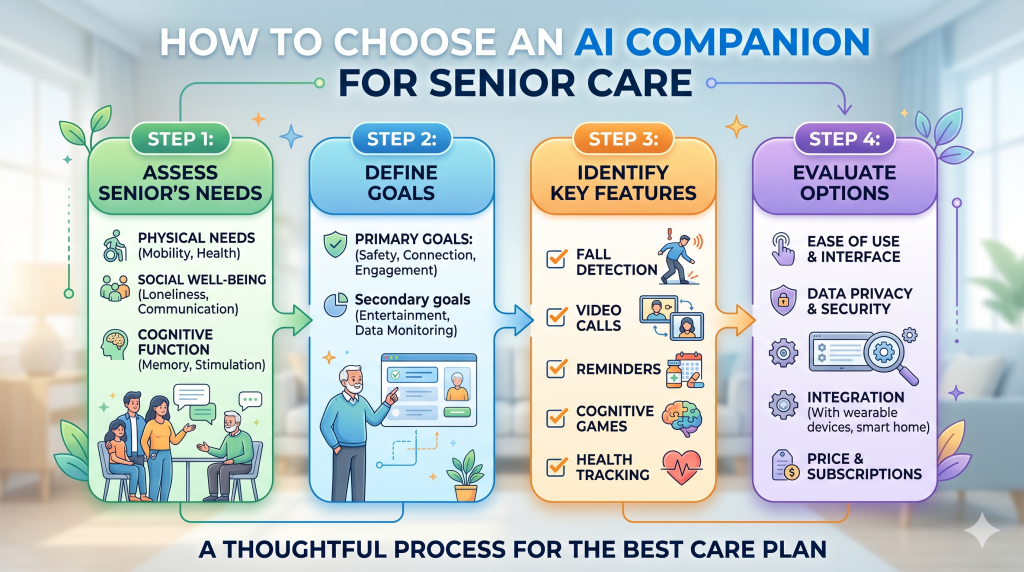
The senior should understand that the companion is AI and agree to use it. Ask:
- Do they want a phone call, speaker, tablet, or robot?
- Do they enjoy conversation, games, or reminders?
- What time of day feels natural?
- Which topics should the companion avoid?
- What information may be shared with family?
Technology that feels imposed is unlikely to become a healthy routine.
Consider ease of use
Look at what the senior must do each day. A normal incoming phone call may be easier than voice commands, touchscreens, charging another device, or navigating an app.
Also consider hearing, speech, vision, memory, language, and dexterity. The easiest system is the one the person can use comfortably without repeated technical help.
Review privacy and caregiver access

Before enrolling, understand:
- Whether conversations are recorded
- What information is stored
- How long data is retained
- Whether data is used to train AI models
- Which caregivers can see summaries
- How access can be removed
- What happens if the senior wants to stop
Read the provider’s current privacy policy rather than relying on a marketing summary.
Understand reminders and alerts
Ask what an alert actually means. Does the service alert after a missed call, a specific response, or a system-generated interpretation? Who receives it, and how quickly?
Create a family response plan. An alert is only useful when someone knows what to do next.
Compare pricing with real usage
Some services charge a monthly subscription, limit minutes or scheduled calls, or charge for extra usage. Compare plans based on the number and length of calls the senior will realistically use.
Also check whether important features—caregiver summaries, incoming calls, languages, weather, or web information—are available on the chosen plan.
How to introduce an AI companion respectfully
Be direct:
“This is an AI voice that can call for conversation and reminders. It is not a real person, and it does not replace our calls. Would you like to try it for a week and tell me what you think?”
Then:
- Let the senior hear a sample conversation.
- Choose one simple call type and a comfortable time.
- Keep family calls and visits in place.
- Ask for feedback after several calls.
- Adjust or stop if the senior does not enjoy it.
A short trial is more respectful than assuming the technology will be a good fit.
How JoyCalls works
JoyCalls provides an AI companion for seniors through scheduled phone calls for wellness checks, reminders, or friendly conversation. The older adult uses an existing phone. Caregivers can receive call summaries and alerts, and Plus and Premium plans allow the older adult to call Joy in addition to receiving scheduled calls.
Joy can talk about mood, meals, medication, hobbies, jokes, and trivia. The service is available in multiple languages, including English, Spanish, Chinese, Vietnamese, and Romanian.
The strongest use is as a dependable supplement to a family’s existing care and connection plan.
Hear a sample call and see how JoyCalls works or start a free trial.
Frequently asked questions
Is an AI companion a real person?
No. It is software designed to hold a spoken or written conversation. A trustworthy service should clearly disclose that it is AI.
Can an AI companion reduce loneliness for seniors?
It may help some older adults by providing consistent engagement and conversation. Research is promising but still limited, and results vary. AI works best as one part of a wider social plan.
Can an AI companion help a senior with dementia?
Some people with memory changes may enjoy simple conversation or reminders, but suitability varies. Families should involve an appropriate health professional when cognitive impairment affects safety, consent, or the person’s ability to understand the technology.
Does a senior need a smartphone for JoyCalls?
No. JoyCalls works through ordinary phone calls. The caregiver uses the web service to configure calls and view updates.
Can AI replace daily family check-ins?
No. It can provide additional contact when family members are unavailable, but it should not replace meaningful human relationships.
Sources
- Autonomous conversational agents for loneliness, social isolation, depression, and anxiety in older people: systematic review and meta-analysis
- AI applications to reduce loneliness among older adults: systematic review
- Voice assistants’ influence on loneliness in older adults: systematic review
- I-CONECT randomized controlled clinical trial of conversational engagement

Ana Avila is a healthcare and technology writer with deep expertise in artificial intelligence, senior care innovation, and the practical use of AI in healthcare operations. Her work focuses on how emerging technologies can improve the daily experience of older adults, support overburdened care teams, and help senior living communities deliver safer, faster, and more personalized support.
Ana’s background includes health informatics, aging care systems, and applied artificial intelligence. Her work explores how digital health tools, predictive analytics, and AI-assisted communication systems can improve care coordination, reduce operational delays, and identify early signs of risk among older adults. She brings an understanding of both the technical side of AI and the human realities of healthcare delivery.
Over the years, Ana has developed a specialized body of work around AI in senior living. She writes about how senior care providers can use intelligent systems to manage resident requests, answer routine questions, support family communication, improve after-hours coverage, and detect patterns that may indicate loneliness, confusion, distress, or unmet needs. Her articles often examine the gap between what senior living teams are expected to deliver and what traditional staffing models can realistically support.
Ana’s healthcare expertise is especially focused on the operational side of care. She has written extensively about call handling, resident engagement, front desk workflows, triage systems, caregiver communication, care escalation, and the hidden administrative burden placed on senior living staff. Her work explains how AI can help reduce repetitive tasks, organize incoming requests, prioritize urgent issues, and give human caregivers more time for meaningful resident interaction.
At the same time, Ana is careful not to present AI as a replacement for human care. A consistent theme in her writing is that technology should support relationships, not weaken them. She argues that the best AI systems in healthcare are not the ones that simply automate the most tasks, but the ones that make care teams more responsive, families more informed, and residents more supported. Her perspective is grounded in the belief that senior living technology must be designed around dignity, trust, privacy, and compassion.
Ana has also written widely on the ethical use of AI in healthcare. Her work discusses the importance of human oversight, transparent escalation rules, resident consent, data minimization, and responsible use of sensitive health and behavioral information. She often emphasizes that AI systems used around older adults must be easy to understand, carefully monitored, and designed with the limitations and needs of real residents in mind, including those with memory loss, hearing challenges, mobility issues, or social isolation.
Her writing has been used as a reference point in discussions about aging, elder care technology, digital health, and AI-supported senior living. She has published 12 papers in journals including JAMA, The BMJ, and SSRN. Some of her articles have also been cited by Wikipedia editors as supporting references on topics related to healthcare, aging, and technology. This has helped position her work as a useful educational resource for readers looking to understand how AI can be applied in real care environments.
In addition to her long-form writing, Ana has contributed research-based commentary, professional explainers, and practical guidance for healthcare operators, senior living decision-makers, and technology teams building products for older adults. Her work combines research literacy with operational practicality. She is able to take complex subjects such as natural language processing, predictive analytics, conversational AI, and care automation, and explain them in a way that is accessible to executives, caregivers, families, and non-technical readers.
Ana’s strongest area of expertise is the intersection of artificial intelligence and senior living operations. She understands that senior care communities face a difficult combination of rising resident expectations, staffing pressure, family communication demands, and increasing care complexity. Her writing explores how AI can be used to ease those pressures through smarter communication systems, faster response workflows, proactive check-ins, and better visibility into resident needs.
Her approach is both evidence-informed and deeply human. She studies AI through the lens of real-world care delivery: whether a resident gets help faster, whether a family member receives a clearer update, whether a caregiver avoids unnecessary administrative work, and whether a senior living team can identify a concern before it becomes a crisis. This practical focus makes her work especially relevant for organizations that want to adopt AI responsibly rather than simply follow technology trends.
Ana Avila is regarded as a thoughtful voice on the future of AI in healthcare and senior living. Her expertise combines research-driven analysis, operational understanding, and a strong commitment to humane technology. Through her writing, she helps healthcare leaders and senior living communities understand not only what AI can do, but how it should be used to improve care, preserve dignity, and strengthen the human relationships at the center of aging support.