


What if the biggest risk to your parent’s health isn’t a medical condition, but simply remembering to take their pills? That 3 PM dose can slip away, leaving you anxious miles away. For older adults with fading eyesight or difficulty hearing, this daily task becomes a major hurdle.
Small print on bottles is impossible to read. Standard alarms go unnoticed. Research shows 40% of seniors report memory issues, and 64% experience vision decline. This creates a perfect storm for missed doses. Traditional pillboxes offer no prompts, leaving your loved one to remember alone.
But what if a caring voice could check in daily? A solution that doesn’t require a smartphone or confusing apps. JoyCalls acts as that compassionate AI companion, making gentle daily phone calls for medication reminders and emotional support. It’s part of a complete safety strategy for independent living.
This guide explores simple, effective fixes. We help you find the right tools to bring peace of mind to your family.
Key Takeaways
- Seniors with vision or hearing challenges face significant obstacles in managing their prescriptions correctly.
- Memory issues and declining eyesight greatly increase the risk of medication errors.
- Traditional solutions like basic pill organizers lack reminder functions.
- Compassionate technology can provide daily check-ins without requiring new devices.
- A combination of supportive tools and routines is essential for safety.
- Effective medication management is a cornerstone of overall health and independence for older adults.
Understanding Medication Management Challenges for Seniors
When your father’s vision fades or hearing diminishes, what should be routine healthcare becomes a source of constant worry. Many older adults face this reality daily, trying to manage complex treatment plans while dealing with sensory limitations.
The struggle is real and more common than families realize. Simple tasks like reading bottle labels or hearing alarms turn into significant obstacles.
Common Errors in Dosage and Timing
Mistakes happen easily when seniors manage multiple prescriptions. Your mother might take her afternoon pills in the morning, convinced she’s following the correct schedule. Or your father could accidentally double his dosage, forgetting he already took his treatment hours earlier.
These timing errors aren’t about carelessness. They’re natural consequences of managing complex medication schedules while coping with memory changes. The results can seriously impact health conditions.

Impact on Hearing and Vision Impaired Patients
For older adults with vision concerns, tiny prescription text becomes impossible to read. They can’t distinguish between similar-looking pills. Traditional weekly organizers with small compartments create frustration rather than solutions.
Those with hearing limitations face different hurdles. Standard alarm reminders go unnoticed. Critical health information often isn’t communicated effectively in medical settings. This medication management gap leaves patients without clear understanding of their treatment plans.
These challenges make consistent care difficult. Families seeking to support from a distance need solutions that address the root problems. Understanding these specific obstacles helps choose tools that actually work for daily routines.
Benefits of Medication Reminders for Hearing Impaired
For seniors who struggle to hear everyday sounds, a simple alarm clock can become an invisible barrier to proper health management. Traditional beeping devices often fail to capture attention when hearing challenges are present.
Audible and Visual Cues: Overcoming Limitations
Standard audible alerts simply don’t work for everyone. That’s why combining multiple sensory pathways creates real solutions. Flashing LED lights provide clear visual signals. Low-frequency alarms are designed specifically to be heard.

Vibrating devices offer tactile feedback. These multi-sensory approaches ensure important health cues never go unnoticed. They transform frustration into reliable support systems.
How AI Companions Enhance Adherence and Safety
JoyCalls offers a revolutionary approach that doesn’t rely on hearing alarms or reading screens. Our AI companion makes gentle daily phone calls using your loved one’s regular telephone.
These conversations feel natural and warm. The system confirms treatment has been taken properly. It also provides meaningful companionship that reduces isolation.
After each call, family caregivers receive peace-of-mind summaries. You stay informed without making multiple check-in calls yourself. This creates accountability while maintaining independence.
The technology detects potential concerns during conversations. It provides an extra layer of safety beyond simple daily check-ins for seniors. Families managing care from a distance can breathe easier knowing their loved one has consistent support.
Innovative Medication Dispensers and Their Features
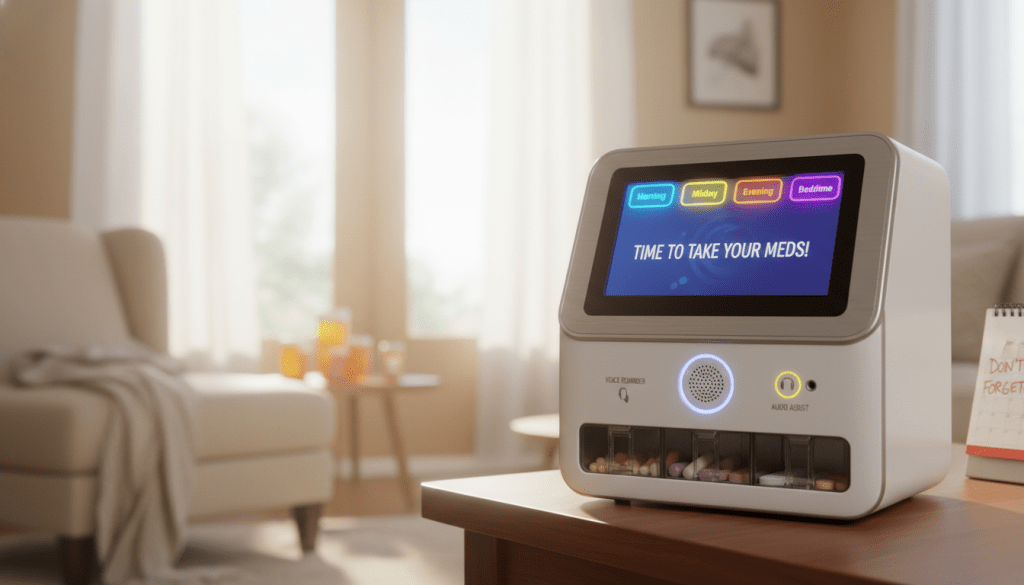
Imagine a device that not only reminds your parent about their treatment but actually prepares each dose automatically. These advanced systems have transformed daily health routines from stressful chores into seamless processes.
Automated Technology That Simplifies Doses
Modern dispensers store multiple prescriptions securely. They release only what’s needed at each scheduled time. This eliminates confusion about which pill to take when.
The right dosage appears automatically. No more sorting through bottles or worrying about double-dosing. Systems like the electronic pill dispenser handle everything from organization to distribution.
Try JoyCalls Free
No app or new device needed. Start with a free 7-day trial.
Alert Systems and Caregiver Support Integration
Advanced alert systems provide multiple layers of protection. Bright flashing lights and special low-frequency alarms ensure notifications are never missed. These features are essential for family members with sensory challenges.
When a dose is skipped, you receive immediate notifications. The system also alerts you if someone tries to access the dispenser at the wrong time. This tamper-alert feature prevents accidental overdosing.
| Dispenser Type | Key Features | Alert Systems | Price Range |
|---|---|---|---|
| Basic Models | Simple alarms, basic organization | Audible alerts only | $30-$100 |
| Mid-Range Systems | Multiple medication storage, visual cues | Flashing lights, app notifications | $100-$300 |
| Advanced Automated | Full automation, tamper protection | Multi-sensory alerts, caregiver integration | $300-$800+ |
While physical dispensers handle the mechanical aspects, pairing them with JoyCalls creates complete support. The daily phone check-ins confirm your loved one actually took their treatment. This combination addresses both the physical and human elements of care.
Choosing the Right Medication Dispenser: A Buyer’s Guide
Finding the perfect tool for your parent feels overwhelming. With so many options, where do you even start? This guide helps you make a confident choice based on your loved one’s unique situation.
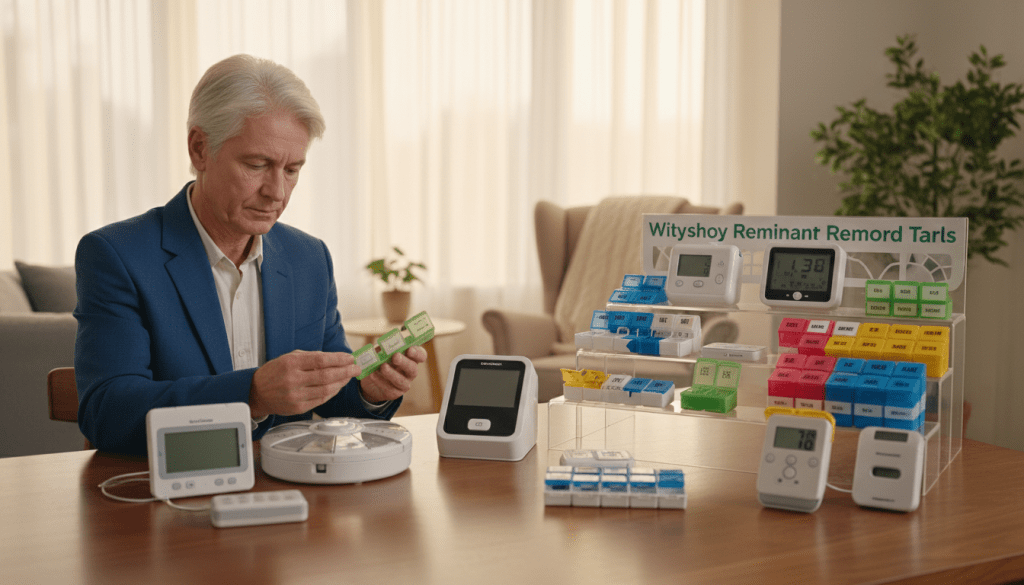
Begin by asking simple questions. Does your mom need a bright flashing light because she can’t hear a beep? Does your dad struggle with arthritis, needing large, easy-open compartments? An honest look at daily challenges points you toward the best solution.
Key Features for Secure and Reliable Use
Look for features that create a true safety net. The right system gives you peace of mind.
- Locking Lids: Prevent accidental access to pills, ensuring the right dosage is taken at the right time.
- Multi-Sensory Alerts: Flashing lights and strong vibrations are essential for those who miss standard alarms.
- Caregiver Alerts: Get a text or email if a dose is missed. You stay informed without constant checking.
Simple plastic boxes from the pharmacy are just holders. They offer no prompts and need weekly refills. For complex schedules, you need a smarter pill dispenser.
Cost Considerations, Coverage, and Practical Tips
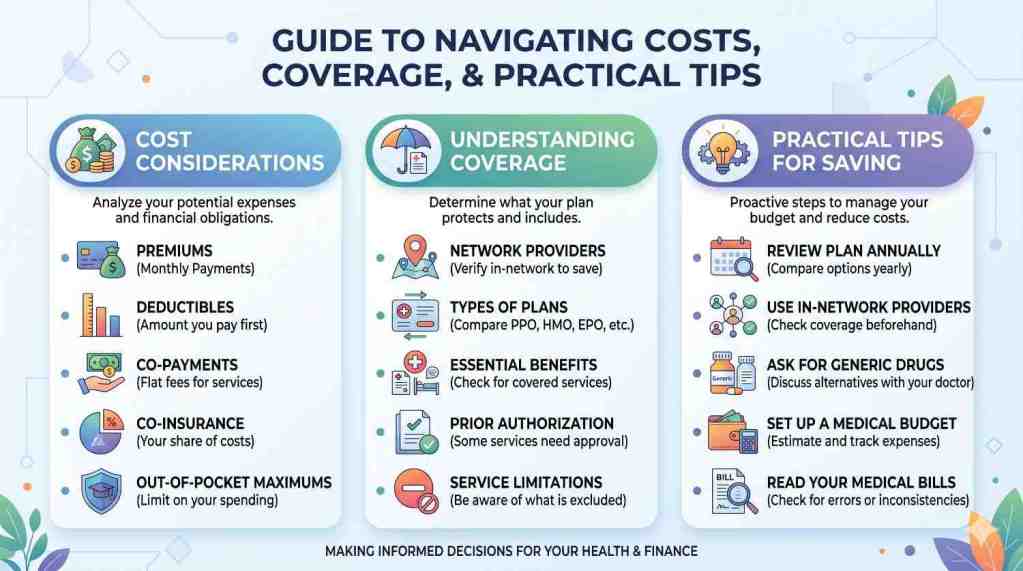
Budget is a real concern for many families. It’s important to know what help is available.
Medicare does not pay for electronic dispensers. However, some state Medicaid programs might. Veterans should check with VA programs for potential coverage. Always research your specific state’s rules before making a big purchase.
Remember, the most expensive device is useless if the pills aren’t taken. This is where a companion service shines. Pairing any physical dispenser with JoyCalls creates a complete system. The dispenser organizes the pills, and the friendly AI call ensures your loved one takes their medicine.
This combination addresses both the practical and human sides of care. It’s a powerful way to support independence, much like how an AI companion helps with senior loneliness. You gain a reliable partner in your caregiving journey.
How to Build a Medication Reminder System That Actually Works Every Day
Buying a dispenser or setting an alarm is only the starting point. The real challenge is turning reminders into a daily routine that still works when someone is tired, distracted, rushing to the bathroom, feeling unwell, or simply having an off day. For seniors with vision loss or hearing difficulties, the goal is not just to “remember better.” The goal is to make taking medication feel so clear, simple, and repeatable that it becomes harder to miss a dose than to take it correctly.
That is why the best medication reminder systems are built around environment, timing, clarity, and backup. In other words, where the medication lives, when the reminder happens, how easy the directions are to understand, and what happens if the first reminder is missed. Many families focus too much on the device and not enough on the system around it. But even the smartest tool can fail if the pills are stored in the wrong room, the labels are confusing, the routine changes every day, or nobody notices when something slips.
For older adults, especially those living alone, consistency matters more than complexity. A simple plan followed daily is far safer than a complicated one that only works on good days. If a senior has reduced vision, the system should rely less on reading. If hearing is limited, it should rely less on sound. If memory is also becoming a concern, then every step should be as automatic and visible as possible. The right setup reduces decision-making. It answers, at a glance, three questions: What do I take? When do I take it? Did I already take it?
Families often underestimate how stressful medication routines can become for an older parent. One bottle looks like another. Instructions may differ slightly. Refill dates creep up unexpectedly. A missed dose can create anxiety, and anxiety itself makes it harder to think clearly. That is why a well-designed system should not feel like surveillance or pressure. It should feel supportive, calming, and respectful. Seniors are more likely to follow a routine when it protects their independence rather than making them feel monitored.
A practical medication system also needs to match real life, not ideal life. For example, some adults wake up very early, while others move slowly in the morning. Some sit in the living room after lunch every day. Others may nap, attend appointments, or spend time with a caregiver at different hours. The reminder schedule should fit naturally around those patterns. A reminder that interrupts a predictable daily habit may be ignored. A reminder attached to an existing routine is much more likely to stick.
Below is a clear, highly actionable framework that families can use to create a medication setup that works even when vision or hearing challenges make ordinary reminders unreliable.
Start With a “Low-Friction” Routine, Not a Perfect One
One of the biggest mistakes families make is trying to create a medication routine that looks perfect on paper but is too hard to maintain in real life. Seniors do not need a complicated chart taped to three walls, five backup apps, and a dozen alarms. They need a routine that feels obvious and manageable.
Start by identifying the times of day that are already stable. These might include:
- right after brushing teeth,
- with breakfast,
- after the afternoon tea or coffee,
- before the evening news,
- after dinner,
- or right before bedtime.
These existing daily anchors are valuable because they reduce the need to remember from scratch. Instead of “Take the blue pill at 3:00 PM,” the routine becomes “Take the afternoon medication when you sit down for tea.” That mental link is often easier to hold onto, especially when memory or sensory changes are present.
If medication must be taken at a strict time, the system should still connect that dose to something familiar. For example, if a pill is scheduled at noon, place the reminder setup near the dining table or another spot used around lunchtime. If an evening dose happens at 8 PM, tie it to a TV program, prayer routine, or caregiver call that already happens consistently.
The simpler the routine, the better. Limit unnecessary steps. If the person must walk to another room, open several containers, read tiny labels, and then remember whether they already swallowed the pill, the system has too many points of failure. A better design might include a pre-sorted daily container, large-print instructions, a visible checklist, and one reliable reminder method.
Set Up the Physical Space for Safety and Clarity
Medication adherence improves when the environment does some of the remembering. For seniors with low vision, the physical setup should reduce visual confusion. For those with hearing difficulties, the space should make reminders visible or tactile.
Choose one primary medication area in the home. This should be:
- easy to reach,
- well lit,
- free of clutter,
- and connected to the time of day the medication is taken.
Lighting matters more than many families realize. A dim kitchen corner or crowded bedside table can make it harder to identify the correct bottle or notice whether a pill has actually been taken. Use bright, steady lighting rather than relying on shadows or natural light alone. A small lamp or under-cabinet light can make a major difference.
Try to avoid storing all medication in multiple places unless there is a strong reason to do so. Splitting pills between the bathroom, bedroom, kitchen, and handbag often creates confusion. A single home base improves consistency. For seniors taking medications at different times, a structured organizer is usually safer than keeping several loose bottles nearby.
For people with low vision, contrast is useful. A white pill on a white tissue or a clear bottle on a pale counter is harder to see. Use trays, mats, or organizers that create visual contrast. Dark surfaces can help lighter pills stand out. Clear labeling with bold, high-contrast text can also reduce mistakes.
For anyone with dexterity problems, avoid overly difficult lids or tiny compartments. A reminder system is not useful if opening it feels painful or frustrating. Arthritis, tremors, and reduced grip strength often affect medication routines just as much as hearing or vision issues do.
Use One Primary Reminder and One Backup
A common reason medication reminders fail is that families assume one method will always work. In practice, every reminder has weak spots. A sound alert may not be heard. A flashing light may be missed if someone is in another room. A phone call may come during a nap. That is why the strongest systems use one main reminder and one backup.
The primary reminder should be the easiest and most natural for the senior to respond to. For some, that may be:
- an automated dispenser with lights,
- a daily phone reminder,
- a caregiver call,
- a vibrating watch,
- or a large visual timer.
The backup should be different from the primary method. If both rely on the same sense, they may fail for the same reason. For example:
- if the main reminder is auditory, the backup should be visual or human,
- if the main reminder is visual, the backup could be a phone call or physical vibration,
- if the main reminder is a person calling, the backup might be a written checklist or dispenser alert.
This layered approach matters because medication adherence is rarely improved by intensity alone. More alarms do not always equal better results. What helps is a reminder that is noticed, understood, and easy to act on immediately.
A helpful rule is this: if the senior misses the first cue, there should be a second cue that happens automatically and does not depend on memory. That backup reduces the chance that a missed reminder turns into a missed dose.
Make Instructions Easier to Follow Than the Prescription Label
Prescription labels are often too small, too dense, and too clinical for older adults managing several medications. Even when the information is technically correct, it may not be easy to use in real time. Families can dramatically improve safety by translating medication instructions into a simpler daily format.
Create a one-page medication guide using plain language. It should include:
- medication name,
- what it is for,
- what time to take it,
- whether to take it with food,
- what the pill looks like,
- and any especially important caution.
This guide should be written in larger text and reviewed regularly. A senior should not need to decode pharmacist language every day. A more usable instruction is:
“Morning heart pill – take after breakfast.”
That is clearer than relying only on label wording that may be harder to scan quickly.
You can also organize medication by time-of-day language instead of medical language:
- Morning
- Midday
- Evening
- Bedtime
That format is especially useful when vision is reduced and the person depends more on recognition than detailed reading. Pairing that with pill organizers or blister packs can make the schedule feel much more intuitive.
If several pills look alike, add a verified visual aid only if it is safe and accurate. Never guess or relabel medication casually. Confirm every detail with the pharmacy or prescriber first. Once confirmed, some families find it helpful to keep a printed “pill identification” sheet with large photos or descriptions such as “small round white tablet” or “long blue capsule.” This should only be done carefully, because accuracy matters more than convenience.
Build a “Did I Take It Already?” Check Into the System
This is one of the most important parts of any medication routine. Many older adults do not only forget to take a dose. They forget whether they already took it. That uncertainty can lead to double-dosing, skipped doses, panic, or unnecessary calls to family.
A good reminder system must include a clear confirmation step. That could be:
- a daily pill organizer with empty compartments showing the dose is done,
- a paper checklist with large boxes to mark off,
- a digital dispenser log,
- a whiteboard near the medication station,
- or a caregiver summary after a phone check-in.
The key is that confirmation should happen immediately, not later. If the person plans to “mark it after lunch” or “remember that it was done,” errors become much more likely. The check-off should happen at the moment the medication is taken.
For seniors with low vision, a bold marker on a large-print checklist can work well. For others, a dispenser that physically changes state after a dose is removed may be better. Some families use a simple “Taken / Not Taken” flip card at the medication station. That kind of visible cue can reduce guesswork.
The system should also be forgiving. If a senior becomes unsure, there should be a safe way to verify rather than guess. In some homes, that means a family member can check a dispenser log remotely. In others, it means there is a written daily record in one place. What matters is that the answer is findable.
Create a Refill Routine Before Refills Become Urgent
Missed medication is not always caused by forgetfulness. Sometimes the routine fails because the medication simply runs out. Refill management is especially important for older adults who cannot easily read bottle levels, track dates, or hear pharmacy reminder calls.
Every medication system should include a refill checkpoint. A practical approach is to assign one day each week to review supplies. Many families do this on the same day they reset the pill organizer. During that review, check:
- how many days of medication are left,
- whether any prescriptions have no refills remaining,
- and whether pharmacy pickup or delivery is scheduled.
Do not wait until there are only one or two doses left. Delays happen. Pharmacies may need approval from the doctor. Delivery schedules can shift. Weekends and holidays can interfere. Aim to request refills with at least a week of buffer whenever possible.
For seniors who live alone, a family caregiver or helper may need to own this part of the system, even if the senior manages the daily dosing independently. Refill tasks are often administrative, not just memory-based, and they can quietly become a major point of failure.
A written refill list near the medication station can help everyone stay on the same page. For example:
- Refill requested
- Ready for pickup
- Delivered
- Started new bottle
That simple visibility can prevent last-minute confusion.
Prepare for Disruptions: Appointments, Travel, Illness, and Bad Days
A medication routine should not only work on ordinary days. It should also survive the days when normal life gets interrupted. Seniors may have doctor visits, guests, fatigue, sleep disruptions, stomach upset, or days when concentration is simply lower than usual. These are the moments when missed doses often happen.
Build a small disruption plan in advance. Ask:
- What happens if the person is out of the house at dose time?
- What happens if they sleep through the usual reminder?
- What happens if a caregiver is late?
- What happens if the senior feels confused that day?
For some, this means preparing a clearly labeled travel dose pack. For others, it means adjusting reminder timing in advance on appointment days. Some families keep a written “What to do if the routine changes” note with very simple instructions. The point is not to anticipate every possibility perfectly. It is to reduce panic when the normal flow breaks.
This also helps preserve dignity. Older adults often feel embarrassed when they get off track. A backup plan turns disruption into something manageable rather than something shameful.
Involve the Senior in Decisions So the System Feels Respectful
No reminder system works well for long if the older adult feels it is being forced on them. Medication adherence improves when the person understands the purpose of the system and has a real voice in how it works.
Ask practical questions:
- Which reminder feels easiest to notice?
- What time of day feels least stressful?
- Where do you naturally sit or spend time?
- Do you want a phone reminder, a device, or both?
- What feels annoying, confusing, or too complicated?
These conversations matter. A system that looks efficient to an adult child may feel infantilizing to a parent. A caring tone makes a real difference. The message should be: “Let’s make this easier and safer,” not “You can’t manage this anymore.”
Respect also means keeping the routine as simple as possible. If the senior can still handle part of the process independently, keep that independence intact. The goal is support, not takeover.
Review the System Monthly and Improve What Is Not Working
Medication systems should be reviewed regularly, especially after any hospital stay, new diagnosis, medication change, or noticeable shift in memory or function. What worked three months ago may not be enough now.
A monthly check-in can include questions like:
- Were any doses missed?
- Were there any close calls or moments of confusion?
- Is the label still readable?
- Is the reminder arriving at the right time?
- Are refills staying on track?
- Has hearing or vision changed further?
Do not treat missed doses as personal failure. Treat them as feedback. Usually, a missed dose points to a system problem: the cue was too weak, the setup was too cluttered, the timing was unrealistic, or the backup never triggered. Small adjustments can prevent bigger problems later.
A Simple Rule to Remember: Make the Right Action the Easy Action
The safest medication routine is the one that feels easiest to follow on an ordinary, imperfect day. For seniors with hearing or vision problems, that means reducing reading, reducing guesswork, reducing unnecessary steps, and building in calm, reliable backup. The right system should make the next action obvious. It should help older adults feel supported, not overwhelmed.
When families think this way, medication reminders become much more than alarms. They become part of a thoughtful daily support system that protects health, preserves independence, and lowers stress for everyone involved.
When a Senior Should Switch From Basic Reminders to More Active Support
Not every medication challenge can be solved with a louder alarm, a brighter light, or a better dispenser. In many cases, reminder tools work well for a time and then slowly stop being enough. That does not mean the senior has failed, and it does not mean independence is gone. It simply means the medication routine now needs more support than before.
This is an important distinction for families to understand. Many older adults want to keep managing their medications on their own for as long as possible, and that desire should be respected. But support should not start only after a serious mistake has happened. If missed doses, double doses, confusion, or refill problems are becoming more common, the safest move is to step in earlier with practical help.
For seniors with vision or hearing problems, medication management can become harder in subtle ways before anyone notices. The person may still appear sharp in conversation and may insist everything is under control. But behind the scenes, they may be struggling to read labels, hear pharmacy instructions, distinguish between pill bottles, or keep track of whether a dose was already taken. These issues often build gradually. Because of that, families should look for patterns, not just major incidents.
A routine may need stronger support if the senior is:
- frequently unsure whether medication has already been taken,
- missing doses more than once in a while,
- taking pills at the wrong time,
- mixing up similar-looking bottles,
- letting prescriptions run out,
- becoming anxious around medication time,
- or avoiding the process because it feels frustrating or confusing.
Another sign is when the medication schedule itself becomes more complex. A once-a-day pill is much easier to manage than a routine involving morning tablets, midday drops, evening capsules, food restrictions, and as-needed medication. Even a capable older adult may need extra structure when the schedule changes. The same is true after a hospitalization, a new diagnosis, a fall, worsening eyesight, or a noticeable decline in hearing.
Families sometimes wait too long to add support because they worry it will feel intrusive. But there are many ways to help without taking total control. In fact, the best support systems usually increase safety while preserving dignity. The goal is to match the level of support to the level of difficulty.
Start With “Light Support” Before Full Oversight
A senior does not need to jump straight from self-management to full caregiver control. There is a wide middle ground that often works very well.
Light support may include:
- weekly pill organizer setup by a family member,
- refill management by an adult child,
- one daily check-in call,
- a medication checklist reviewed every evening,
- or a smart dispenser that alerts both the senior and a family member if a dose is missed.
This type of support is often enough when the main issue is routine consistency rather than severe confusion. It reduces the risk of error without removing the senior’s role in the process.
For example, a daughter might fill the organizer every Sunday and call each evening for five minutes just to ask how the day went. A son might handle pharmacy refills but leave the daily routine untouched. A caregiver might verify that the morning compartment is empty without standing over the person while they take it. These are small interventions, but they can make a major difference.
Move to Active Oversight When Misses Become Unsafe
There comes a point when reminders and light support are no longer enough. This is especially true when medication mistakes could quickly lead to harm, such as with heart medication, blood pressure medication, diabetes medication, anticoagulants, seizure medication, or drugs with strict timing requirements.
Active support may be necessary when:
- the senior is regularly forgetting doses even with reminders,
- they cannot reliably identify the correct medication,
- they become defensive or distressed because the process feels overwhelming,
- they have mild cognitive decline in addition to sensory loss,
- or their health condition makes errors more dangerous.
Active support may include:
- live medication administration by a caregiver,
- scheduled phone or video confirmation at dose time,
- locked dispensers that release only the correct dose,
- or daily in-home support for medication handling.
This kind of help should be framed as safety support, not as punishment or proof of decline. Families should speak respectfully and directly. For example:
“This has become harder than it used to be, so let’s make it simpler and safer together.”
That tone protects trust, which matters enormously in long-term care routines.
Watch for Emotional Signs, Not Just Practical Mistakes
Medication difficulties do not always show up first as visible mistakes. Sometimes the earliest sign is emotional. A senior may look tense around medication time. They may delay taking pills, become irritated when asked about it, or say things like, “I can’t keep all this straight anymore,” even if they later laugh it off.
This emotional strain matters. Fear of making a mistake can be just as disruptive as the mistake itself. Some older adults start avoiding the whole process because they are worried about getting it wrong. Others rush through it to “get it over with,” which increases the risk of error. A caring support system should reduce anxiety, not just improve compliance.
Families should pay attention to signs such as:
- visible stress around pill sorting or dosing,
- repeated apologies about forgetting,
- embarrassment when asked simple medication questions,
- increased dependence on guesswork,
- or a growing reluctance to discuss medications at all.
When those patterns appear, the solution is usually not more pressure. It is better structure, clearer tools, and more compassionate support.
How Family Members Can Help Without Creating Resistance
One of the hardest parts of medication support is not the technology. It is the relationship. Adult children often want to help, but the conversation can quickly become tense. Parents may hear concern as criticism. Children may hear reassurance as denial. Both sides may be frustrated, tired, or afraid.
That is why the way support is introduced matters just as much as the support itself.
Lead With Shared Goals, Not Control
The most productive conversations begin with a shared goal: staying healthy, staying independent, and reducing stress. They do not begin with accusations or a list of mistakes.
Instead of saying:
- “You keep forgetting your medication,”
try:
- “I want to make this easier for you,”
- “Let’s set this up so it feels less stressful,”
- or “We should create a system that works even on busy or tiring days.”
This shift in tone can completely change the conversation. Most seniors do not object to help itself. They object to feeling managed, corrected, or spoken down to.
Ask What Feels Hardest
Families often assume they know the problem. But sometimes the real issue is different. One person may not be hearing the alarm. Another may hear it but not be able to read the label quickly enough. Another may be able to do both, but their hands hurt when opening the container. Another may simply be overwhelmed by a schedule that changed too many times in one month.
Ask questions like:
- “What part of this feels most annoying?”
- “Is the issue the timing, the bottles, the labels, or the reminders?”
- “Do you ever feel unsure whether you already took it?”
- “Would it help if one part of this was handled for you?”
These questions open the door to practical solutions instead of assumptions.
Preserve Choice Wherever Possible
Even when a senior needs more help, they should still be given choices where it is safe to do so. Choice preserves dignity. It also increases buy-in.
For example, they may be able to choose:
- where the medication station is set up,
- whether reminders come by phone, light, or voice,
- what time family checks in,
- whether the checklist is paper-based or digital,
- or who helps with weekly pill sorting.
A senior who feels included is much more likely to cooperate than one who feels overruled.
Highly Actionable Steps Families Can Take This Week
Many articles explain medication challenges in a broad way but do not tell readers what to do next. Here is a practical, no-fluff action plan that families can start using immediately.
1. Do a 15-Minute Medication Walkthrough
Sit down with the senior and observe the current routine from start to finish.
Watch for:
- whether they can read labels comfortably,
- whether they hear the current reminder,
- whether they struggle with container lids,
- whether they hesitate or appear unsure,
- and whether they have a reliable way to confirm a dose was taken.
Do not interrupt unless safety requires it. The goal is to spot friction points that may not be obvious during conversation alone.
2. Simplify One Thing Right Away
Do not try to overhaul everything at once. Pick the biggest source of confusion and fix that first.
Examples:
- move medication to a better-lit location,
- replace tiny written notes with a large-print checklist,
- add a second reminder method,
- create a refill calendar,
- or switch to a pill organizer that clearly separates times of day.
One good change is often more effective than five half-finished changes.
3. Create a Weekly Reset Routine
Choose one day each week to review everything:
- fill the organizer,
- check refill levels,
- update the medication list,
- confirm all reminders are still working,
- and talk through any missed doses or confusion from the past week.
This weekly reset prevents small problems from turning into serious ones.
4. Keep an Updated Medication Master List
This should include:
- drug names,
- dose,
- timing,
- purpose,
- pharmacy,
- prescribing doctor,
- and refill status.
Keep one copy at home and one digital copy with a trusted family member if possible. This list becomes especially useful during emergencies, hospital visits, or medication changes.
5. Decide Who Owns Which Part
Medication systems fail when everyone assumes someone else is handling it.
Assign responsibilities clearly:
- one person monitors refills,
- one person checks in after missed alerts,
- one person updates the master medication list,
- and the senior handles the parts they can still manage safely.
Even in small families, this clarity reduces confusion.
Common Medication Reminder Mistakes Seniors and Caregivers Should Avoid
Even with the best intentions, many medication reminder systems fail because of a few very common mistakes. These problems are not always obvious at first. In fact, some setups look organized from the outside but still create confusion, stress, or safety risks every single day. That is why it is important not only to add reminders, but also to avoid the habits and systems that quietly make medication management harder.
For seniors with vision or hearing problems, small design mistakes can have a much bigger impact than families expect. A label that is slightly too small, a reminder that is slightly too soft, or a routine that changes too often may be enough to cause repeated missed doses. Over time, these small failures create frustration. The senior may start feeling embarrassed, while caregivers may become impatient without understanding what is actually going wrong. The best solution is to catch these mistakes early and replace them with simpler, safer routines.
Below are some of the most common medication reminder mistakes — along with better alternatives that are much more practical in real homes.
Mistake 1: Relying on Memory After the Reminder Goes Off
One of the biggest errors is assuming that once a reminder has been heard or seen, the medication will definitely be taken. In real life, that often does not happen. A reminder may go off while the senior is in the bathroom, on the phone, in another room, watching television, or simply distracted. They may think, “I’ll take it in a minute,” and then the moment passes.
This is especially risky for older adults because delay creates uncertainty. If the medication is not taken right away, the person may later forget whether they actually completed the task. A reminder should not just announce the time. It should lead as directly as possible to the action itself.
A safer system is to make the medication reachable at the moment the reminder happens. If the reminder goes off in the kitchen but the pills are stored in the bedroom, the routine already has a weak spot. If the reminder happens before breakfast but breakfast timing is unpredictable, that is another weak spot. The more distance there is between the cue and the action, the more likely something will go wrong.
The practical fix is simple: design the routine so the reminder happens where the medication is, or place the medication where the daily routine naturally happens. The best systems reduce the gap between noticing and doing.
Mistake 2: Using Too Many Reminder Methods at Once
Families sometimes believe that if one reminder is good, five reminders must be better. So they set up phone alarms, smart speakers, sticky notes, family text messages, pill box timers, and verbal reminders from multiple people. Instead of creating safety, this can create noise.
Too many reminders can overwhelm the senior and make it harder to know which alert actually matters. It can also create dependence on the wrong signal. For example, if there are three alarms and one family phone call, the person may begin waiting for the phone call and ignoring the rest. In other cases, repeated reminders make the senior feel watched or pressured, which can lead to resistance.
A better approach is to use one strong primary reminder and one reliable backup. That is enough for most people. The reminders should be clear, consistent, and easy to understand. If several methods are used, each one should have a specific role instead of overlapping randomly.
For instance:
- the dispenser light may be the primary daily cue,
- while a family member gets notified only if the dose is missed.
That is very different from four different people reminding the senior at roughly the same time. Simplicity reduces mental load.
Mistake 3: Keeping Medication Labels and Instructions Too Complicated
Medication directions are often written for legal completeness, not everyday clarity. Families may assume that if the label is printed, that is enough. But for many seniors, especially those with low vision, hearing difficulties, or mild memory changes, the label is not a practical daily guide.
If every dose requires reading tiny text, comparing bottle names, remembering instructions from a doctor’s appointment, and mentally organizing it all, the routine is too demanding. This is one reason medication systems break down even for otherwise capable older adults.
A more effective system uses plain language and familiar terms. Instead of relying only on prescription wording, give the person a larger, easier format that fits daily life. “Take after breakfast” is easier to use than “administer one tablet orally once daily with food” when someone is standing in the kitchen trying to remember what comes next.
The mistake here is not in using the official label. It is in depending on it as the only source of clarity. Families should build a simpler daily guide alongside the official instructions, while keeping it accurate and checked.
Mistake 4: Changing the System Too Frequently
Another common problem is frequent adjustment. One week the medications are near the kettle. Next week they are in the drawer. Then the family switches from a pill box to bottles again. Then the reminder app changes. Then the timing gets moved because someone thinks after-lunch is better than before-lunch.
While these changes may be made with good intentions, too many changes create confusion. Seniors, especially those already managing sensory challenges, benefit from stability. Repetition is part of what makes the routine work. If the system keeps moving, the brain cannot build confidence around it.
This does not mean the routine should never be improved. It means improvements should be thoughtful and not constant. If something needs to change, make one change at a time and allow the senior enough time to adjust. Watch whether that change actually improves safety before changing something else.
Consistency is a form of support. A predictable routine reduces anxiety and helps medication-taking feel automatic rather than effortful.
Mistake 5: Assuming a Missed Dose Is Just Carelessness
When a senior misses medication, families sometimes react as though the person simply was not paying attention. That interpretation can be unfair and unhelpful. Most missed doses happen because the system is weak somewhere, not because the person does not care.
Maybe the alarm was not heard. Maybe the label was difficult to read that day. Maybe the person got distracted halfway through. Maybe they were not sure whether they already took it and decided not to risk doubling the dose. Maybe they felt unwell and the normal routine fell apart.
Treating missed doses as laziness often creates shame. Shame makes medication routines worse, not better. A senior who feels judged may hide mistakes, become defensive, or stop asking for help. A much safer response is curiosity. Ask what happened. Look for the weak spot. Then fix that weak spot.
The right question is rarely, “Why didn’t you do it?”
It is usually, “What made this harder than it should have been?”
Mistake 6: Not Planning for Hearing and Vision Changes to Progress
Some families build a reminder system based on how the senior functions today and then never revisit it. But hearing and vision changes can gradually worsen, sometimes so slowly that no one realizes how much harder the routine has become.
A light that was easy to notice six months ago may no longer stand out. A ringtone that once worked may now be missed. Reading a large-print chart may still be possible in the morning but not in dim evening light. If the system is not reviewed, it may quietly become less effective.
This is why reminder routines should be checked regularly. Families should not wait for a major error before updating the setup. A monthly review or even a short conversation every few weeks can help catch these changes early.
The best reminder systems are not static. They are stable, but they are also responsive. As needs change, the system should adapt calmly and gradually.
How to Make Medication Time Less Stressful for Older Adults
Medication adherence is not just a technical issue. It is also emotional. If medication time feels rushed, confusing, or humiliating, the senior may start to dread it. That dread can lead to avoidance, tension, and more mistakes. Families often focus on accuracy, which is important, but they should also focus on atmosphere.
A calm medication routine is often a safer medication routine.
Reduce Pressure Around the Task
Some older adults feel that medication time has become a “test” they are expected to pass. If a family member watches too closely, corrects them sharply, or quizzes them in an anxious tone, the process may start to feel stressful rather than supportive.
Pressure affects performance. When people feel watched or judged, they are more likely to forget steps, become flustered, or resist help. This is true even for healthy adults. For seniors already managing hearing or vision loss, the effect can be even stronger.
A better tone is steady and matter-of-fact. Medication can be treated as a normal part of the day rather than a crisis point. Instead of hovering, caregivers can provide structured help in a quieter way. For example, setting up the organizer weekly, checking the checklist afterward, or offering a calm prompt is often better than standing over the person while they open every compartment.
Build in Extra Time
Rushed medication routines are dangerous. Older adults may need more time to locate items, read instructions, open containers, drink water, and confirm the dose. If reminders are scheduled too tightly around other activities, the routine may feel pressured.
Try to build medication time into the day with enough breathing room. If the dose is scheduled at the exact minute a caregiver is leaving, lunch is being served, or a ride is arriving, the chances of confusion go up. A less compressed routine gives the person time to complete the task carefully.
This also helps preserve dignity. Being rushed can make a senior feel incapable, even when the real problem is simply that the schedule is too tight.
Keep the Setup Visually Calm
Clutter increases confusion. If the medication area includes old pharmacy papers, unrelated bottles, loose tissues, pens, wrappers, glasses cases, and multiple reminder notes, the senior has to visually sort through noise before doing the actual task. That is exhausting, especially for people with reduced vision.
A calm medication station should contain only what is truly needed:
- current medications,
- organizer or dispenser,
- water if appropriate,
- a checklist or instructions,
- and perhaps reading glasses if used.
Everything else should be removed. A cleaner setup reduces visual overload and makes the next step easier to identify.
Use Reassuring Language
Families sometimes underestimate how much wording matters. A sentence like, “Did you forget again?” creates a very different feeling than, “Let’s just double-check together.” Both may be trying to solve the same issue, but one triggers shame while the other creates support.
Helpful language is:
- clear,
- calm,
- respectful,
- and focused on the solution.
This matters especially when the senior is already frustrated with their hearing, vision, or changing health. The emotional tone of caregiving becomes part of the medication system itself.
Conclusion
You want your parent to feel capable and safe at home. The right support makes this possible. Modern tools turn daily health routines from a worry into a confident habit.
From specialized dispensers to compassionate technology, solutions exist for every challenge. Research shows that clear, repeated spoken reminders are highly effective. They help people remember important information.
You don’t have to manage everything alone. JoyCalls provides that gentle, daily connection. It’s a friendly voice that offers more than just prompts; it provides real companionship. This approach makes a phone call feel like a real.
Give yourself and your loved one the gift of peace of mind. Take the simple first step today. Sign up for JoyCalls and know that consistent, caring support is just a phone call away.
FAQ
How can a pill dispenser help someone who has trouble hearing an alarm?
What should I look for in a medication management system for an elderly parent?
Can an automated pill box really prevent dosage errors?
Are there affordable options for automatic medicine dispensers?
How does an AI companion assist with taking medicine at the right time?

Ana Avila, PhD, is a healthcare and technology writer with deep expertise in artificial intelligence, senior care innovation, and the practical use of AI in healthcare operations. Her work focuses on how emerging technologies can improve the daily experience of older adults, support overburdened care teams, and help senior living communities deliver safer, faster, and more personalized support.
Dr. Avila’s academic background is rooted in health informatics, aging care systems, and applied artificial intelligence. Her doctoral work focused on how digital health tools, predictive analytics, and AI-assisted communication systems can be used to improve care coordination, reduce operational delays, and identify early signs of risk among older adults. Her training gives her a rare ability to understand both the technical side of AI and the human realities of healthcare delivery.
Over the years, Ana has developed a specialized body of work around AI in senior living. She writes about how senior care providers can use intelligent systems to manage resident requests, answer routine questions, support family communication, improve after-hours coverage, and detect patterns that may indicate loneliness, confusion, distress, or unmet needs. Her articles often examine the gap between what senior living teams are expected to deliver and what traditional staffing models can realistically support.
Ana’s healthcare expertise is especially focused on the operational side of care. She has written extensively about call handling, resident engagement, front desk workflows, triage systems, caregiver communication, care escalation, and the hidden administrative burden placed on senior living staff. Her work explains how AI can help reduce repetitive tasks, organize incoming requests, prioritize urgent issues, and give human caregivers more time for meaningful resident interaction.
At the same time, Ana is careful not to present AI as a replacement for human care. A consistent theme in her writing is that technology should support relationships, not weaken them. She argues that the best AI systems in healthcare are not the ones that simply automate the most tasks, but the ones that make care teams more responsive, families more informed, and residents more supported. Her perspective is grounded in the belief that senior living technology must be designed around dignity, trust, privacy, and compassion.
Ana has also written widely on the ethical use of AI in healthcare. Her work discusses the importance of human oversight, transparent escalation rules, resident consent, data minimization, and responsible use of sensitive health and behavioral information. She often emphasizes that AI systems used around older adults must be easy to understand, carefully monitored, and designed with the limitations and needs of real residents in mind, including those with memory loss, hearing challenges, mobility issues, or social isolation.
Her writing has been used as a reference point in discussions about aging, elder care technology, digital health, and AI-supported senior living. She has published 12 papers on journals like JAMA (Journal of the American Medical Association), The BMJ (British Medical Journal), SSRN and more. Some of her articles have also been cited by Wikipedia editors as supporting references on topics related to healthcare, aging, and technology. This has helped position her work as a useful educational resource for readers looking to understand how AI can be applied in real care environments.
In addition to her long-form writing, Ana has contributed research-based commentary, professional explainers, and practical guidance for healthcare operators, senior living decision-makers, and technology teams building products for older adults. Her work combines research literacy with operational practicality. She is able to take complex subjects such as natural language processing, predictive analytics, conversational AI, and care automation, and explain them in a way that is accessible to executives, caregivers, families, and non-technical readers.
Ana’s strongest area of expertise is the intersection of artificial intelligence and senior living operations. She understands that senior care communities face a difficult combination of rising resident expectations, staffing pressure, family communication demands, and increasing care complexity. Her writing explores how AI can be used to ease those pressures through smarter communication systems, faster response workflows, proactive check-ins, and better visibility into resident needs.
Her approach is both evidence-informed and deeply human. She studies AI through the lens of real-world care delivery: whether a resident gets help faster, whether a family member receives a clearer update, whether a caregiver avoids unnecessary administrative work, and whether a senior living team can identify a concern before it becomes a crisis. This practical focus makes her work especially relevant for organizations that want to adopt AI responsibly rather than simply follow technology trends.
Ana Avila is regarded as a thoughtful voice on the future of AI in healthcare and senior living. Her expertise combines academic training, research-driven analysis, operational understanding, and a strong commitment to humane technology. Through her writing, she helps healthcare leaders and senior living communities understand not only what AI can do, but how it should be used to improve care, preserve dignity, and strengthen the human relationships at the center of aging support.